Test-Driven Development (TDD): The Complete Guide


Red. Green. Refactor. Three words that, practiced consistently, produce code that is better designed, better tested, and easier to change than almost any other development approach. The debate isn't whether TDD works — it's whether the discipline is worth it for your situation.
Key Takeaways
TDD produces well-tested code by definition. If you write a failing test before every feature, you cannot ship untested code — the tests are a prerequisite to the code existing.
The red-green-refactor cycle is a design tool, not just a testing tool. Writing the test first forces you to think about the API before the implementation, which consistently produces better interfaces.
TDD is not always worth it. For exploratory code, prototypes, UI work, and situations where requirements are unclear, the overhead of test-first development slows you down without proportional benefit.
The hard part of TDD is discipline, not technique. The cycle is simple. Writing a test before you write code when you already know exactly what the code should do requires a consistent habit that most developers take months to build.
TDD has one real tradeoff: you pay upfront in speed to avoid paying later in debugging and fear of refactoring. Whether that trade is worth it depends on how long the code lives and how complex the logic is. For a pricing engine you'll maintain for three years — yes. For a prototype you might delete next week — no. Most TDD debates skip this and argue about the principle instead, which is why they never resolve.
What Is TDD?
Test-Driven Development is a cycle: write a failing test, write the minimum code to pass it, clean up the code, repeat. The tests are written before the production code — not after, not in parallel, before.
The three steps:
- Write a test for behavior that doesn't exist yet — it fails because the code isn't there
- Write the minimum production code to make the test pass — not the elegant solution, the minimum
- Refactor — improve structure and naming while the tests confirm behavior is preserved
The "minimum code" constraint in step two is where most of TDD's value actually comes from. It prevents over-engineering, speculative features, and abstractions for requirements that don't exist yet.
Kent Beck introduced TDD as part of Extreme Programming in the early 2000s. Robert C. Martin later formalized it into three laws:
The Three Laws of TDD
- You may not write production code until you have written a failing unit test
- You may not write more of a unit test than is sufficient to fail
- You may not write more production code than is sufficient to make the failing test pass
These constraints produce a tight loop: small test, minimum code, clean up, repeat. The loop length should be minutes, not hours.
The Red-Green-Refactor Cycle
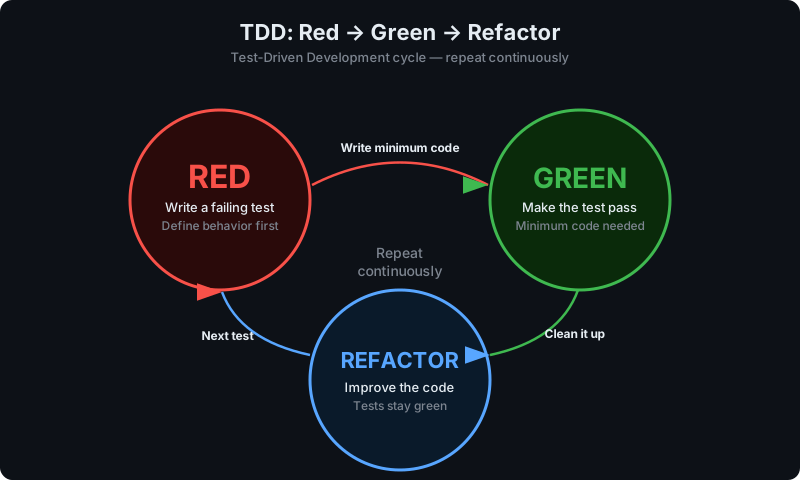
The names come from test runner colors.
Red: Write a Failing Test
Write a test for behavior that doesn't exist. Run it and confirm it fails. A test that passes before you write any implementation isn't testing anything — it's just green noise. The failure also confirms your test setup works and the behavior genuinely isn't there yet.
Green: Make the Test Pass
Write the minimum production code to pass the test. Don't handle edge cases without tests. Don't add the abstraction you'll "obviously need later." Just pass the test. The ugliest implementation that works is the right implementation at this stage.
Refactor: Improve Without Breaking
With a passing test, clean up: rename variables, extract methods, remove duplication. Run the tests continuously. If they stay green, the behavior is intact. If one fails, the last change introduced a bug — undo it and try again.
Then write the next failing test.
TDD in Practice: Code Examples
Example 1: Password Validator
Step 1 — Red: Write a failing test
// password-validator.test.js
const { validatePassword } = require('./password-validator');

test('accepts a strong password', () => {
  expect(validatePassword('Abc123!@#')).toEqual({ valid: true });
});
Run it: FAIL — validatePassword is not a function
Step 2 — Green: Minimum code to pass
// password-validator.js
function validatePassword(password) {
  return { valid: true };
}

module.exports = { validatePassword };
This implementation accepts everything. That's correct — you don't have a test for rejection yet. Run it: PASS. Now write the test that forces you to care about invalid passwords.
Step 3 — Red again: Add a failing case
test('rejects a password shorter than 8 characters', () => {
  expect(validatePassword('Ab1!')).toEqual({
    valid: false,
    error: 'Password must be at least 8 characters'
  });
});
Run it: FAIL — received { valid: true }, expected { valid: false, error: ... }
Step 4 — Green: Add length validation
function validatePassword(password) {
  if (password.length < 8) {
    return { valid: false, error: 'Password must be at least 8 characters' };
  }
  return { valid: true };
}
Both tests pass. Add the next requirement — uppercase required, number required, special character required — each as its own failing test, each followed by the minimum code to pass it. By the end, every rule in the validator has a test that proves it works.
Example 2: Shopping Cart in Python
# test_cart.py
import pytest
from cart import ShoppingCart

def test_new_cart_is_empty():
    cart = ShoppingCart()
    assert cart.total == 0
    assert cart.item_count == 0

# Run: FAIL - ShoppingCart doesn't exist
# cart.py - minimum to pass
class ShoppingCart:
def __init__(self):
self.total = 0
self.item_count = 0# Add next failing test
def test_adding_item_updates_total():
cart = ShoppingCart()
cart.add_item(price=9.99, quantity=2)
assert cart.total == 19.98
assert cart.item_count == 2
# Run: FAIL# Update ShoppingCart to pass
class ShoppingCart:
def __init__(self):
self._items = []
@property
def total(self):
return sum(item['price'] * item['quantity'] for item in self._items)
@property
def item_count(self):
return sum(item['quantity'] for item in self._items)
def add_item(self, price, quantity=1):
self._items.append({'price': price, 'quantity': quantity})The design of ShoppingCart wasn't planned upfront — it emerged from what the tests required. No unnecessary state. No speculative methods. The interface is clean because the tests forced it to be usable before the implementation existed.
Benefits of TDD
1. Verified Behavior by Definition
Every behavior has a test written before the code. Post-hoc tests are subtly unreliable: you already know how the implementation works, so you unconsciously write tests that confirm what you built rather than probe what might be wrong. TDD removes that bias by requiring you to define expected behavior before you have any implementation to be biased toward.
2. Design Pressure
To write a unit test, you instantiate a class, inject its dependencies, call a method, and assert. If that sequence is painful — if it requires a database, fifteen mocks, or calling three other services first — the test is telling you the design is wrong. Tight coupling, too many responsibilities, poorly factored dependencies: all of these make tests hard to write. TDD surfaces design problems immediately rather than at the point where they're expensive to fix. Code that's easy to test is modular and loosely coupled — not because you planned it that way, but because TDD makes the alternative too painful to sustain.
3. Safe Refactoring
A test suite built through TDD lets you refactor aggressively. The tests tell you immediately if you've broken behavior. Without comprehensive tests, teams avoid refactoring because the risk is too high — technical debt accumulates not from bad initial decisions but from the inability to safely improve them later.
4. Reduced Debugging Time
When a TDD test fails, you have a minimal reproduction case already written. You know exactly which behavior broke. Compare this to debugging a production issue: reproduce it, narrow it down, fix it, verify nothing else broke. TDD collapses that loop to a failing test and a clear scope.
5. Tests as Documentation
TDD tests describe what the system does in executable code. A well-written test suite answers "what does this code do?" more accurately than documentation, because unlike documentation it breaks when the behavior changes.
Challenges and Criticisms
1. Upfront Cost Is Real
TDD is slower than writing code without tests. The payoff is in reduced debugging, safer refactoring, and fewer production incidents over time. For short-lived or exploratory code, that payoff may never materialize. The upfront cost is a legitimate reason to skip TDD in the right contexts — not everywhere.
2. Hard to Apply to Some Code
TDD works cleanly for business logic and algorithms. It breaks down for:
- UI code — complex rendering logic is awkward to TDD; visual testing tools are more effective
- Exploratory code — when you don't know what you're building, tests are premature commitment
- Infrastructure and configuration — wiring and config are hard to unit test meaningfully
- Third-party integrations — writing tests against external APIs adds friction without proportional safety
3. Test Quality Matters
TDD with bad tests produces a large green test suite that catches nothing. Tests that cover lines of code rather than behaviors give false confidence. Going through the motions of TDD without learning to write meaningful tests is worse than not doing TDD — you have the overhead without the benefit.
4. Over-Specification
Tests tightly coupled to implementation become a maintenance burden. If a refactor requires updating a hundred tests, the test suite is slowing you down, not protecting you. Good TDD tests cover behavior and outputs, not implementation details. The test should not care how the code produces the result, only that it produces it.
When TDD Works Best
Use TDD for:
- Complex business logic: pricing, tax, rule engines, anything where correctness is non-negotiable
- Algorithms where edge cases are numerous and tricky
- Domain model code that will evolve over a long period
- APIs you're designing — tests reveal awkward interfaces before you've committed to them
- Bug fixes — write the reproducing test first, then fix the bug; the test proves the fix and prevents regression
Skip TDD for:
- Prototypes and throwaway code
- UI rendering and visual behavior
- Database schema and migration work
- Simple CRUD with no business logic
- Exploratory code where requirements are still unclear
- Code you'll delete in a week
The practical approach: TDD on the 20% of code that's complex and critical. Test the rest through integration tests or post-hoc unit tests. The 20% is where bugs are expensive and where the design pressure pays back.
TDD vs BDD
| Dimension | TDD | BDD |
|---|---|---|
| Focus | Technical correctness | Business behavior |
| Who writes tests | Developers | Developers + QA + stakeholders |
| Test language | Code | Natural language (Given/When/Then) |
| Tools | Jest, pytest, JUnit | Cucumber, SpecFlow, Behave |
| Granularity | Unit-level | Scenario-level |
| Primary benefit | Design + coverage | Communication + acceptance criteria |
BDD applies TDD's core idea at the business layer. TDD drives implementation correctness at the unit level; BDD drives feature development at the acceptance level. They're complementary — most teams doing BDD are also doing TDD at the unit level underneath it.
FAQ
What is TDD (Test-Driven Development)?
TDD is a development practice where you write a failing test before writing any production code. You follow the red-green-refactor cycle: write a failing test, write the minimum code to pass it, improve the design while keeping tests green, repeat. The tests drive what gets built — they're not written after the fact to hit coverage numbers.
What is red-green-refactor?
Red-green-refactor is the TDD cycle. Red: write a failing test. Green: write the minimum code to pass it. Refactor: improve the code's design without breaking the tests. The cycle should take minutes. Long cycles mean you're writing too much at once.
What are the benefits of TDD?
Every behavior is tested by construction. Design pressure produces modular, testable code. Refactoring is safe because tests catch regressions immediately. Bugs surface with a minimal reproduction case already written. Tests document what the system does more accurately than written docs.
Is TDD slower than regular development?
Short-term, yes. Medium to long-term it typically pays back through less debugging, safer refactoring, and fewer production incidents. For short-lived or exploratory code, the payoff may not arrive in time to matter.
Does TDD guarantee bug-free code?
No. TDD guarantees the behaviors you wrote tests for work correctly. It doesn't cover behaviors you didn't think to test, architectural problems, performance issues, or integration failures. It's a development practice with specific benefits, not a correctness proof.
When should I not use TDD?
UI rendering, exploratory or throwaway code, simple CRUD with no business logic, infrastructure configuration, and code you're learning. TDD's value is highest for complex business logic, critical algorithms, and code maintained over years.
Conclusion
TDD's primary value is design feedback. If code is hard to test, the test is telling you something about the design — tight coupling, too many responsibilities, unclear interfaces. Fix the design and the tests become easy. The test coverage is a side effect of a better development process.
Apply it where it pays: complex logic, critical paths, code that will outlive the sprint. Skip it where it doesn't. Decide based on how long the code lives and how expensive a bug there would be — not based on principle.
For teams using HelpMeTest, TDD-produced unit tests work alongside automated browser testing — unit tests catch logic errors at the source, browser tests catch integration and UX failures at the surface. Both layers, different bugs.
Next steps:
- BDD Guide — extend TDD principles to business-level scenarios
- Unit Testing Guide — master the foundations of unit testing
- Integration Testing Guide — combine unit tests with integration coverage
Reference: This guide covers one term from the Software Testing Glossary — the complete A–Z reference for every testing concept explained in one place.