Integration Testing: The Complete Guide with Examples

Your unit tests all pass. Every function works in isolation. Then you deploy and discover that your user service returns IDs as strings, but your order service expects integers. Integration testing is the only layer that catches what happens when your units meet reality.
Key Takeaways
Integration tests validate interactions between components, not components themselves. Database calls, API responses, service-to-service communication — these are where production bugs actually live.
Integration tests are slower than unit tests but far more valuable for catching real bugs. The goal isn't to replace unit tests but to test the contracts between modules.
Database integration tests need real databases, not mocks. Mocking a database hides query performance issues, constraint violations, and transaction behavior that only appear with real data.
Test at the component boundary, not inside it. Integration tests should verify what goes in and what comes out — not how the implementation works internally.
Integration testing is a software testing phase where individual components or modules are combined and tested as a group to verify they work correctly together. Unlike unit tests that test code in isolation, integration tests validate the interactions between components — database calls, API responses, service-to-service communication, and file system operations.
This guide covers everything you need to know: what integration testing is, how it differs from unit testing, the four main approaches, the best tools, and how to fit integration tests into a CI/CD pipeline.
This guide is for: software developers and QA engineers who want to build effective integration test suites that catch real bugs without slowing down their workflow.
What Is Integration Testing?
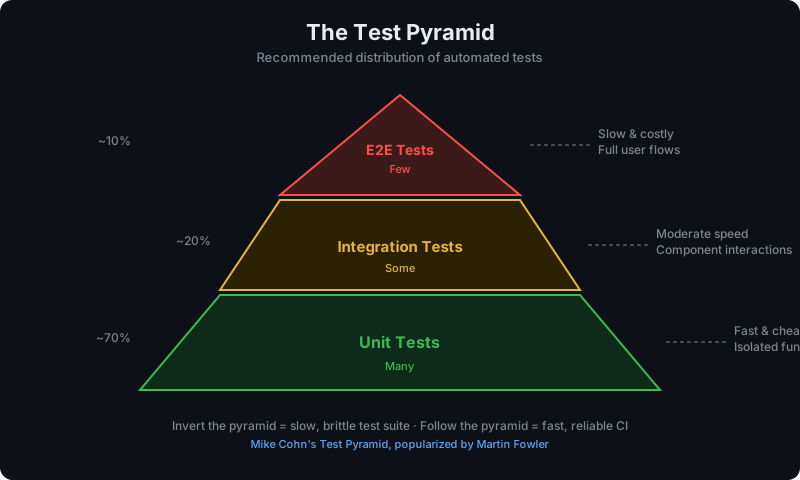
Integration testing sits between unit testing and end-to-end (E2E) testing in the testing pyramid. It answers a critical question that unit tests cannot: does this component work correctly when connected to the real system?
A unit test for a UserService might verify that createUser() maps fields correctly. But it can't tell you whether the database schema matches what the code expects, whether the email service actually sends confirmation emails, or whether the API authentication middleware allows the request through. Integration tests verify all of this.
What Integration Tests Cover
- Database layer: queries, transactions, schema validation, ORM behavior
- External APIs: HTTP client behavior, error handling, retry logic
- Message queues: publish/subscribe correctness, message format validation
- File systems: read/write operations, permissions, path handling
- Service-to-service calls: REST, gRPC, GraphQL communication between microservices
- Authentication/authorization: middleware, token validation, permission enforcement
What Integration Tests Do NOT Cover
- Full user workflows (that's E2E testing)
- Individual function logic in isolation (that's unit testing)
- Performance under load (that's load/stress testing)
Integration Testing vs Unit Testing
The difference between integration testing and unit testing is scope — and it fundamentally changes what you learn from each.
| Dimension | Unit Testing | Integration Testing |
|---|---|---|
| Scope | Single function/class | Multiple components together |
| Dependencies | Mocked/stubbed | Real (or realistic) |
| Speed | Milliseconds per test | Seconds per test |
| Isolation | Complete | Partial |
| Feedback | "This function works" | "These components work together" |
| Setup complexity | Low | Medium-High |
| Failure diagnosis | Easy to pinpoint | Requires investigation |
The Problem With Unit Tests Alone
Unit tests can all pass while your application is completely broken. Here's a classic example:
// Unit test passes — function logic is correct
test('formatUser maps fields correctly', () => {
  const result = formatUser({ first_name: 'Alice', last_name: 'Smith' });
  expect(result.fullName).toBe('Alice Smith');
});But if your database stores firstname (no underscore) instead of first_name, this test tells you nothing. The unit test mocked the database call. The integration test would have caught it:
// Integration test catches the schema mismatch
test('fetched user has correct fullName', async () => {
  const user = await userRepository.findById(testUserId);
  expect(user.fullName).toBe('Alice Smith'); // Fails if DB column name is wrong
});When Unit Tests Are Enough vs When You Need Integration Tests
Unit tests are sufficient when:
- Testing pure business logic with no external dependencies
- Validating input parsing, data transformation, or calculation logic
- Testing error handling for conditions you can fully control
Integration tests are necessary when:
- Code interacts with a database, API, or message queue
- Multiple services or modules communicate with each other
- The test environment configuration affects behavior (auth, feature flags)
- You've been bitten by a bug that only appeared in integration
Types of Integration Testing
There are four primary integration testing strategies. The right choice depends on your codebase structure, team size, and delivery cadence.
1. Big Bang Integration Testing
All components are integrated simultaneously and tested as a complete system.
How it works: Develop all modules in parallel, then combine everything at once and run the full test suite.
Pros:
- Simple conceptually — no phased integration planning
- Works for small systems with few components
Cons:
- Hard to isolate failures — when something breaks, it's unclear which integration caused it
- Testing can only begin after all components are complete
- High risk for large systems
Best for: Small projects with 2-3 components and a deadline that doesn't allow phased integration.
2. Top-Down Integration Testing
Testing starts from the top-level (UI or API layer) and works down through dependencies, using stubs for lower-level modules not yet tested.
How it works:
- Test the top-level module first, using stubs for its dependencies
- Replace stubs with real components one at a time, moving downward
- Test each integration point as you go
Pros:
- Major design flaws are detected early (at the architectural level)
- Produces a working skeleton of the application early in the process
- Useful for validating system flow before backend is complete
Cons:
- Requires significant stub/mock creation for lower layers
- Database and service integrations are tested last — bugs found late
Best for: Frontend-driven development where UI behavior needs early validation.
3. Bottom-Up Integration Testing
Testing starts from the lowest-level components (database, services) and works up toward the UI, using drivers to simulate higher-level calls.
How it works:
- Test database layer and external services first
- Build up through business logic and service layers
- Integrate with the UI/API layer last
Pros:
- No stubs needed — real components are tested from the start
- Database and infrastructure bugs caught earliest, where they're cheapest to fix
- Easier to isolate failures at each layer
Cons:
- Full application behavior isn't testable until late in the cycle
- Requires test drivers for components not yet integrated
Best for: Backend-heavy applications and microservices. This is the most common approach for modern teams.
4. Sandwich (Hybrid) Integration Testing
A combination of top-down and bottom-up. High-priority paths are tested top-down while low-level components are simultaneously tested bottom-up. The two test suites converge in the middle.
How it works: Split the system at a mid-layer. Test everything above that layer top-down; test everything below it bottom-up.
Pros:
- Parallel testing speeds up the overall cycle
- High-risk paths at both ends are covered early
- Flexible — prioritize whatever layer matters most
Cons:
- Most complex to coordinate
- Requires both stubs (for top-down) and drivers (for bottom-up)
Best for: Large systems with dedicated QA teams where speed matters and resources allow parallel workstreams.
Integration Testing Tools
JavaScript/TypeScript
Jest + Supertest is the most common stack for Node.js API integration testing.
// tests/api/users.integration.test.js
const request = require('supertest');
const app = require('../../src/app');
const { setupTestDb, cleanupTestDb } = require('../helpers/db');

beforeAll(async () => {
  await setupTestDb();
});

afterAll(async () => {
  await cleanupTestDb();
});

describe('POST /api/users', () => {
  test('creates a user and returns 201', async () => {
    const response = await request(app)
      .post('/api/users')
      .set('Authorization', 'Bearer test-token')
      .send({
        email: 'alice@example.com',
        name: 'Alice Smith',
      });

    expect(response.status).toBe(201);
    expect(response.body.id).toBeDefined();
    expect(response.body.email).toBe('alice@example.com');
  });

  test('returns 409 when email already exists', async () => {
    // Create user first
    await request(app).post('/api/users').send({ email: 'bob@example.com', name: 'Bob' });

    // Try to create again
    const response = await request(app)
      .post('/api/users')
      .send({ email: 'bob@example.com', name: 'Bob' });

    expect(response.status).toBe(409);
    expect(response.body.error).toBe('Email already in use');
  });
});Python
Pytest with the requests library or httpx for API integration tests:
# tests/test_users_integration.py
import pytest
import httpx

BASE_URL = "http://localhost:8000"

@pytest.fixture(autouse=True)
def clean_db(db_session):
    yield
    db_session.execute("DELETE FROM users WHERE email LIKE '%@test.example.com'")
    db_session.commit()

def test_create_user_returns_201():
    response = httpx.post(f"{BASE_URL}/api/users", json={
        "email": "alice@test.example.com",
        "name": "Alice Smith"
    }, headers={"Authorization": "Bearer test-token"})

    assert response.status_code == 201
    data = response.json()
    assert "id" in data
    assert data["email"] == "alice@test.example.com"

def test_duplicate_email_returns_409():
    payload = {"email": "bob@test.example.com", "name": "Bob"}
    httpx.post(f"{BASE_URL}/api/users", json=payload)

    response = httpx.post(f"{BASE_URL}/api/users", json=payload)
    assert response.status_code == 409
assert response.json()["error"] == "Email already in use"Database Integration Testing
Database integration testing is one of the highest-value things you can do. Schema mismatches, missing indexes, transaction isolation bugs, and ORM behavior differences are invisible to unit tests but caught immediately by database integration tests.
Testcontainers: Real Databases in Tests
Testcontainers is the modern standard for database integration testing. It spins up a real database (PostgreSQL, MySQL, MongoDB, etc.) in a Docker container for your tests, then tears it down automatically.
// jest.setup.js
const { PostgreSqlContainer } = require('@testcontainers/postgresql');

let container;
let connectionString;

beforeAll(async () => {
  container = await new PostgreSqlContainer('postgres:16')
    .withDatabase('testdb')
    .withUsername('testuser')
    .withPassword('testpass')
    .start();

  connectionString = container.getConnectionUri();
  process.env.DATABASE_URL = connectionString;

  // Run migrations
  await runMigrations(connectionString);
}, 60_000); // Allow 60s for container startup

afterAll(async () => {
  await container.stop();
});Why Testcontainers over SQLite or in-memory DBs?
Testing against SQLite when you ship PostgreSQL is a common mistake. SQLite has different:
- Type coercion behavior
- Constraint enforcement (e.g., foreign key checks are off by default)
- JSON query support
- Full-text search syntax
- Concurrent write handling
Testcontainers gives you the real database, so your tests reflect real behavior.
Test Data Management
Good database integration tests follow the arrange-act-assert pattern with proper data setup and teardown:
describe('OrderRepository', () => {
  let db;

  beforeEach(async () => {
    db = await getTestDb();
    // Clean state for each test
    await db.query('TRUNCATE orders, order_items CASCADE');
  });

  test('findByUser returns only that user\'s orders', async () => {
    // Arrange
    const userId = await createTestUser(db, { email: 'alice@test.com' });
    const otherUserId = await createTestUser(db, { email: 'bob@test.com' });

    await createTestOrder(db, { userId, total: 99.99 });
    await createTestOrder(db, { userId: otherUserId, total: 49.99 });

    // Act
    const repo = new OrderRepository(db);
    const orders = await repo.findByUser(userId);

    // Assert
    expect(orders).toHaveLength(1);
    expect(orders[0].total).toBe('99.99');
  });
});API Integration Testing
API integration tests verify that your HTTP endpoints behave correctly end-to-end — routing, middleware, serialization, error handling, and authentication all in one test.
What to Test in API Integration Tests
- Happy paths: successful requests return correct status codes and response bodies
- Error paths: invalid input, missing resources, and server errors return correct error responses
- Authentication: unauthenticated requests are rejected; authorized requests succeed
- Validation: malformed requests return 400 with clear error messages
- Side effects: the database state changes correctly after mutations
Authentication in Integration Tests
// helpers/auth.js
const jwt = require('jsonwebtoken');

function createTestToken(userId, role = 'user') {
  return jwt.sign(
    { sub: userId, role },
    process.env.JWT_SECRET || 'test-secret',
    { expiresIn: '1h' }
  );
}

// Use in tests
test('GET /api/admin/users requires admin role', async () => {
  const userToken = createTestToken('user-123', 'user');
  const adminToken = createTestToken('admin-456', 'admin');

  const userResponse = await request(app)
    .get('/api/admin/users')
    .set('Authorization', `Bearer ${userToken}`);

  expect(userResponse.status).toBe(403);

  const adminResponse = await request(app)
    .get('/api/admin/users')
    .set('Authorization', `Bearer ${adminToken}`);

  expect(adminResponse.status).toBe(200);
});Integration Testing in CI/CD
Integration tests belong in CI — but they need careful configuration to run reliably without being a bottleneck.
GitHub Actions Setup
# .github/workflows/integration-tests.yml
name: Integration Tests

on:
  push:
    branches: [main]
  pull_request:

jobs:
  integration-tests:
    runs-on: ubuntu-latest

    services:
      postgres:
        image: postgres:16
        env:
          POSTGRES_DB: testdb
          POSTGRES_USER: testuser
          POSTGRES_PASSWORD: testpass
        ports:
          - 5432:5432
        options: >-
          --health-cmd pg_isready
          --health-interval 10s
          --health-timeout 5s
          --health-retries 5

      redis:
        image: redis:7
        ports:
          - 6379:6379

    steps:
      - uses: actions/checkout@v4

      - name: Setup Node.js
        uses: actions/setup-node@v4
        with:
          node-version: '20'
          cache: 'npm'

      - name: Install dependencies
        run: npm ci

      - name: Run migrations
        run: npm run db:migrate
        env:
          DATABASE_URL: postgresql://testuser:testpass@localhost:5432/testdb

      - name: Run integration tests
        run: npm run test:integration
        env:
          DATABASE_URL: postgresql://testuser:testpass@localhost:5432/testdb
          REDIS_URL: redis://localhost:6379
NODE_ENV: testKeeping Integration Tests Fast
Integration tests should complete in under 5 minutes in CI. Strategies to stay fast:
- Use transactions for test isolation — wrap each test in a transaction and roll back instead of truncating tables
- Parallelize at the test file level — Jest's
--runInBand=falseand Pytest'spytest-xdistboth support this - Seed data once per test suite — create reference data (lookup tables, fixed users) once in
beforeAll, notbeforeEach - Use lightweight base images —
postgres:16-alpinestarts faster thanpostgres:16 - Cache Docker layers in CI — most CI providers support Docker layer caching to skip repeated pulls
Monitoring Integration Test Health
Beyond CI, it's worth tracking whether your integration test suite is actually catching bugs in production. Tools like HelpMeTest let you run scheduled tests against real environments and monitor service health with automated alerting — combining the confidence of integration tests with 24/7 monitoring so regressions get caught immediately, not in the next deploy cycle.
Integration Testing Best Practices
1. Test Against Real Dependencies
Prefer real databases and services over mocks for integration tests. Mocks lie — they reflect your assumptions about how a system behaves, not actual behavior.
Exception: third-party APIs with rate limits, billing implications, or non-deterministic responses (payment processors, email providers). Use realistic fakes or recorded responses for those.
2. Isolate Tests From Each Other
Each test must be able to run independently in any order. Use one of:
- Transaction rollback: wrap each test in a DB transaction and roll back after
- Truncate/reset: clean specific tables in
afterEach - Unique prefixes: generate unique identifiers per test to avoid conflicts
3. Use Factories, Not Fixtures
Fixture files (JSON blobs of test data) become brittle as schemas evolve. Factory functions generate data dynamically and stay valid as the schema changes:
// factories/user.factory.js
const { v4: uuidv4 } = require('uuid');

function createUserData(overrides = {}) {
  return {
    id: uuidv4(),
    email: `user-${uuidv4()}@test.example.com`,
    name: 'Test User',
    role: 'user',
    createdAt: new Date(),
    ...overrides,
  };
}4. Don't Test the Framework
Don't write integration tests that verify Express routing works or that Prisma executes queries. Test your application's behavior — the business outcomes of the operations, not the mechanics.
Too low-level (avoid):
test('POST /api/users calls userService.create()', ...)Right level:
test('POST /api/users creates a user and sends a welcome email', ...)5. Keep Tests Deterministic
Non-deterministic tests (flaky tests) erode trust in the entire suite. Common causes and fixes:
| Cause | Fix |
|---|---|
| Shared database state | Isolate with transactions or unique IDs |
| Time-dependent assertions | Freeze time or use relative comparisons |
| Random data without seed | Use seeded random or factories with fixed values |
| Race conditions | Use await, avoid timeouts, use proper async primitives |
| External API calls | Record and replay responses with tools like nock or VCR |
6. Fail Fast, Fail Clearly
Integration test failure messages should tell you exactly what broke. Include the HTTP status, response body, and relevant request details in failure output:
expect(response.status).toBe(200),
`Expected 200 but got ${response.status}. Response body: ${JSON.stringify(response.body)}`FAQ
What is integration testing in simple terms?
Integration testing verifies that two or more software components work correctly when connected together. Where a unit test checks that a function works in isolation, an integration test checks that the function works correctly when it's actually talking to a database, calling an API, or communicating with another service.
How is integration testing different from unit testing?
Unit tests isolate a single function or class and mock all dependencies. Integration tests use real dependencies (actual databases, real HTTP endpoints, actual file systems) to verify that components work together. Unit tests run in milliseconds; integration tests run in seconds. Both are necessary — unit tests verify logic, integration tests verify that the system is correctly assembled.
How is integration testing different from end-to-end testing?
Integration tests verify that components work together at the code level — typically through direct API calls or database operations. End-to-end tests simulate real user behavior through the UI using tools like Playwright or Cypress. E2E tests cover complete user flows; integration tests cover specific integration points. Integration tests are faster and easier to debug than E2E tests.
When should I write integration tests?
Write integration tests whenever your code interacts with external systems: databases, APIs, message queues, or file systems. Also write them whenever unit tests alone can't give you confidence that a feature works — for example, when business logic depends on data fetched from multiple tables, or when middleware chains need to work together correctly.
What are the best tools for integration testing?
For Node.js: Jest + Supertest for API tests, Testcontainers for database tests. For Python: Pytest + httpx for API tests, Testcontainers-python for database tests. For Java: Spring Boot Test + Testcontainers is the standard stack. For Go: the standard testing package with net/http/httptest and testcontainers-go.
How many integration tests should I have?
The classic testing pyramid suggests roughly 10-20% of your test suite should be integration tests, 70-80% unit tests, and 5-10% E2E tests. In practice, for data-heavy backend applications, you may have more integration tests than unit tests — and that's fine. Focus on covering every external integration point, not hitting a specific ratio.
How do I run integration tests in CI/CD without slowing down the pipeline?
Run unit tests first (fast, cheap). Run integration tests in a separate job with real service dependencies (PostgreSQL, Redis) defined as CI service containers. Use parallelization for larger suites. Target under 5 minutes total for integration tests. Cache Docker images and npm/pip dependencies to eliminate pull time.
Conclusion
Integration testing is what separates teams that ship confidently from teams that discover problems in production. Unit tests verify logic. Integration tests verify that your system is actually assembled correctly — that the database schema matches your queries, that your services talk to each other correctly, and that the middleware chain does what you think it does.
Start with the highest-risk integration points: your database layer, your authentication flow, and any third-party service integrations. Add tests whenever a production bug slips through unit tests. Over time, you build a suite that catches real problems without adding significant overhead to your development cycle.
For continuous monitoring beyond CI — catching integration issues in staging and production environments — HelpMeTest provides automated test execution and health monitoring that keeps running even when your team isn't watching.
Next steps:
- E2E Testing Guide — extend coverage to full user workflows
- Unit Testing Guide — fill gaps in your unit test foundation
- CI/CD Pipeline Testing Guide — structure your full testing pipeline
Reference: This guide covers one term from the Software Testing Glossary — the complete A–Z reference for every testing concept explained in one place.