
Unit Testing: The Complete Guide for Developers


If you have ever shipped code that broke something 3 modules away, you understand what unit tests are for. They're not just verification — they're the first line of defense against cascade failures, the documentation that doesn't lie, and the only feedback loop fast enough to use while you're writing code.
Key Takeaways
Unit tests run in milliseconds and should run constantly. A feedback loop measured in minutes is too slow to be useful — good unit tests give you results before you've switched windows.
Isolation is the defining property of a unit test. If your test hits a database, a file system, or an external API, it's an integration test — and it will be 100x slower and 10x flakier.
80% line coverage is a starting point, not a destination. Focus coverage on business logic and complex conditional paths — not trivial getters, framework boilerplate, or configuration code.
Unit tests are the most valuable documentation you can write. Unlike comments, they're executable and always accurate — they fail when the code they describe stops behaving as documented.
Unit testing is the practice of verifying individual pieces of code in isolation — a single function, a single class, a single module — to confirm they behave correctly given specific inputs. If you have ever written expect(add(1, 2)).toBe(3), you have written a unit test.
This guide covers everything: what unit tests are, why they matter, how to write good ones, real code examples in JavaScript, Python, and Java, how to handle mocking, what code coverage targets to aim for, and the best practices that separate professional test suites from fragile ones.
What Is Unit Testing?
A unit test is an automated test that verifies a single, isolated unit of source code. The "unit" is typically a function or a method. Unit tests:
- Call a function with specific inputs
- Assert that the output matches expectations
- Run independently of external systems (databases, APIs, file systems)
- Complete in milliseconds
The key word is isolated. When a unit test fails, you know exactly where the bug is — in that specific function. No need to trace through network calls, database queries, or user interface flows.
// A unit test in its simplest form
function add(a, b) {
  return a + b;
}

test('adds two positive numbers', () => {
  expect(add(1, 2)).toBe(3);
});That is a unit test. It calls one function with known inputs and verifies the output. No server, no database, no browser.
Why Unit Testing Matters
Teams that skip unit testing pay the price later. Here is why unit tests belong at the foundation of every software project:
1. Find bugs where they are created
Unit tests catch bugs at the function level, before they propagate up through layers of the application. A bug found during development costs roughly 10x less to fix than one found in production.
2. Enable confident refactoring
When you want to clean up a messy function or change an algorithm, unit tests tell you immediately if you broke something. Without them, refactoring is guesswork.
3. Document behavior through examples
A well-written unit test is executable documentation. Instead of a comment that might go stale, a test proves what the function does with real inputs and real outputs.
4. Accelerate code reviews
Reviewers can read the tests to understand intent, edge cases, and expected behavior — without having to mentally simulate execution.
5. Support CI/CD pipelines
Unit tests run fast (entire suites often complete in under 30 seconds), making them ideal as the first gate in continuous integration pipelines. Code that breaks unit tests never reaches staging.
The Testing Pyramid
Unit tests sit at the bottom of the testing pyramid
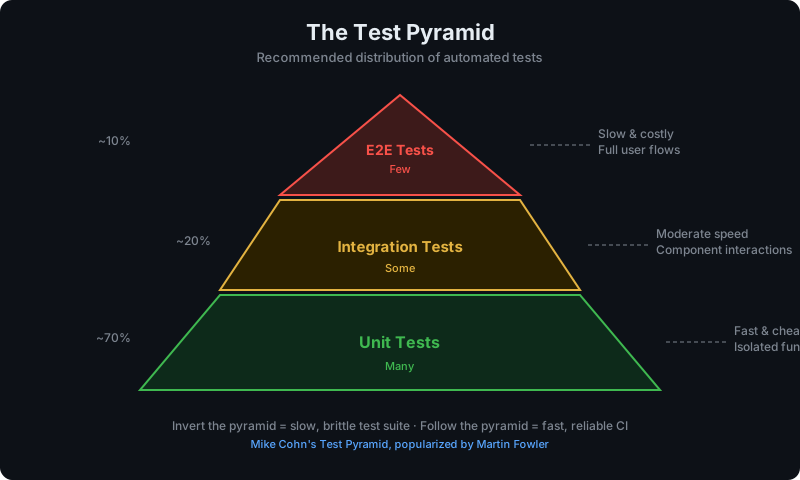
, a model that describes how to balance different types of tests:
         /\
        /E2E\        — Few, slow, expensive, test full workflows
       /------\
      / Integr \     — Medium, test component interactions
     /----------\
    /  Unit Tests \  — Many, fast, cheap, test individual functions
/--------------\Unit tests should be the most numerous. They are fast, cheap to write, and give precise failure information.
Integration tests verify that multiple units work together — for example, a service layer calling a database repository.
End-to-end tests simulate real user journeys through the full application stack.
A healthy test suite typically follows roughly a 70/20/10 split: 70% unit tests, 20% integration tests, 10% end-to-end tests. The exact ratio depends on your application type — pure business logic services lean heavier on unit tests, while UI-heavy applications may need more end-to-end coverage.
For a complete breakdown of all test types, see our software testing glossary.
Unit Testing Frameworks
Every major language has a mature unit testing framework. Here is how the landscape looks in 2026:
JavaScript / TypeScript: Jest and Vitest
Jest is the dominant testing framework for JavaScript, created by Meta. It includes a test runner, assertion library, and mocking system in one package.
Vitest is a newer alternative built on Vite. It is API-compatible with Jest but significantly faster — typically 2-4x faster on cold runs, 10-15x faster in watch mode. For new projects using Vite, Vitest is the default choice. For the full comparison, see Vitest vs Jest.
Python: pytest
pytest is the standard for Python unit testing. It has cleaner syntax than the built-in unittest module and a rich plugin ecosystem. It discovers tests automatically from files matching test_*.py.
Java: JUnit
JUnit 5 is the standard for Java unit testing. Combined with Mockito for mocking, it handles the vast majority of Java unit testing needs.
Other Languages
| Language | Primary Framework |
|---|---|
| Go | testing (built-in) |
| Rust | Built-in #[test] attribute |
| Ruby | RSpec or Minitest |
| C# | xUnit, NUnit, or MSTest |
| PHP | PHPUnit |
Writing Good Unit Tests: Examples
JavaScript (Jest / Vitest)
A basic test for a pure function:
// src/utils/price.js
export function applyDiscount(price, discountPercent) {
  if (discountPercent < 0 || discountPercent > 100) {
    throw new Error('Discount must be between 0 and 100');
  }
  return price * (1 - discountPercent / 100);
}// src/utils/price.test.js
import { describe, it, expect } from 'vitest'; // or remove import for Jest globals
describe('applyDiscount', () => {
it('applies a 20% discount correctly', () => {
expect(applyDiscount(100, 20)).toBe(80);
});
it('applies a 0% discount (no change)', () => {
expect(applyDiscount(50, 0)).toBe(50);
});
it('applies a 100% discount (free)', () => {
expect(applyDiscount(100, 100)).toBe(0);
});
it('throws on negative discount', () => {
expect(() => applyDiscount(100, -5)).toThrow('Discount must be between 0 and 100');
});
it('throws when discount exceeds 100%', () => {
expect(() => applyDiscount(100, 150)).toThrow('Discount must be between 0 and 100');
});
});Notice:
- Each test covers one scenario
- Test names are complete sentences that describe expected behavior
- Edge cases and error paths are tested, not just the happy path
Python (pytest)
# src/utils/price.py
def apply_discount(price: float, discount_percent: float) -> float:
    if not 0 <= discount_percent <= 100:
        raise ValueError("Discount must be between 0 and 100")
return price * (1 - discount_percent / 100)# tests/test_price.py
import pytest
from src.utils.price import apply_discount
def test_applies_20_percent_discount():
assert apply_discount(100, 20) == 80
def test_zero_discount_returns_original_price():
assert apply_discount(50, 0) == 50
def test_full_discount_returns_zero():
assert apply_discount(100, 100) == 0
def test_raises_on_negative_discount():
with pytest.raises(ValueError, match="Discount must be between 0 and 100"):
apply_discount(100, -5)
def test_raises_when_discount_exceeds_100():
with pytest.raises(ValueError):
apply_discount(100, 150)
@pytest.mark.parametrize("price,discount,expected", [
(200, 10, 180),
(50, 50, 25),
(1000, 5, 950),
])
def test_various_discounts(price, discount, expected):
assert apply_discount(price, discount) == expectedpytest's @pytest.mark.parametrize is a powerful way to run the same test logic with multiple inputs without duplicating test code.
Java (JUnit 5)
// src/main/java/utils/PriceUtils.java
public class PriceUtils {
    public static double applyDiscount(double price, double discountPercent) {
        if (discountPercent < 0 || discountPercent > 100) {
            throw new IllegalArgumentException("Discount must be between 0 and 100");
        }
        return price * (1 - discountPercent / 100);
    }
}// src/test/java/utils/PriceUtilsTest.java
import org.junit.jupiter.api.*;
import org.junit.jupiter.params.ParameterizedTest;
import org.junit.jupiter.params.provider.CsvSource;
import static org.junit.jupiter.api.Assertions.*;
class PriceUtilsTest {
@Test
void applies20PercentDiscount() {
assertEquals(80.0, PriceUtils.applyDiscount(100, 20), 0.001);
}
@Test
void zeroDiscountReturnsOriginalPrice() {
assertEquals(50.0, PriceUtils.applyDiscount(50, 0), 0.001);
}
@Test
void fullDiscountReturnsZero() {
assertEquals(0.0, PriceUtils.applyDiscount(100, 100), 0.001);
}
@Test
void throwsOnNegativeDiscount() {
assertThrows(IllegalArgumentException.class,
() -> PriceUtils.applyDiscount(100, -5));
}
@ParameterizedTest
@CsvSource({"200, 10, 180", "50, 50, 25", "1000, 5, 950"})
void variousDiscounts(double price, double discount, double expected) {
assertEquals(expected, PriceUtils.applyDiscount(price, discount), 0.001);
}
}Mocking Dependencies
Most real-world functions do not exist in a vacuum. They call databases, external APIs, or other services. Unit tests must replace these external dependencies with test doubles so tests run in isolation.
The three most common test doubles:
| Type | What it does |
|---|---|
| Mock | Records calls and lets you assert how it was called |
| Stub | Returns preset values when called |
| Spy | Wraps a real function to observe calls while keeping real behavior |
For a deeper dive into all five types of test doubles, see the software testing glossary.
Mocking in JavaScript (Jest/Vitest)
// src/services/userService.js
import { db } from './database';
import { emailClient } from './email';

export async function registerUser(email, password) {
  const existing = await db.users.findByEmail(email);
  if (existing) {
    throw new Error('Email already registered');
  }
  const user = await db.users.create({ email, password });
  await emailClient.sendWelcome(user.email);
  return user;
}// src/services/userService.test.js
import { describe, it, expect, vi, beforeEach } from 'vitest';
import { registerUser } from './userService';
import { db } from './database';
import { emailClient } from './email';
vi.mock('./database');
vi.mock('./email');
describe('registerUser', () => {
beforeEach(() => {
vi.clearAllMocks();
});
it('creates a user when email is not taken', async () => {
db.users.findByEmail.mockResolvedValue(null);
db.users.create.mockResolvedValue({ id: 1, email: 'alice@example.com' });
emailClient.sendWelcome.mockResolvedValue(undefined);
const user = await registerUser('alice@example.com', 'securepass');
expect(user).toEqual({ id: 1, email: 'alice@example.com' });
expect(emailClient.sendWelcome).toHaveBeenCalledWith('alice@example.com');
});
it('throws when email is already registered', async () => {
db.users.findByEmail.mockResolvedValue({ id: 99, email: 'alice@example.com' });
await expect(registerUser('alice@example.com', 'pass')).rejects.toThrow(
'Email already registered'
);
expect(db.users.create).not.toHaveBeenCalled();
});
});Key pattern: mock at the module boundary, not inside functions. Each test resets mocks with vi.clearAllMocks() to prevent test pollution.
Mocking in Python (pytest + unittest.mock)
# tests/test_user_service.py
from unittest.mock import AsyncMock, patch
import pytest
from src.services.user_service import register_user

@pytest.mark.asyncio
async def test_creates_user_when_email_not_taken():
    with patch('src.services.user_service.db') as mock_db, \
         patch('src.services.user_service.email_client') as mock_email:

        mock_db.users.find_by_email = AsyncMock(return_value=None)
        mock_db.users.create = AsyncMock(return_value={'id': 1, 'email': 'alice@example.com'})
        mock_email.send_welcome = AsyncMock()

        user = await register_user('alice@example.com', 'securepass')

        assert user == {'id': 1, 'email': 'alice@example.com'}
        mock_email.send_welcome.assert_called_once_with('alice@example.com')

@pytest.mark.asyncio
async def test_raises_when_email_already_registered():
    with patch('src.services.user_service.db') as mock_db:
        mock_db.users.find_by_email = AsyncMock(
            return_value={'id': 99, 'email': 'alice@example.com'}
        )

        with pytest.raises(ValueError, match="Email already registered"):
            await register_user('alice@example.com', 'pass')

mock_db.users.create.assert_not_called()Mocking in Java (Mockito)
// src/test/java/services/UserServiceTest.java
import org.junit.jupiter.api.Test;
import org.junit.jupiter.api.extension.ExtendWith;
import org.mockito.InjectMocks;
import org.mockito.Mock;
import org.mockito.junit.jupiter.MockitoExtension;
import static org.mockito.Mockito.*;
import static org.junit.jupiter.api.Assertions.*;

@ExtendWith(MockitoExtension.class)
class UserServiceTest {

    @Mock UserRepository userRepository;
    @Mock EmailClient emailClient;

    @InjectMocks UserService userService;

    @Test
    void createsUserWhenEmailNotTaken() throws Exception {
        when(userRepository.findByEmail("alice@example.com")).thenReturn(null);
        when(userRepository.create(any())).thenReturn(new User(1L, "alice@example.com"));

        User result = userService.registerUser("alice@example.com", "securepass");

        assertEquals("alice@example.com", result.getEmail());
        verify(emailClient).sendWelcome("alice@example.com");
    }

    @Test
    void throwsWhenEmailAlreadyRegistered() {
        when(userRepository.findByEmail("alice@example.com"))
            .thenReturn(new User(99L, "alice@example.com"));

        assertThrows(IllegalStateException.class,
            () -> userService.registerUser("alice@example.com", "pass"));

        verify(userRepository, never()).create(any());
    }
}Code Coverage Targets
Code coverage measures how much of your source code is executed during tests. Common metrics:
| Metric | What it measures |
|---|---|
| Line coverage | Percentage of lines executed |
| Branch coverage | Percentage of if/else branches taken |
| Function coverage | Percentage of functions called |
| Statement coverage | Percentage of statements executed |
Recommended coverage targets
There is no universally correct coverage number, but here is practical guidance:
| Context | Target | Rationale |
|---|---|---|
| Business logic / domain code | 90-95% | High-risk, high-value code |
| API handlers / controllers | 80-85% | Important but slightly less pure |
| Utility libraries | 85-90% | Often reused widely |
| UI components | 60-75% | Visual behavior tested by E2E |
| Generated code | Skip | No value in testing auto-generated code |
| Third-party wrappers | Skip | Test that you call them, not that they work |
The coverage trap: 100% coverage does not mean your code is correct — it means every line was executed. You can hit 100% with assertions that always pass. Coverage measures breadth of execution, not correctness of behavior. Aim for meaningful assertions, not coverage numbers.
Enabling coverage
Jest / Vitest:
# Vitest
npx vitest run --coverage

# Jest
npx jest --coverageAdd to your config to enforce thresholds:
// vitest.config.ts
export default defineConfig({
  test: {
    coverage: {
      provider: 'v8',
      thresholds: {
        lines: 80,
        branches: 75,
        functions: 80,
      },
    },
  },
});pytest:
pip install pytest-cov
pytest --cov=src --cov-report=html --cov-fail-under=80JUnit (with JaCoCo):
<!-- pom.xml -->
<plugin>
  <groupId>org.jacoco</groupId>
  <artifactId>jacoco-maven-plugin</artifactId>
  <configuration>
    <rules>
      <rule>
        <limits>
          <limit>
            <counter>LINE</counter>
            <minimum>0.80</minimum>
          </limit>
        </limits>
      </rule>
    </rules>
  </configuration>
</plugin>Unit Testing Best Practices
1. Follow the Arrange-Act-Assert (AAA) pattern
Structure every test in three phases:
it('applies discount to order total', () => {
  // Arrange — set up the inputs
  const order = { total: 200, discountCode: 'SAVE20' };

  // Act — call the code under test
  const result = applyOrderDiscount(order);

  // Assert — verify the outcome
  expect(result.total).toBe(160);
});This pattern makes tests readable at a glance. A reader knows exactly what inputs go in, what action is taken, and what should come out.
2. One assertion focus per test
Tests should verify one behavior. This does not mean literally one expect() — sometimes you need a few — but each test should have a single reason to fail.
// Bad: testing two different behaviors in one test
it('discount and tax', () => {
  const result = calculateFinalPrice(100, 20, 0.08);
  expect(result.discounted).toBe(80);
  expect(result.withTax).toBe(86.4);
});

// Better: separate concerns
it('applies 20% discount correctly', () => {
  const result = calculateFinalPrice(100, 20, 0);
  expect(result.discounted).toBe(80);
});

it('applies tax after discount', () => {
  const result = calculateFinalPrice(100, 20, 0.08);
  expect(result.withTax).toBe(86.4);
});3. Test names should describe behavior, not implementation
// Bad — describes implementation
it('calls findByEmail', () => { ... });

// Good — describes behavior
it('rejects registration when email is already taken', () => { ... });A failing test with a good name tells you exactly what broke without reading the implementation.
4. Test edge cases and error paths
Most bugs live at boundaries: empty strings, zero values, null inputs, invalid ranges. Do not just test the happy path.
Typical edge cases to check:
- Empty arrays / strings
- Zero and negative numbers
null/undefined/None- Maximum and minimum allowed values
- Concurrent operations (if applicable)
- Error conditions and exceptions
5. Keep tests independent
Tests should not share state or depend on execution order. Each test should set up its own data and clean up after itself. Shared mutable state between tests causes brittle, order-dependent suites.
// Bad: tests share module-level state
let user;
beforeAll(() => { user = createUser(); });

// Good: each test is self-contained
it('sends welcome email on registration', async () => {
  const user = await registerUser('test@example.com', 'pass');
  expect(emailSpy).toHaveBeenCalledWith(user.email);
});6. Do not mock what you own
Mock external dependencies (third-party APIs, databases, email services) but test your own code for real. Over-mocking means you test that you called a mock, not that your logic is correct.
// Bad: mocking your own utility makes the test useless
vi.mock('./priceUtils');
priceUtils.calculateTotal.mockReturnValue(100);
// Now you're testing nothing

// Good: call your own code directly
const total = calculateTotal(items);
expect(total).toBe(expectedTotal);7. Run tests in CI on every commit
Unit tests should be mandatory in your CI pipeline. Any commit that breaks tests should be blocked from merging.
# .github/workflows/test.yml
name: Tests
on: [push, pull_request]
jobs:
  test:
    runs-on: ubuntu-latest
    steps:
      - uses: actions/checkout@v4
      - uses: actions/setup-node@v4
        with:
          node-version: '22'
      - run: npm ci
- run: npm test8. Keep tests fast
Unit tests should complete in milliseconds. If a test takes more than a second, it is either doing real I/O (should be mocked) or doing something computationally expensive (consider whether it belongs in the unit tier at all).
A suite of 500 unit tests should run in under 10 seconds. If your suite is slow, it will not be run.
Common Unit Testing Mistakes
Testing implementation details
// Bad: test breaks if you rename the internal variable
it('sets internal counter to 1', () => {
  const counter = new Counter();
  counter.increment();
  expect(counter._count).toBe(1); // accessing private state
});

// Good: test observable behavior
it('returns 1 after one increment', () => {
  const counter = new Counter();
  counter.increment();
  expect(counter.value()).toBe(1); // using the public API
});Testing private implementation details couples your tests to internal structure. Rename a variable or refactor internals and your tests break, even if behavior is correct.
Snapshot testing everything
Snapshot tests (comparing serialized output to a stored file) are useful for detecting unintended changes, but they become a liability when overused:
- Developers mindlessly update snapshots instead of investigating failures
- Snapshots obscure what behavior is actually being verified
- Large snapshot files are hard to review in pull requests
Use snapshots sparingly — mainly for complex UI component output or large data structures where explicit assertions would be unreadable.
Not writing regression tests for bugs
When you fix a bug, write a test that reproduces it before applying the fix. This proves your fix actually works and prevents the bug from returning.
// Regression test: reproduce the bug first
it('does not crash when input array is empty', () => {
  // This revealed a bug: processItems([]) threw TypeError
  expect(() => processItems([])).not.toThrow();
  expect(processItems([])).toEqual([]);
});Unit Testing and Beyond
Unit tests are your safety net for individual functions. But modern applications need more than unit tests alone:
- Integration tests verify that your functions work together correctly — your service layer talks to the right repository, your repository generates correct SQL.
- End-to-end tests verify real user workflows in a real browser — that clicking "Register" actually creates an account and redirects to the dashboard.
For end-to-end testing, many teams use Playwright or Cypress alongside their unit testing framework. This means maintaining two separate test setups, two sets of configurations, and two different mental models for writing tests.
HelpMeTest simplifies end-to-end testing by letting you describe test scenarios in plain English. An AI agent executes them in a real browser — no Playwright scripting, no locator maintenance. It handles the E2E layer while you focus on writing thorough unit tests for your business logic.
Frequently Asked Questions
What is a unit in unit testing?
A unit is the smallest testable piece of code — typically a function or method. Some definitions extend it to a class or a module, but the principle is the same: test one thing in isolation. The boundaries of a "unit" are not always clear-cut; what matters is that the test runs without external dependencies.
How many unit tests should I write?
Write as many tests as needed to cover the behavior you care about. At minimum: the happy path, the error path, and key edge cases. For complex business logic, you might write 10-20 tests for a single function. For a simple getter, one test may be enough.
Should unit tests test private methods?
No. Test through the public API. Private methods are implementation details — they may be refactored, inlined, or extracted, and your tests should not care. If a private method is so complex it needs its own tests, consider extracting it into a separate utility with its own public interface.
How is unit testing different from integration testing?
Unit tests test one function in isolation, with all dependencies mocked. Integration tests test how multiple components work together — typically with real implementations of adjacent code, though still with external services mocked. An integration test for an API route might use a real service layer and repository, but stub the actual database connection.
Can I write unit tests for legacy code with no tests?
Yes, but carefully. The safest approach is to add tests for the specific behavior you are about to change, not to retrofit full coverage on everything at once. Start with the highest-risk functions, work outward, and extract dependencies to make mocking easier.
What is test-driven development (TDD)?
TDD is a development practice where you write the test before the implementation. The cycle is: write a failing test, write the minimum code to make it pass, refactor. TDD produces thorough test coverage by construction, because you cannot write code without a test driving it.
Summary
Unit testing is the foundation of a reliable software system. Here is the condensed version:
- What: Tests that verify individual functions in isolation, with all external dependencies mocked
- Why: Fast feedback, confident refactoring, living documentation, and CI pipeline gates
- Pyramid: 70% unit tests, 20% integration, 10% end-to-end is a reasonable starting point
- Frameworks: Jest/Vitest (JavaScript), pytest (Python), JUnit + Mockito (Java)
- Pattern: Arrange-Act-Assert — set up, call, verify
- Coverage: 80-90% for business logic, but meaningful assertions matter more than numbers
- Best practices: One behavior per test, test through public APIs, keep tests fast and independent
The testing glossary at /software-testing-glossary has definitions for every term used in this article — mocks, stubs, spies, fakes, test fixtures, and more.



