Behavior-Driven Development (BDD) Guide: Gherkin, Cucumber, and Given-When-Then


Your developers say the feature is done. Your product manager says it's wrong. The spec was clear — they just interpreted it differently. BDD exists to eliminate that conversation by forcing everyone to agree on what "done" means before a line of code is written.
Key Takeaways
BDD = TDD + natural language + stakeholder collaboration. It extends test-driven development by making tests readable by non-developers, so everyone owns the acceptance criteria.
Gherkin (Given-When-Then) syntax is a communication tool, not a testing framework. Its value is in forcing precision before development, not in making test automation easier.
The Three Amigos meeting matters more than the tool. Developer, QA, and product owner writing scenarios together eliminates misunderstandings that no amount of testing can fix after the fact.
BDD works best when requirements are complex or ambiguous. If everyone already agrees on what the feature does, BDD overhead isn't worth it.
Behavior-Driven Development (BDD) is a software development methodology that extends Test-Driven Development by describing application behavior in natural language that both technical and non-technical stakeholders can understand. BDD uses a structured language — typically Given-When-Then — to write scenarios that serve as both acceptance criteria and automated tests.
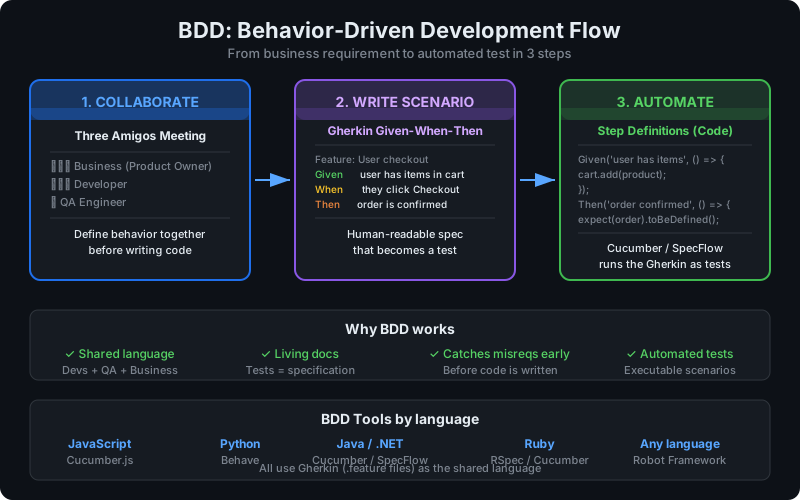
BDD bridges the communication gap between business requirements and code. Instead of developers writing tests that only they understand, BDD scenarios are co-created by developers, QA engineers, and product owners — reducing misunderstandings before code is written.
This guide covers what BDD is, Gherkin syntax, the leading tools (Cucumber, SpecFlow, Behave), how to facilitate BDD collaboration, and practical examples.
What Is Behavior-Driven Development?
BDD was introduced by Dan North in 2003 as an evolution of TDD. Where TDD focuses on technical correctness at the unit level, BDD focuses on describing system behavior from the user's perspective using business language.
The core insight: most software project failures come from misunderstood requirements. The solution is a shared, executable language for describing behavior — readable by everyone, automated by developers.
The BDD Flow
- Discover: business stakeholders and developers collaborate to identify desired behaviors
- Formalize: write behaviors as Gherkin scenarios (Given-When-Then)
- Automate: developers write step definitions that map Gherkin to executable code
- Verify: scenarios run as automated tests in CI/CD
The Gherkin scenarios become living documentation — always up-to-date because they fail when the behavior changes.
How BDD Differs From Conventional Testing
| Conventional Testing | BDD |
|---|---|
| Written by developers/QA after code | Written collaboratively before code |
| Technical language | Business language |
| Tests implementation | Tests behavior/outcomes |
| Unreadable by stakeholders | Readable by everyone |
| Verifies code is correct | Verifies code does what the business needs |
Gherkin Syntax: Given-When-Then
Gherkin is the structured natural language used to write BDD scenarios. It's based on the Given-When-Then pattern, which describes the context, action, and expected outcome of a behavior.
Core Gherkin Keywords
Feature: User Authentication
  As a registered user
  I want to log into my account
  So that I can access my personal data

  Scenario: Successful login with valid credentials
    Given I am on the login page
    And I have a registered account with email "alice@example.com"
    When I enter my email "alice@example.com" and password "correct-password"
    And I click the login button
    Then I should be redirected to my dashboard
    And I should see "Welcome, Alice" on the page

  Scenario: Failed login with wrong password
    Given I am on the login page
    When I enter my email "alice@example.com" and password "wrong-password"
    And I click the login button
    Then I should see the error message "Invalid email or password"
    And I should remain on the login page
Gherkin Keywords
| Keyword | Purpose |
|---|---|
Feature |
Groups related scenarios; describes the feature |
Scenario |
A specific behavior example |
Scenario Outline |
A parameterized scenario with multiple examples |
Given |
The initial context (what is already true) |
When |
The action or event being tested |
Then |
The expected outcome |
And |
Continues a Given, When, or Then |
But |
Contrast case (negative outcome) |
Background |
Steps that run before every scenario in a feature |
Examples |
Data table for Scenario Outline |
Scenario Outlines for Data-Driven Testing
Scenario Outline: Login with different user types
  Given I am on the login page
  When I log in as "<role>" with valid credentials
  Then I should see the "<expected_page>" dashboard

  Examples:
    | role    | expected_page |
    | admin   | Admin         |
    | manager | Manager       |
    | viewer  | Read-only     |
This single scenario runs three tests, one for each example row — keeping your feature files DRY.
Background Steps
When multiple scenarios share the same setup, use Background:
Feature: Shopping Cart

  Background:
    Given I am logged in as "alice@example.com"
    And my cart is empty

  Scenario: Adding an item to cart
    When I add "Widget Pro" to my cart
    Then my cart should contain 1 item
    And the cart total should be "$29.99"

  Scenario: Removing an item from cart
    Given my cart contains "Widget Pro"
    When I remove "Widget Pro" from my cart
    Then my cart should be empty
BDD Tools
Cucumber (JavaScript/Java/Ruby)
Cucumber is the most widely used BDD framework. It reads Gherkin feature files and maps steps to code.
JavaScript (Cucumber.js):
npm install @cucumber/cucumber// step-definitions/auth.steps.js
const { Given, When, Then } = require('@cucumber/cucumber');
const { expect } = require('chai');
Given('I am on the login page', async function () {
await this.page.goto('/login');
});
When('I enter my email {string} and password {string}', async function (email, password) {
await this.page.fill('[name="email"]', email);
await this.page.fill('[name="password"]', password);
});
When('I click the login button', async function () {
await this.page.click('[type="submit"]');
});
Then('I should be redirected to my dashboard', async function () {
await this.page.waitForURL('/dashboard');
expect(this.page.url()).to.include('/dashboard');
});SpecFlow (.NET/C#)
SpecFlow is Cucumber for .NET:
// Features/Auth.feature
Feature: Authentication
  Scenario: Successful login
    Given I navigate to the login page
    When I enter valid credentials
    Then I should see the dashboard

// Steps/AuthSteps.cs
[Binding]
public class AuthSteps
{
    [Given(@"I navigate to the login page")]
    public void GivenINavigateToTheLoginPage()
    {
        driver.Navigate().GoToUrl("http://localhost/login");
    }

    [Then(@"I should see the dashboard")]
    public void ThenIShouldSeeTheDashboard()
    {
        Assert.That(driver.Url, Does.Contain("/dashboard"));
    }
}
Behave (Python)
Behave is Cucumber for Python:
# features/auth.feature
Feature: Authentication
  Scenario: Successful login
    Given I am on the login page
    When I enter email "alice@example.com" and password "password123"
    And I click login
    Then I should see the dashboard

# features/steps/auth.py
from behave import given, when, then
from selenium.webdriver.common.by import By

@given('I am on the login page')
def step_go_to_login(context):
    context.browser.get('http://localhost/login')

@when('I enter email "{email}" and password "{password}"')
def step_enter_credentials(context, email, password):
    context.browser.find_element(By.NAME, 'email').send_keys(email)
    context.browser.find_element(By.NAME, 'password').send_keys(password)

@then('I should see the dashboard')
def step_verify_dashboard(context):
    assert '/dashboard' in context.browser.current_url
Robot Framework
Robot Framework uses a keyword-driven syntax that's similar in spirit to Gherkin:
*** Test Cases ***
User Can Log In Successfully
    [Documentation]    Verify successful login with valid credentials
    Go To    ${BASE_URL}/login
    Input Text    name=email    alice@example.com
    Input Text    name=password    password123
    Click Button    Login
    Location Should Contain    /dashboard
    Page Should Contain    Welcome, Alice
Robot Framework is particularly powerful for acceptance testing and integrates well with tools like HelpMeTest which is built on it.
Writing Effective BDD Scenarios
Good Scenarios Are Business-Focused
Write scenarios from the user's perspective, not the system's:
# Bad — technical, implementation-focused
Scenario: POST /api/orders returns 201
  Given a valid JWT token in the Authorization header
  When I send a POST request to /api/orders with payload {"product_id": 123}
  Then the response status code should be 201
  And the response body should contain {"order_id": ...}

# Good — business-focused
Scenario: Customer places an order
  Given I am a logged-in customer
  And "Widget Pro" is in stock
  When I add "Widget Pro" to my cart and complete checkout
  Then I should receive an order confirmation
  And my order should appear in my order history
Keep Scenarios Focused
Each scenario should test one behavior. If you need And more than twice, consider splitting:
# Bad — too many concerns in one scenario
Scenario: Complete user journey
  Given I register a new account
  When I verify my email
  And I complete my profile
  And I add items to cart
  And I complete checkout
  Then I should receive a confirmation email
  And my account should show the order

# Good — separate scenarios for each behavior
Scenario: User registers successfully
  ...

Scenario: User completes their profile
  ...

Scenario: User places first order
  ...
Use Declarative Style, Not Imperative
Describe what, not how:
# Imperative (avoid) — describes UI steps
When I click the "Add to Cart" button
And I see the cart dropdown appear
And I click "Proceed to Checkout"
And I fill in the credit card field with "4242424242424242"
And I fill in the expiry with "12/28"

# Declarative (prefer) — describes business intent
When I add "Widget Pro" to my cart
And I complete checkout with a valid credit card
The declarative style is more maintainable — UI changes don't require updating scenarios.
Implementing Step Definitions
Step definitions are the code that implements each Gherkin step. Good step definitions are:
- Reusable — written so the same step works in multiple scenarios
- Single-purpose — each step does one thing
- State-aware — use context/world objects to share state between steps
// World setup (Cucumber.js)
// support/world.js
const { setWorldConstructor, World } = require('@cucumber/cucumber');
const { chromium } = require('playwright');

class CustomWorld extends World {
  async openBrowser() {
    this.browser = await chromium.launch();
    this.page = await this.browser.newPage();
  }

  async closeBrowser() {
    await this.browser.close();
  }
}

setWorldConstructor(CustomWorld);

// hooks.js
const { Before, After } = require('@cucumber/cucumber');

Before(async function () {
  await this.openBrowser();
});

After(async function () {
  await this.closeBrowser();
});
Parameterized Steps
Use parameters to make steps reusable across scenarios:
// Handles: I add "Widget Pro" to my cart
//          I add "Premium Plan" to my cart
When('I add {string} to my cart', async function (productName) {
  await this.page.goto(`/products/${productName.toLowerCase().replace(' ', '-')}`);
  await this.page.click('[data-testid="add-to-cart"]');
});

// Handles: I have 2 items in my cart
//          I have 5 items in my cart
Given('I have {int} items in my cart', async function (count) {
  for (let i = 0; i < count; i++) {
    await addProductToCart(this.page, `product-${i}`);
  }
});
BDD Collaboration: The Three Amigos
The most important BDD practice isn't a tool — it's the Three Amigos meeting. Before a feature is developed, three perspectives review and refine the scenarios:
- Developer: "How will we build this? What technical constraints exist?"
- QA/Tester: "What could go wrong? What edge cases are missing?"
- Product Owner/Business Analyst: "Is this what the business actually needs? Does this match the acceptance criteria?"
The meeting surfaces misunderstandings and gaps before any code is written. A 30-minute Three Amigos session can prevent days of rework.
Three Amigos meeting format:
- Product owner presents the user story
- Together, write Gherkin scenarios for happy paths
- QA raises edge cases and failure scenarios
- Developer flags technical constraints
- Finalize scenarios as the acceptance criteria
Without this collaboration, BDD becomes just another test format — scenarios written by developers after the fact, providing no communication value.
BDD vs TDD
| Dimension | TDD | BDD |
|---|---|---|
| Level | Unit | Feature/acceptance |
| Language | Code | Natural language (Gherkin) |
| Audience | Developers | Developers + business stakeholders |
| Test granularity | Fine-grained | Coarse-grained |
| Primary tool | Jest, pytest, JUnit | Cucumber, SpecFlow, Behave |
| Best for | Complex logic | Complex requirements |
| Overhead | Low | Medium-High (collaboration + scenarios) |
| Living documentation | Partial | Yes |
Can you use both? Yes — they're complementary. Use TDD at the unit level to drive implementation, and BDD at the acceptance level to verify features meet business requirements. The BDD scenarios become your acceptance tests; TDD drives the code underneath.
FAQ
What is BDD (Behavior-Driven Development)?
BDD is a software development methodology where teams describe application behavior in natural language before writing code. It extends TDD by adding collaboration with business stakeholders and using Given-When-Then (Gherkin) syntax to write scenarios that both humans and computers can understand. Scenarios become automated acceptance tests that verify the application behaves as the business intended.
What is Gherkin?
Gherkin is the structured natural language used to write BDD scenarios. It uses keywords like Feature, Scenario, Given, When, Then, And, and But to describe behavior in a consistent format. Gherkin files (.feature files) are read by BDD frameworks like Cucumber, SpecFlow, and Behave, which map each step to executable code via step definitions.
What does Given-When-Then mean?
Given-When-Then is the core structure of a BDD scenario: Given describes the initial context or preconditions, When describes the action or event being tested, and Then describes the expected outcome. Together they form a complete behavioral specification: starting state, trigger, and result.
What is Cucumber?
Cucumber is the most widely used BDD framework. It reads Gherkin feature files and executes the steps by mapping them to code (step definitions) written by developers. Cucumber supports JavaScript, Java, Ruby, and other languages. It produces reports showing which scenarios pass and fail, making it useful for demonstrating feature acceptance to stakeholders.
When should I use BDD?
BDD adds the most value when: (1) requirements are complex or prone to misunderstanding, (2) multiple stakeholders need to agree on behavior before development, (3) you want living documentation that non-developers can read and verify, (4) you're doing acceptance testing at the feature level. BDD adds overhead — it's not worth it for simple features with clear requirements or for internal technical behavior.
Is BDD just writing tests in English?
No — that's the most common misunderstanding. The value of BDD is the collaboration process that produces the scenarios, not the scenarios themselves. If developers write scenarios alone, after the fact, with no stakeholder involvement, BDD provides no additional value over regular automated testing. The Three Amigos meeting and pre-development scenario creation are what make BDD work.
Conclusion
BDD's greatest value is communication, not automation. The Gherkin scenarios are artifacts of a collaborative process — a shared language that catches requirement misunderstandings before code is written.
If you implement BDD without the Three Amigos collaboration — just having developers write Given-When-Then scenarios after the fact — you get the overhead without the benefit. Start with the collaboration process, and the automation follows naturally.
For teams using HelpMeTest, which is built on Robot Framework, BDD-style keyword-driven tests translate naturally into the platform's test structure, enabling both human-readable documentation and automated browser testing.
Next steps:
- TDD Guide — the technical foundation that BDD builds on
- E2E Testing Guide — automate BDD scenarios with browser testing
- Integration Testing Guide — test the layers below the UI
Reference: This guide covers one term from the Software Testing Glossary — the complete A–Z reference for every testing concept explained in one place.