Software Testing Glossary: Every Term Explained (A–Z)


You keep seeing "flaky test" in pull request comments and "mutation score" in standup notes. The terminology of software testing has accumulated 40 years of jargon — this glossary gives you the definitions without the textbook padding.
Key Takeaways
Software testing has distinct terminology for a reason. "Mock" and "stub" are not interchangeable; "smoke test" and "sanity test" are different things. Precision matters when teams are debugging failures.
Most testing terms cluster around a few core concepts. Test pyramid, test doubles, coverage types, and the red-green-refactor cycle explain 80% of what you'll encounter in QA discussions.
This glossary covers 80+ terms from unit testing to mutation testing. Use it as a reference when you encounter unfamiliar terminology in code reviews, documentation, or team discussions.
Knowing the right term is the first step to finding the right solution. When you can name the type of test you need, you can search for the right tool, framework, and best practice.
Software testing has its own language. Words like "stub," "fixture," "regression," and "BDD" mean very specific things—and confusing them costs time, breaks builds, and leads to arguments in code reviews.
This glossary covers every major testing term in one place: what it means, when it applies, and how it connects to the broader craft of building reliable software. Organized alphabetically and by category so you can scan or search for exactly what you need.
Whether you're a developer writing your first unit tests, a QA engineer explaining concepts to your team, or a founder trying to understand what your engineers are talking about—this is your reference.
Quick Navigation
- A–B: Core Test Types
- C: Coverage, CI/CD, Contract Testing
- D: Defects & Debugging
- E–F: E2E, Exploratory, Fakes
- G–I: Gherkin, Integration, ISTQB
- L–M: Load Testing, Mocks, Mutation
- P–Q: Performance, Penetration, QA/QC
- R: Regression, Risk-Based, Robot Framework
- S: Smoke, Stress, Stub, System Testing
- T: TDD, Test Case, Test Coverage, Test Double
- U–Z: UAT, Unit Testing, Visual, White Box
A–B: Core Test Types
A/B Testing
A/B testing (also called split testing) compares two versions of a feature, UI element, or user flow to determine which performs better against a defined metric. Version A is shown to one group of users, version B to another. The winner is whichever version better meets the goal—higher conversion rate, lower bounce rate, faster task completion.
A/B testing is a product and marketing discipline as much as a software testing discipline. It requires statistical significance to draw valid conclusions—don't ship the winner after 30 users. Tools like Google Optimize, Optimizely, and LaunchDarkly handle traffic splitting and result tracking.
When to use: Before rolling out UI changes, pricing page revisions, onboarding flows, or any feature where user behavior is the metric.
Acceptance Criteria
Acceptance criteria are the specific conditions a feature or story must satisfy before it is considered done. They define the scope of a feature precisely: what the software must do, what it must not do, and how it behaves at its edges.
Written well, acceptance criteria are unambiguous, testable, and agreed upon by developers, QA, and stakeholders before work begins. Written poorly, they create scope disputes at the end of a sprint.
Format example:
- Given a logged-in user with an empty cart,
- When they click "Add to Cart" on a product page,
- Then the cart count in the header increases by 1 and the product appears in the cart drawer.
Acceptance criteria form the basis of acceptance tests (see below) and BDD scenarios (see BDD).
Acceptance Testing
Acceptance testing validates that a system meets its specified requirements and is ready for delivery. It is the last major testing phase before a software release and answers the question: "Does this actually do what the stakeholders need?"
There are two main forms:
- UAT (User Acceptance Testing): End users or representatives test the system in conditions that simulate real-world use.
- OAT (Operational Acceptance Testing): Operations teams verify the system can be deployed, monitored, backed up, and recovered.
Acceptance testing is distinct from system testing. System testing checks the technical specification. Acceptance testing checks the business requirement. A system can pass all system tests and still fail acceptance testing if the feature doesn't work the way users actually need it.
Accessibility Testing
Accessibility testing verifies that a software product works for users with disabilities, including visual impairments, motor limitations, cognitive differences, and hearing loss. It checks compliance with standards like WCAG 2.1 (Web Content Accessibility Guidelines) and legal requirements like ADA (Americans with Disabilities Act) and the European Accessibility Act.
What accessibility testing covers:
- Screen reader compatibility (NVDA, JAWS, VoiceOver)
- Keyboard-only navigation
- Sufficient color contrast ratios
- Alternative text for images
- ARIA labels and semantic HTML structure
- Focus management in single-page applications
Tools like Axe, WAVE, and Lighthouse can automate many checks. But automated tools catch only about 30% of accessibility issues—manual testing with assistive technology is required for complete coverage.
Ad Hoc Testing
Ad hoc testing (also called random testing or unstructured testing) is exploratory testing performed without formal test cases, documentation, or a plan. A tester interacts with the system freely, following intuition and curiosity to find unexpected failures.
Ad hoc testing finds bugs that scripted tests miss because it doesn't follow predefined paths. Its weakness is that it's not reproducible—when you find a bug, you may not be able to recreate the exact steps.
Pair testing is a structured form of ad hoc testing where a developer and tester work together at one workstation to combine technical and user perspectives.
Alpha Testing
Alpha testing is the first phase of user acceptance testing, conducted at the developer's site by internal staff or selected users before the software is released externally. The goal is to simulate real-world use and catch bugs before external exposure.
Alpha testing is particularly common for commercial off-the-shelf (COTS) software. Internal employees act as early adopters, testing unreleased features in a controlled environment. Issues found in alpha testing are typically more critical than those in beta testing because the software hasn't been hardened yet.
API Testing
API testing validates the interfaces between software components—specifically HTTP APIs, REST endpoints, GraphQL queries, and internal service calls. It tests that APIs:
- Return the correct responses for valid inputs
- Reject invalid inputs with appropriate error codes
- Perform within expected response time thresholds
- Handle authentication and authorization correctly
- Are resilient to malformed or malicious input
API testing sits between unit testing (testing individual functions) and E2E testing (testing full user flows). It's faster than E2E testing and catches integration failures before they surface as UI bugs.
Popular API testing tools: Postman, Insomnia, REST Assured, and k6.
ATDD (Acceptance Test-Driven Development)
ATDD is a development practice where acceptance tests are written before implementation begins. It extends TDD (Test-Driven Development) from the unit level to the feature level: the acceptance test defines what success looks like, then development proceeds to make that test pass.
ATDD emphasizes collaboration between developers, QA engineers, and business stakeholders. All three parties contribute to defining acceptance criteria at the start of a feature, which gets translated into automated acceptance tests.
ATDD vs. BDD vs. TDD:
- TDD: "Does this function work correctly?"
- ATDD: "Does this feature meet the acceptance criteria?"
- BDD: "Does this feature behave the way stakeholders described?"
The three practices overlap significantly. BDD and ATDD are often implemented together using Gherkin syntax.
BDD (Behavior-Driven Development)
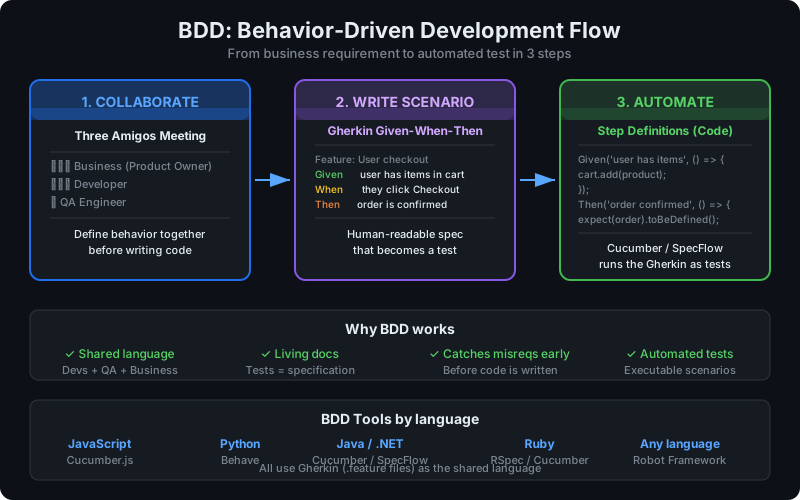
BDD is a software development practice that bridges the gap between business requirements and technical implementation by writing tests in plain, human-readable language. BDD tests describe system behavior from the user's perspective using the Given-When-Then format.
Example BDD scenario:
Feature: User login

  Scenario: Successful login with valid credentials
    Given the user is on the login page
    When they enter valid email and password
    And click the Login button
    Then they should be redirected to the dashboard
And see their username in the navigation barBDD scenarios serve as both specifications and automated tests. They can be read by non-technical stakeholders to verify the system behaves correctly and executed by frameworks like Cucumber, SpecFlow, or Robot Framework to run as automated tests.
Benefits:
- Living documentation that stays in sync with the code
- Shared language between business and engineering
- Tests that describe intent, not implementation
- Catches misunderstood requirements early
Beta Testing
Beta testing is external user acceptance testing where a pre-release version of the software is made available to a select group of real users outside the organization. Unlike alpha testing, beta testing happens in the real-world environment with real users, providing feedback on usability, performance, and compatibility that internal testing can't replicate.
Closed beta: Invited users only, with NDA agreements. Good for controlled feedback from representative users. Open beta: Publicly available, anyone can sign up. Good for scale testing and broad feedback collection.
Beta testing produces qualitative feedback (user experience issues, missing features) and quantitative data (crash rates, performance metrics, feature usage patterns).
Boundary Value Analysis (BVA)
Boundary value analysis is a black box testing technique that tests at the edges of valid input ranges. Defects tend to cluster at boundaries—developers often write < when they meant <=, or handle the first and last valid values incorrectly.
For an age input that accepts 18–65:
- Invalid below boundary: 17
- Valid lower boundary: 18
- Valid just above lower: 19
- Valid just below upper: 64
- Valid upper boundary: 65
- Invalid above boundary: 66
BVA is complementary to equivalence partitioning. Together they provide systematic coverage of input domains without exhaustively testing every value.
C: Coverage, CI/CD, Contract Testing
CI/CD Pipeline Testing
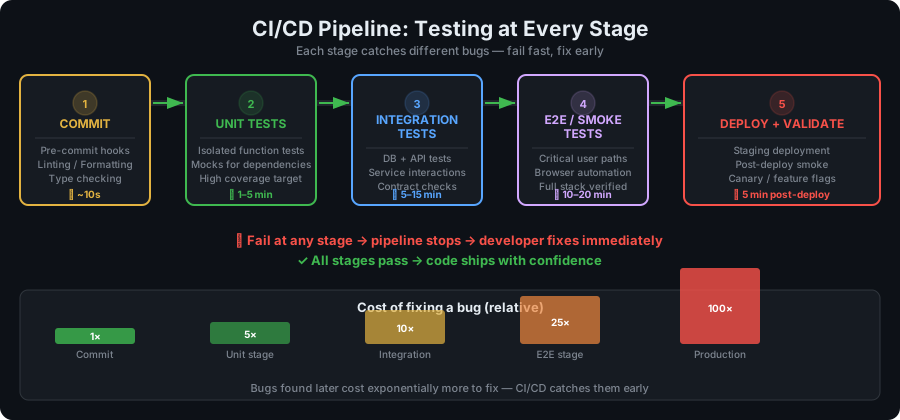
CI/CD (Continuous Integration/Continuous Deployment) pipeline testing is the practice of running automated tests at each stage of the software delivery pipeline. Every code commit triggers a sequence of tests that verify the change doesn't break existing functionality before it proceeds to the next stage.
A typical CI/CD test pipeline:
- Pre-commit hooks: Linting, formatting, type checking (seconds)
- Unit tests: Fast, isolated tests (1–5 minutes)
- Integration tests: Component interaction tests (5–15 minutes)
- E2E smoke tests: Critical path validation (10–20 minutes)
- Full regression suite: Complete automated test run (20–60 minutes)
- Staging deployment and validation: Pre-production checks
Failing tests block the pipeline, preventing broken code from reaching production. This "fail fast" approach catches bugs when they're cheapest to fix.
Popular CI/CD platforms: GitHub Actions, GitLab CI, CircleCI, Jenkins, and Buildkite.
Code Coverage
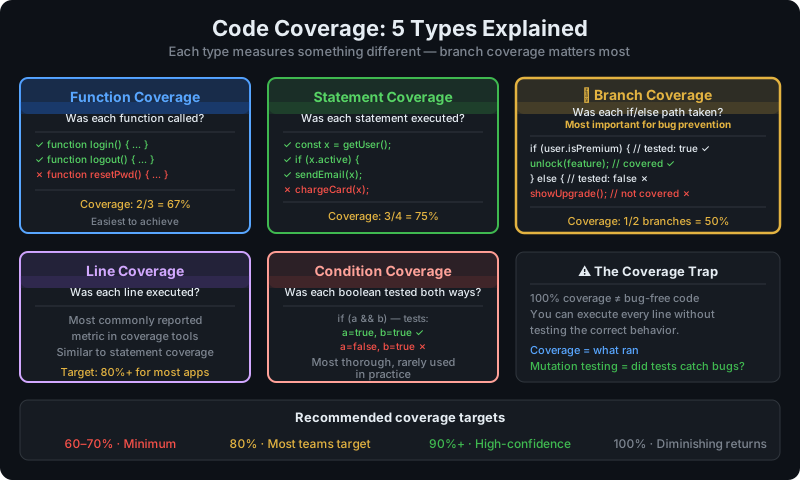
Code coverage (also called test coverage) is a metric that measures what percentage of your source code is executed when your test suite runs. A 90% line coverage means 90% of lines in the codebase are touched by at least one test.
Types of code coverage:
- Line coverage: Percentage of lines executed
- Statement coverage: Percentage of statements executed (more granular than lines)
- Branch coverage: Percentage of code branches (if/else paths) tested
- Function coverage: Percentage of functions called
- Condition coverage: Percentage of boolean conditions evaluated to both true and false
Common coverage thresholds:
- 60–70%: Baseline for most teams
- 80%: Target for production applications
- 90%+: High-confidence coverage (diminishing returns above 95%)
The coverage trap: 100% code coverage does not mean your code is bug-free. You can execute every line without testing the correct behavior. Coverage is a measurement of what's tested, not proof that the tests are good. Pair coverage metrics with mutation testing (see below) for a more honest picture.
Component Testing
Component testing (also called module testing) verifies the behavior of individual software components in isolation from the rest of the system. It sits between unit testing (single functions) and integration testing (multiple components interacting).
A "component" is a deployable, cohesive unit of software: a React component, a microservice, an API handler, a background job processor. Component tests verify the complete behavior of that unit—including its internal logic, side effects, and error handling—without needing the entire application running.
Compatibility Testing
Compatibility testing verifies that software works correctly across different environments: operating systems, browsers, devices, screen resolutions, network conditions, and software versions. It ensures users get a consistent experience regardless of their setup.
Types of compatibility testing:
- Cross-browser testing: Chrome, Firefox, Safari, Edge
- Cross-platform testing: Windows, macOS, Linux, iOS, Android
- Cross-device testing: Desktop, tablet, mobile
- Backward compatibility: Works with previous versions of dependencies
- Forward compatibility: Works with upcoming versions
Tools like BrowserStack, Sauce Labs, and LambdaTest provide real device grids for compatibility testing at scale.
Contract Testing
Contract testing verifies the integration between services by testing that each service honors the "contract" (agreed-upon API specification) it has with its consumers. Instead of running both services together (integration testing), contract testing verifies each side independently against the contract.
In a microservices architecture, service A sends a request to service B. Contract testing verifies:
- Consumer contract: Service A sends requests that match the agreed-upon format
- Provider contract: Service B responds in the format service A expects
The consumer writes the contract (what it expects from the provider). The provider runs tests against that contract to verify it's honored. This allows teams to develop and deploy services independently without breaking integrations.
Tools: Pact (most widely used), Spring Cloud Contract.
Continuous Testing
Continuous testing is the practice of running automated tests throughout the development lifecycle—not just before release. Every code change triggers relevant tests, giving developers immediate feedback while the change is fresh in their minds.
Continuous testing is a core practice of DevOps and CI/CD. It shifts testing left (earlier in the pipeline) and makes quality everyone's responsibility rather than a gate at the end.
Continuous testing ≠ test automation: Test automation is a tool; continuous testing is a practice. Continuous testing requires deciding which tests to run at which stages, managing test execution speed, and acting on test results before proceeding.
Cross-Browser Testing
Cross-browser testing verifies that a web application works correctly and looks consistent across different browsers and versions. CSS rendering differences, JavaScript engine behavior, and web API support vary across Chrome, Firefox, Safari, Edge, and their mobile counterparts.
Cross-browser bugs are particularly costly to discover late because they can affect large user segments. A layout broken in Safari affects 19% of global web traffic.
Modern approaches: Use a grid of real browsers (BrowserStack, LambdaTest), automated with Playwright or Selenium. Supplement with visual regression testing to catch rendering differences.
D: Defects & Debugging
Defect (Bug)
A defect (commonly called a bug) is a flaw in software that causes it to behave differently from what is expected or specified. Defects can be errors in code, design, documentation, or configuration.
Defect lifecycle:
- New: Defect reported
- Assigned: Assigned to a developer
- In Progress: Under investigation or fix
- Fixed: Developer believes it's resolved
- In Retest: QA verifies the fix
- Closed: Fix verified and defect closed
- Reopened: Fix didn't work, defect reactivated
Defect density is the number of defects per unit of code (usually per 1,000 lines). High defect density indicates problematic areas that may need refactoring or additional testing attention.
Defect Escape Rate
Defect escape rate is the percentage of defects that make it through the testing phase and are discovered in production by end users. It's a key quality metric: a high escape rate means your testing isn't catching bugs before they affect customers.
Formula: Defect Escape Rate = (Defects found in production / Total defects found) × 100
Targeting below 10% is common. Teams with mature automated testing practices typically achieve 1–5%.
Dynamic Testing
Dynamic testing involves executing the software and observing its behavior. All forms of running code against inputs and checking outputs are dynamic testing: unit tests, integration tests, E2E tests, manual testing.
Contrasted with static testing, which analyzes code without executing it (code reviews, static analysis tools, linting).
E–F: E2E, Exploratory, Fakes
E2E Testing (End-to-End Testing)
End-to-end testing (E2E testing) validates complete user workflows from start to finish, exercising the full application stack—frontend, backend, database, and external integrations. It simulates real user scenarios to verify that all components work together correctly.
Example E2E test scenario:
- User navigates to the homepage
- Clicks "Sign Up"
- Completes registration form
- Verifies email
- Logs in
- Adds a product to the cart
- Completes checkout
- Receives order confirmation
E2E tests catch integration failures that unit and integration tests miss. They're slow (seconds to minutes per test), brittle (break when UI changes), and expensive to maintain. Use them for critical paths only—the testing pyramid recommends a small number of E2E tests at the top, many unit tests at the bottom.
Tools: Cypress, Playwright, Selenium WebDriver, Puppeteer, Robot Framework.
Equivalence Partitioning
Equivalence partitioning is a black box testing technique that divides input data into groups (partitions) where all values in a partition should behave the same way. Instead of testing every possible input, you test one representative value from each partition.
For an input accepting 1–100:
- Invalid partition below range: any value < 1 (test: -1 or 0)
- Valid partition: any value 1–100 (test: 50)
- Invalid partition above range: any value > 100 (test: 101)
Equivalence partitioning dramatically reduces the number of test cases needed while maintaining coverage. Used with boundary value analysis, it provides systematic input coverage.
Exploratory Testing
Exploratory testing is simultaneous learning, test design, and test execution. The tester actively explores the application, making decisions about what to test next based on what they discover. It has no predefined test scripts.
This is not random clicking. Experienced exploratory testers form hypotheses, design mini-experiments, document findings, and adapt their approach based on what they learn. The goal is to find bugs that scripted tests miss because they follow expected paths.
Session-based exploratory testing is a structured approach: testers work in fixed time-boxed sessions (60–90 minutes) with a specific charter (area or risk to investigate), then debrief their findings.
When exploratory testing finds the most bugs: After major changes, in unfamiliar code, on complex user flows, and in areas where requirements were vague.
Fake
A fake is a type of test double that has a working implementation—it does real things—but takes shortcuts that make it unsuitable for production.
The classic example is an in-memory database. Real code: a PostgreSQL database that persists to disk and supports transactions. Fake: a Map<string, Record> in memory that implements the same interface. The fake works for testing—it stores and retrieves data correctly—but it doesn't persist between process restarts and doesn't scale.
Other examples:
- In-memory cache instead of Redis
- Local file store instead of S3
- Hard-coded payment processor that always succeeds
Fakes allow tests to run fast and without external dependencies while exercising real logic. They're more realistic than stubs (which just return canned responses) but simpler than production implementations.
Flaky Tests
Flaky tests are tests that pass and fail intermittently without code changes—they produce non-deterministic results. Running the same test suite twice may produce different outcomes.
Common causes:
- Race conditions (async tests that depend on timing)
- Test isolation failures (one test's state leaks into another)
- External service dependencies (network requests, databases)
- Date/time-sensitive assertions
- Random data that occasionally hits edge cases
Flaky tests are expensive. They erode trust in the test suite, cause CI pipelines to fail spuriously, and waste developer time investigating false failures. A flaky test is often worse than no test because it trains developers to ignore failures.
Fix approaches: Retry flaky tests automatically (short-term), fix root causes (long-term), quarantine known flaky tests into a separate suite while fixing them.
Functional Testing
Functional testing verifies that the software functions according to its functional requirements—that features do what they're supposed to do. It tests the "what" of the system: given this input, does the system produce the correct output?
Functional testing is a broad category that includes unit testing, integration testing, system testing, and acceptance testing. Its counterpart is non-functional testing (performance, security, usability, accessibility).
Fuzz Testing (Fuzzing)
Fuzz testing (fuzzing) automatically generates large quantities of random, malformed, or unexpected input data and feeds it to the software under test to find crashes, memory errors, and unexpected behavior.
Originally a security testing technique, fuzzing now appears in quality assurance pipelines to find edge cases that manual or scripted testing misses. Modern fuzzers (like AFL, libFuzzer) are "coverage-guided"—they mutate inputs in ways that explore new code paths.
What fuzzing finds: Buffer overflows, null pointer dereferences, unhandled exceptions, format string vulnerabilities, and infinite loops triggered by specific inputs.
G–I: Gherkin, Integration, ISTQB
Gherkin
Gherkin is the plain-text language used to write BDD scenarios that are both human-readable and machine-executable. It uses keywords like Feature, Scenario, Given, When, Then, And, and But to structure test specifications.
Gherkin files (.feature files) are parsed by frameworks like Cucumber, Behave (Python), or Robot Framework to generate executable tests. Each line maps to a step definition: a piece of test code that implements that action.
Gherkin structure:
Feature: User authentication
  As a registered user
  I want to log in
  So that I can access my account

  Scenario: Login with valid credentials
    Given I am on the login page
    When I enter my email "user@example.com"
    And I enter my password "correct-password"
    And I click the login button
    Then I should see the dashboard
And my username should appear in the headerGherkin is the lingua franca of BDD—it bridges the gap between business requirements and automated tests.
Grey Box Testing
Grey box testing is a testing approach where the tester has partial knowledge of the internal implementation. It combines the external perspective of black box testing with some internal knowledge from white box testing.
Use cases: Testing APIs with knowledge of the data schema, testing security with knowledge of the authentication mechanism, performance testing with knowledge of database query patterns.
Grey box testing is common in integration testing where you know how components are connected but test from their external interfaces.
Integration Testing
Integration testing verifies that multiple components work correctly when combined. Where unit testing checks individual functions in isolation, integration testing checks that the connections between components—API calls, database queries, message queues, external service integrations—behave correctly.
Types of integration testing:
- Big bang integration: Combine all components at once, test everything together
- Top-down integration: Start from the top of the component hierarchy, stub lower layers
- Bottom-up integration: Start from the lowest-level components, build upward
- Incremental integration: Add one component at a time, test after each addition
What integration tests catch:
- Incorrect API contracts between services
- Database schema mismatches
- Authentication and authorization failures at service boundaries
- Data transformation errors across layers
- Network timeout and retry behavior
Integration tests are slower than unit tests but faster than E2E tests. In the testing pyramid, they sit in the middle—more than E2E tests, fewer than unit tests.
ISTQB
ISTQB (International Software Testing Qualifications Board) is the global certification body for software testing professionals. Founded in 2002, ISTQB provides standardized qualifications and a common vocabulary for the testing profession.
ISTQB certification levels:
- Foundation Level (CTFL): Core testing concepts, entry-level
- Advanced Level: Test Manager, Test Analyst, Technical Test Analyst
- Expert Level: Improving the Testing Process, Test Management, Agile Testing
The ISTQB Glossary (currently v4.3) is the authoritative reference for testing terminology and is updated regularly to reflect industry evolution.
L–M: Load Testing, Mocks, Mutation
Load Testing
Load testing is a type of performance testing that verifies system behavior under expected and peak load conditions. It answers the question: "How does the system perform when a realistic number of users are using it simultaneously?"
What load testing measures:
- Response times at various concurrency levels
- Throughput (requests per second)
- Resource utilization (CPU, memory, disk I/O) under load
- Breaking points (at what load does performance degrade unacceptably?)
- Recovery behavior after load drops
A load test typically ramps users up gradually, holds at peak, then ramps down—observing behavior at each stage. Tools: k6, Apache JMeter, Locust, Gatling.
Load vs. stress testing: Load testing validates performance at expected load. Stress testing pushes beyond expected load to find failure modes (see Stress Testing).
Localization Testing (L10n Testing)
Localization testing verifies that software behaves correctly after being translated and adapted for a specific locale or market. It goes beyond translation checking to verify that dates, numbers, currencies, and UI layouts work correctly in the target locale.
What localization testing checks:
- Text expansion/contraction (German strings are ~30% longer than English; Japanese can be shorter)
- Date formats (MM/DD/YYYY vs. DD/MM/YYYY vs. YYYY-MM-DD)
- Number formats (1,234.56 vs. 1.234,56)
- Currency symbols and placement
- Right-to-left text rendering (Arabic, Hebrew)
- Character encoding (Unicode support)
- Cultural appropriateness of images and colors
Related: Internationalization testing (i18n testing) verifies the application's infrastructure can support multiple locales; localization testing verifies specific locale implementations.
Mock
A mock is a test double that replaces a real dependency and verifies that specific interactions occurred. Unlike stubs (which just provide canned responses), mocks assert on how they were called—the number of calls, the arguments passed, and the call order.
Mock example (JavaScript with Jest):
const emailService = { send: jest.fn() };
const userService = new UserService(emailService);

await userService.registerUser({ email: 'user@example.com' });

expect(emailService.send).toHaveBeenCalledOnce();
expect(emailService.send).toHaveBeenCalledWith({
  to: 'user@example.com',
  subject: 'Welcome!',
  template: 'welcome'
});The mock verifies that registerUser sends exactly one welcome email to the correct address with the correct template.
When to use mocks:
- When you need to verify that a dependency was called correctly
- When the dependency has side effects (sending email, charging credit cards, writing to external APIs)
- When you need to simulate error conditions from a dependency
Mock vs. stub: Use stubs when you only care about the output; use mocks when you care about the interaction.
Monkey Testing
Monkey testing (also called random testing) involves sending random, unexpected, or invalid inputs to an application to see how it handles them. The name comes from the "infinite monkey theorem"—a monkey randomly pressing keyboard keys might eventually produce valid inputs.
Dumb monkey testing: Completely random inputs with no knowledge of the application. Smart monkey testing: Random inputs within valid ranges, understanding the application structure.
Monkey testing is useful for stress testing, finding crash-causing edge cases, and testing error handling. It's related to fuzz testing but typically less systematic.
Mutation Testing
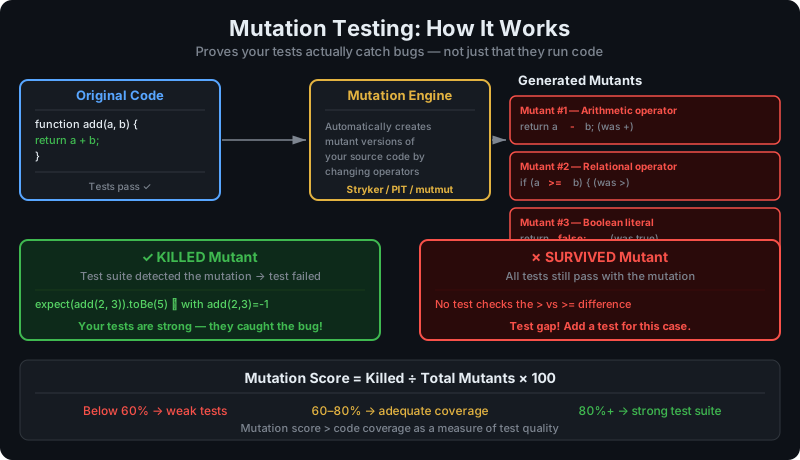
Mutation testing assesses the quality of your test suite by introducing small changes (mutations) to the source code and checking whether your tests catch them. If a mutation doesn't cause any test to fail, it reveals a gap in your test coverage.
Example mutations:
- Change
>to>= - Flip
truetofalse - Delete a return statement
- Change
+to-
If your tests don't catch these mutations, you have code that looks tested but has gaps in assertion quality. High code coverage doesn't guarantee your assertions are meaningful—mutation testing does.
Mutation score = (Killed mutants / Total mutants) × 100. A score of 80%+ is considered good.
Tools: Stryker (JavaScript/TypeScript), PIT (Java), mutmut (Python).
P–Q: Performance, Penetration, QA/QC
Penetration Testing (Pen Testing)
Penetration testing is an authorized simulation of a cyberattack against a system to find exploitable vulnerabilities before malicious actors do. Penetration testers (ethical hackers) use the same tools, techniques, and methodologies as attackers—but with permission and the goal of improving security.
Penetration test types:
- Black box: Tester has no prior knowledge of the system
- White box: Tester has full access to source code and architecture
- Grey box: Tester has partial knowledge (e.g., valid credentials but no source code)
What pen testing covers: Network vulnerabilities, web application vulnerabilities (OWASP Top 10), authentication weaknesses, privilege escalation, social engineering, physical security.
Pen testing produces a report with findings ranked by severity (Critical, High, Medium, Low) and remediation recommendations.
Performance Testing
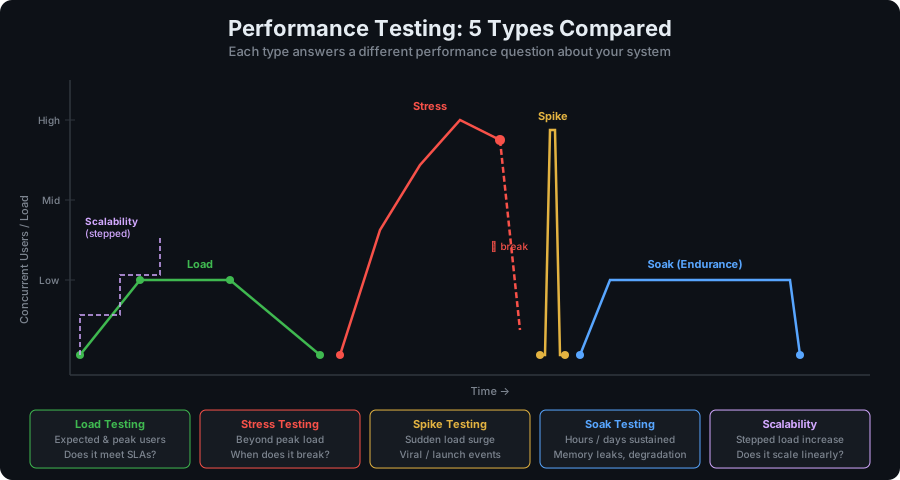
Performance testing is an umbrella term for tests that measure system performance characteristics: speed, scalability, stability, and resource utilization. It answers: "How fast and reliable is this system under various conditions?"
Types of performance testing:
- Load testing: Expected and peak user loads
- Stress testing: Beyond peak load to find breaking points
- Spike testing: Sudden, sharp increases in load
- Soak testing (Endurance testing): Sustained load over long periods (hours/days)
- Scalability testing: How performance changes as load increases
- Volume testing: Performance with large datasets
Key metrics: Response time (average, P95, P99), throughput (requests/second), error rate, CPU/memory utilization, time-to-first-byte.
Performance testing is commonly done before major releases, after infrastructure changes, and to validate SLA compliance.
QA (Quality Assurance)
Quality Assurance (QA) is the systematic process of ensuring that software development and testing processes produce software that meets defined quality standards. QA focuses on the process—improving how software is developed and tested to prevent defects from occurring.
QA is proactive and preventive. QC (Quality Control) is reactive and corrective.
QA activities include:
- Defining testing standards and processes
- Reviewing requirements for testability and clarity
- Participating in code reviews
- Establishing CI/CD pipelines and quality gates
- Tracking and analyzing defect trends
- Driving process improvements
A QA engineer does much more than run tests—they're responsible for the overall quality of the development process.
QC (Quality Control)
Quality Control (QC) is the reactive process of identifying defects in software products through testing and inspection. Where QA focuses on improving processes, QC focuses on verifying that outputs meet quality standards.
QC activities: executing test cases, reporting defects, verifying bug fixes, validating releases against acceptance criteria.
The QA/QC distinction matters in how teams structure their work. A QA-only mindset (only finding bugs before release) is fundamentally different from a QC+QA mindset (improving processes to prevent bugs from occurring).
R: Regression, Risk-Based, Robot Framework
Recovery Testing
Recovery testing verifies that software can recover from crashes, hardware failures, network outages, and other failure conditions. It tests failover mechanisms, backup and restore procedures, and graceful degradation behavior.
What recovery testing validates:
- Application restarts cleanly after a crash
- Data is not corrupted after an unexpected shutdown
- Transactions are completed or rolled back correctly after failures
- Failover to backup systems happens within defined RPO/RTO targets
- Error messages are informative and actionable
Recovery testing is critical for applications with strict availability requirements and is a key component of disaster recovery (DR) testing.
Regression Testing
Regression testing re-runs existing tests after code changes to verify that nothing previously working has broken. It's the safety net that catches unintended side effects of new features, bug fixes, or refactoring.
Why regression testing matters: As a codebase grows, every change can potentially affect other parts of the system in unexpected ways. Without regression testing, you're flying blind every time you deploy.
What gets regression tested:
- Previously passing test cases
- Fixed bugs (to verify they don't re-emerge)
- Related features that touch changed code
- Critical paths identified by risk analysis
Full regression vs. selective regression: Running the full test suite provides maximum confidence but takes time. Selective regression runs only tests related to changed code—faster but risks missing cross-system impacts. CI/CD pipelines typically run selective regression on pull requests and full regression before releases.
Risk-Based Testing
Risk-based testing prioritizes test cases based on the probability and impact of failures. Instead of trying to test everything equally, teams focus testing effort on the areas where failures would be most likely and most costly.
Risk formula: Risk = Probability of failure × Impact of failure
High risk areas: Core revenue features, authentication, payment processing, data export. These get the most thorough testing.
Low risk areas: Rarely used features, read-only displays of non-critical data. These get lighter testing.
Risk-based testing is pragmatic—it acknowledges that complete testing is impossible and directs limited resources where they matter most. It requires honest assessment of what can go wrong and what the consequences would be.
Robot Framework
Robot Framework is an open-source automation framework for acceptance testing and robotic process automation (RPA). It uses a keyword-driven approach where tests are written in human-readable syntax that maps to Python-based library functions.
*** Test Cases ***
Valid Login
    Open Browser    https://example.com/login    chrome
    Input Text      id=email    user@example.com
    Input Text      id=password    correct-password
    Click Button    xpath=//button[@type='submit']
    Page Should Contain    Dashboard
[Teardown] Close BrowserRobot Framework supports web testing (via SeleniumLibrary or Browser Library), API testing, database testing, and SSH. Its clear syntax makes tests readable by non-developers, and its keyword library ecosystem is extensive.
S: Smoke, Stress, Stub, System Testing
Sanity Testing
Sanity testing is a narrow regression test that verifies a specific bug fix or feature addition works before proceeding with broader testing. It's smaller than smoke testing—focused on one area rather than the entire application.
When a bug fix is deployed, a sanity test checks: did this specific fix actually resolve the issue? If yes, proceed. If no, send back for rework without running the full test suite.
Smoke vs. sanity: Smoke tests are broad (does the whole application basically work?). Sanity tests are narrow (does this specific thing work?).
Security Testing
Security testing identifies vulnerabilities, threats, and risks in a software application that could be exploited by attackers. It verifies that the application protects data, maintains user privacy, and resists common attack vectors.
Security testing types:
- SAST (Static Application Security Testing): Analyzes source code for vulnerabilities without running it
- DAST (Dynamic Application Security Testing): Tests the running application for vulnerabilities
- IAST (Interactive Application Security Testing): Instruments the application during testing to detect vulnerabilities
- SCA (Software Composition Analysis): Checks third-party dependencies for known vulnerabilities
- Penetration testing: Manual, adversarial testing by security experts
OWASP Top 10 is the standard reference for common web application vulnerabilities: injection attacks, broken authentication, XSS, IDOR, security misconfiguration, and more.
Shift-Left Testing
Shift-left testing is the practice of moving testing earlier in the development lifecycle. Instead of testing being a gate at the end of development, it's integrated throughout—from requirements review through coding.
Shift-left practices:
- Writing unit tests before or during code (TDD)
- Reviewing requirements and designs for testability
- Running automated tests on every commit
- Developers testing their own code before code review
- QA involved in sprint planning and requirement clarification
The "left" refers to the left side of a traditional project timeline—earlier stages. Shift-left reduces the cost of fixing defects by finding them when the context is fresh and changes are smaller.
Shift-right testing is the complementary practice of testing in production—monitoring, feature flags, canary deployments, and chaos engineering.
Smoke Testing
Smoke testing (also called build verification testing) is a preliminary test to verify that the basic, critical functionality of an application works after a new build or deployment. If the smoke test fails, the build is rejected without further testing.
The term comes from hardware testing—power on a new circuit and check if it smokes. If it does, don't bother with more detailed testing.
Smoke test examples:
- Application starts up without errors
- Login flow works
- Main navigation renders correctly
- Database connection is healthy
- Core API endpoints return 200
Smoke tests are fast (5–15 minutes), wide (cover many features shallowly), and the first line of defense against broken builds. If smoke tests pass, detailed regression testing proceeds.
Soak Testing (Endurance Testing)
Soak testing runs the system under a sustained load for an extended period—hours or days—to identify performance degradation over time. It catches issues that don't appear in short tests: memory leaks, connection pool exhaustion, log file growth, and gradual performance degradation.
A soak test might run at 50% of peak load for 24 hours, monitoring memory usage, response times, error rates, and system resource consumption throughout.
Spike Testing
Spike testing verifies system behavior when load increases suddenly and dramatically, then drops back to normal. It simulates real-world events like product launches, viral social media posts, or scheduled promotions.
Example spike scenario: 100 concurrent users for 30 minutes, then 5,000 users for 5 minutes, then back to 100. Does the system scale up and down correctly? Does it recover after the spike? Does the spike cause any lasting degradation?
Static Testing
Static testing analyzes software artifacts without executing the code. Code reviews, design reviews, requirements inspections, and automated static analysis tools all fall under static testing.
Static analysis tools (linters, SAST tools, type checkers) find bugs, security vulnerabilities, and code quality issues automatically by analyzing source code structure. Examples: ESLint (JavaScript), Pylint (Python), SonarQube, Semgrep.
Static testing finds defects early and cheaply—the earlier a bug is found, the less it costs to fix. Code review is consistently one of the most cost-effective defect detection practices.
Stress Testing
Stress testing pushes the system beyond its expected operational limits to find breaking points and observe failure modes. It answers: "What happens when we exceed capacity? How does the system fail, and does it recover?"
Stress tests intentionally cause failures. The goal is to understand failure behavior so it can be designed to fail gracefully, trigger alerts, and recover automatically.
What stress testing reveals:
- At what load point does performance become unacceptable?
- Does the system fail hard (crash) or soft (degrade gracefully)?
- After the load drops, does the system recover automatically?
- Does failure in one component cascade to others?
Stub
A stub is a test double that replaces a real component with a simplified version that returns predefined responses. Stubs provide the inputs that the code under test needs without the complexity, side effects, or unreliability of the real component.
Stub example: Instead of calling a real payment API that charges real credit cards:
const paymentService = {
  charge: async (amount, cardToken) => ({ success: true, transactionId: 'test-123' })
};This stub always returns a successful charge, allowing tests to verify checkout logic without hitting a real payment processor.
When to use stubs:
- External services that are slow, unavailable, or costly in test environments
- Dependencies that have side effects (sending emails, charging cards, writing to production databases)
- When you want to test specific response scenarios (error cases, timeouts)
Stub vs. mock: Stubs provide responses; mocks verify interactions. If you only care about the output, use a stub. If you need to verify the dependency was called correctly, use a mock.
System Testing
System testing tests the entire integrated application as a whole against its specified requirements. It's performed after component and integration testing, before acceptance testing.
System testing verifies end-to-end functionality from the user's perspective but is conducted by QA (not end users). It tests functional requirements (does it do what the spec says?) and non-functional requirements (performance, security, accessibility).
System testing is the first time the complete system is tested as a single entity—all components integrated, all external integrations connected, in a test environment that mirrors production.
T: TDD, Test Case, Test Coverage, Test Double
TDD (Test-Driven Development)
Test-Driven Development (TDD) is a development practice where tests are written before production code. The development cycle follows three steps, repeated continuously:
- Red: Write a failing test that specifies desired behavior
- Green: Write the minimum production code to make the test pass
- Refactor: Improve the code while keeping all tests passing
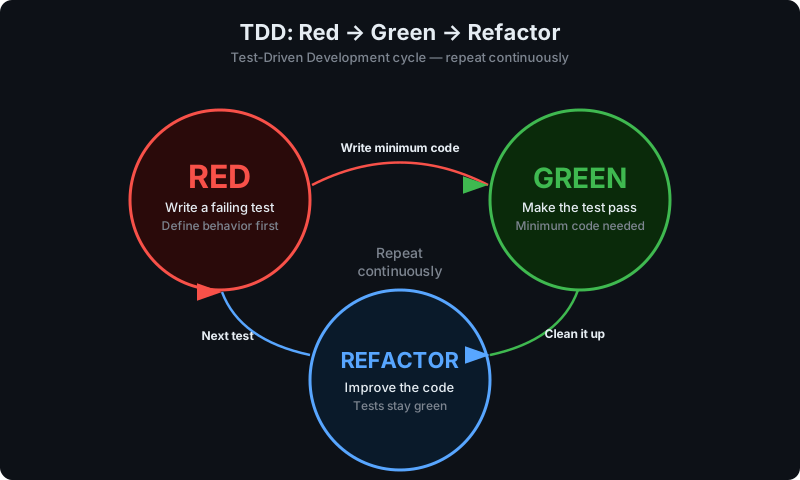
TDD produces code that is inherently testable (you wrote the test first), has high unit test coverage, and documents intended behavior. It forces small, focused functions and discourages over-engineering.
Benefits of TDD:
- Bugs are found within minutes of introduction, not days
- Test suite documents the specification
- Refactoring is safe because tests catch regressions immediately
- Code is naturally modular because testable code has minimal dependencies
TDD is hard: It requires discipline, especially when under pressure. The urge to just write code and test later is strong. Teams that succeed with TDD treat test writing as part of development, not overhead.
Test Case
A test case is a documented set of conditions, inputs, actions, and expected results used to verify a specific aspect of software behavior. A test case has:
- ID: Unique identifier
- Title: What is being tested
- Preconditions: System state required before execution
- Steps: Actions to perform
- Expected result: What should happen
- Actual result: What actually happened (filled in during execution)
- Status: Pass/Fail
Good test cases are specific, self-contained, and independent from other test cases. Bad test cases are vague ("test the login"), dependent on execution order, or test multiple things at once.
Test Double
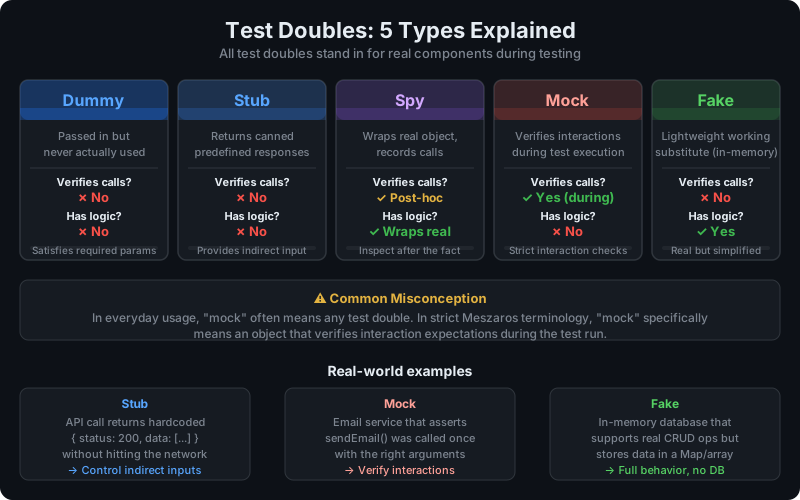
Test double is the generic term for any object that stands in for a real component during testing. The name comes from film—a stunt double stands in for an actor. Gerard Meszaros defined five types of test doubles:
| Type | Description | Verifies? | Has Logic? |
|---|---|---|---|
| Dummy | Placeholder, never used | No | No |
| Stub | Returns predefined responses | No | No |
| Spy | Records calls for later inspection | Post-hoc | Wraps real |
| Mock | Verifies interactions immediately | Yes (during) | No |
| Fake | Lightweight working substitute | No | Yes |
In practice, "mock" is colloquially used to mean any test double. In strict usage (Meszaros's definition), mocks specifically verify interaction expectations.
Test Environment
A test environment is a configured system (server, database, network, configuration) set up specifically for running tests, isolated from development and production. Test environments prevent tests from affecting real data or real users.
Environment tiers:
- Local/Dev: Developer's machine, most permissive
- CI: Automated build environment, ephemeral
- Integration/Staging: Mirrors production, long-lived
- UAT: End user testing environment
- Production: Real users, minimal testing (smoke tests, canary checks)
Environment management is a significant DevOps challenge. Inconsistencies between test and production environments ("works on staging, breaks in production") are a leading cause of post-deployment failures.
Test Fixture
A test fixture is a fixed state of data and system configuration used as a baseline for running tests. Fixtures ensure tests start from a known, consistent state and produce reproducible results.
Types of test fixtures:
- Database fixtures: Pre-loaded test data (users, products, orders)
- File fixtures: Test files, configuration files, response payloads
- Object fixtures: Pre-constructed domain objects
In testing frameworks, fixtures typically run setup/teardown logic:
- beforeEach / setUp: Establish the fixture before each test
- afterEach / tearDown: Clean up after each test
Well-managed fixtures ensure test isolation—each test starts fresh and isn't affected by previous tests.
Test Harness
A test harness is the combination of software tools, test scripts, and configurations needed to test a component. It includes the test runner, fixture management, mock/stub setup, reporting, and any scaffolding needed to exercise the code under test.
A test harness is to testing what scaffolding is to construction—a temporary structure that supports the work of testing without being part of the final product.
Test Plan
A test plan is a document that describes the scope, approach, resources, and schedule for testing a software release or feature. It defines what will be tested, how it will be tested, who will test it, and what criteria constitute success.
Test plan contents:
- Objectives and scope
- Test strategy (types of testing to perform)
- Features to test / not to test
- Test environment requirements
- Entry and exit criteria
- Resource requirements (people, tools, environments)
- Risk identification and mitigation
- Defect management process
- Schedule and milestones
In Agile teams, test plans are often lightweight and embedded in stories or sprint ceremonies rather than formal documents.
Test Pyramid
The test pyramid is a visualization of the recommended distribution of automated tests, introduced by Mike Cohn and popularized by Martin Fowler. The pyramid has three layers:
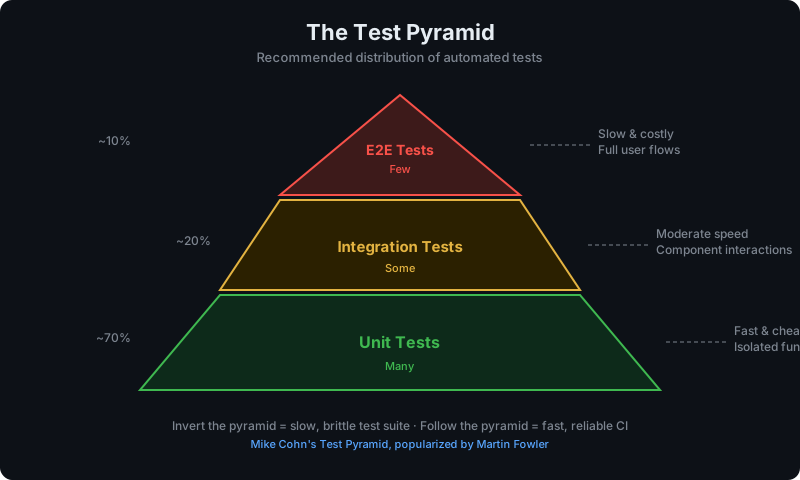
- Base (Unit tests): Many, fast, cheap to write and maintain. Test individual functions in isolation.
- Middle (Integration tests): Some, moderate speed. Test component interactions.
- Top (E2E tests): Few, slow, expensive. Test complete user flows.
Teams that invert the pyramid (many E2E tests, few unit tests) have slow, brittle test suites that are expensive to maintain. The pyramid guides teams toward a balanced testing strategy.
Test Suite
A test suite is a collection of test cases grouped together for execution. Test suites can be organized by feature, component, test type (unit, integration, E2E), or risk level.
A well-organized test suite structure:
- Fast unit test suite (runs in < 2 minutes on every commit)
- Integration test suite (runs in < 10 minutes on pull requests)
- Full regression suite (runs in < 30 minutes before release)
- Critical path smoke suite (runs in < 5 minutes after deployment)
U–Z: UAT, Unit Testing, Visual, White Box
UAT (User Acceptance Testing)
User Acceptance Testing (UAT) is the final validation phase where actual users (or representative users) test the system to confirm it meets their needs and is ready for release. It's the last line of defense before deployment.
UAT process:
- Prepare test scenarios based on real user workflows
- Recruit representative users (not developers or QA)
- Observe users interacting with the system
- Document issues, confusion, and failures
- Sign off when acceptance criteria are met
UAT finds problems that QA misses because QA engineers know how the system is supposed to work—users interact with it as they would in the real world, often revealing usability issues and workflow gaps.
Unit Testing
Unit testing tests the smallest testable units of code—individual functions, methods, or classes—in isolation from their dependencies. Unit tests are the foundation of automated testing and the base of the testing pyramid.
Characteristics of good unit tests:
- Fast: Run in milliseconds, not seconds
- Isolated: No external dependencies (no network, no database, no filesystem)
- Deterministic: Same result every time
- Self-documenting: Test names describe the behavior being verified
- One assertion per test: Each test verifies one specific thing
Unit test example (Jest):
describe('calculateTotal', () => {
  it('adds item prices correctly', () => {
    const items = [{ price: 10 }, { price: 20 }, { price: 5 }];
    expect(calculateTotal(items)).toBe(35);
  });

  it('returns 0 for empty cart', () => {
    expect(calculateTotal([])).toBe(0);
  });

  it('applies discount code correctly', () => {
    const items = [{ price: 100 }];
    expect(calculateTotal(items, { code: 'SAVE10', percent: 10 })).toBe(90);
  });
});Unit test frameworks: Jest (JavaScript), Vitest (JavaScript), pytest (Python), JUnit (Java), RSpec (Ruby), NUnit (.NET).
Usability Testing
Usability testing evaluates software from the perspective of real users to measure how easy and effective it is to use. It's qualitative research, not bug-finding: the goal is to understand the user experience and identify friction points, confusion, and task failures.
Usability testing methods:
- Moderated usability testing: Facilitator observes and interviews user in real-time
- Unmoderated testing: Users complete tasks independently, sessions recorded
- Think-aloud protocol: Users verbalize their thoughts as they navigate
- First-click testing: Measures where users click first for a given task
Key metrics: task completion rate, time on task, error rate, and satisfaction scores (SUS - System Usability Scale).
Visual Testing (Visual Regression Testing)
Visual testing (visual regression testing) detects unintended visual changes in the UI by comparing screenshots of the application against approved baseline images. Any pixel-level difference is flagged for review.
What visual testing catches: Layout regressions, font changes, color changes, element misalignment, responsive layout breaks, and cross-browser rendering differences—issues that functional tests don't detect because they don't look at the rendered UI.
Tools: Percy, Applitools, BackstopJS, Chromatic (for Storybook).
Visual testing is particularly valuable in design systems and component libraries where a change to a shared component can visually break dozens of dependent components.
White Box Testing
White box testing (also called clear box, glass box, or structural testing) tests software with full knowledge of its internal structure—source code, architecture, and implementation details. The tester designs tests based on the code's internal paths, conditions, and branches.
White box testing techniques:
- Statement coverage: Test every line of code
- Branch coverage: Test every if/else path
- Path coverage: Test every unique execution path through the code
White box testing requires technical skills and code access. It's most effective for finding security vulnerabilities, unreachable code, and logic errors that black box testing misses.
White box vs. black box: Black box tests the interface (what the code does). White box tests the implementation (how it does it). Both are necessary for comprehensive coverage.
Zero-Day Vulnerability
A zero-day vulnerability is a security flaw that has been discovered but not yet publicly disclosed or patched—leaving zero days for the vendor to fix it before potential exploitation. Zero-day vulnerabilities are particularly dangerous because no defense exists at discovery.
In testing, zero-day awareness drives security testing practices: keeping dependencies updated (vulnerability scanning), running DAST against running applications, and participating in bug bounty programs to find vulnerabilities before attackers do.
Testing Glossary: Quick Reference Table
| Term | Category | Definition Summary |
|---|---|---|
| A/B Testing | Testing Type | Compare two variants to determine which performs better |
| Acceptance Testing | Testing Type | Validates software meets stakeholder requirements before release |
| Accessibility Testing | Testing Type | Verifies software works for users with disabilities |
| Ad Hoc Testing | Testing Type | Unscripted, informal exploratory testing |
| Alpha Testing | Testing Stage | Internal pre-release testing at developer's site |
| API Testing | Testing Type | Tests interfaces between software components |
| ATDD | Methodology | Acceptance criteria written as tests before development |
| BDD | Methodology | Tests written in Given-When-Then describing behavior |
| Beta Testing | Testing Stage | External pre-release testing with real users |
| BVA | Technique | Testing at edges of valid input ranges |
| CI/CD Pipeline Testing | Practice | Automated tests triggered at each pipeline stage |
| Code Coverage | Metric | Percentage of code executed by test suite |
| Component Testing | Testing Type | Tests individual components in isolation |
| Compatibility Testing | Testing Type | Verifies software across environments/platforms |
| Contract Testing | Testing Type | Verifies service API contracts between consumers and providers |
| Continuous Testing | Practice | Running tests throughout the development lifecycle |
| Cross-Browser Testing | Testing Type | Tests across different browsers |
| Defect (Bug) | Concept | Flaw causing software to behave unexpectedly |
| Dummy | Test Double | Placeholder object passed but never used |
| Dynamic Testing | Testing Type | Tests that execute the software |
| E2E Testing | Testing Type | Full user workflow testing across entire system |
| Equivalence Partitioning | Technique | Divides inputs into partitions for efficient test design |
| Exploratory Testing | Testing Type | Simultaneous learning and testing without scripts |
| Fake | Test Double | Working substitute with simplified implementation |
| Flaky Tests | Quality Issue | Tests that pass/fail non-deterministically |
| Functional Testing | Category | Tests that features do what they should |
| Fuzz Testing | Testing Type | Random input generation to find crashes |
| Gherkin | Language | Plain-text BDD scenario language |
| Grey Box Testing | Testing Type | Testing with partial knowledge of internals |
| Integration Testing | Testing Type | Tests component interactions |
| ISTQB | Organization | Global software testing certification body |
| Load Testing | Testing Type | Performance at expected/peak user loads |
| Localization Testing | Testing Type | Verifies software in specific locale/market |
| Mock | Test Double | Verifies interactions with dependencies |
| Monkey Testing | Testing Type | Random input testing |
| Mutation Testing | Testing Type | Assesses test quality by introducing code mutations |
| Non-Functional Testing | Category | Tests quality attributes (performance, security, etc.) |
| Penetration Testing | Testing Type | Authorized simulated cyberattack to find vulnerabilities |
| Performance Testing | Testing Type | Tests speed, scalability, stability under load |
| QA (Quality Assurance) | Concept | Improving processes to prevent defects |
| QC (Quality Control) | Concept | Detecting defects through testing and inspection |
| Recovery Testing | Testing Type | Verifies recovery from failures |
| Regression Testing | Testing Type | Re-runs tests after changes to catch regressions |
| Risk-Based Testing | Approach | Prioritizes testing by failure probability × impact |
| Robot Framework | Tool | Open-source keyword-driven test automation framework |
| Sanity Testing | Testing Type | Narrow regression of specific bug fix |
| Security Testing | Testing Type | Identifies vulnerabilities and security weaknesses |
| Shift-Left Testing | Practice | Moving testing earlier in the development lifecycle |
| Smoke Testing | Testing Type | Quick critical path check after build/deployment |
| Soak Testing | Testing Type | Sustained load testing over long periods |
| Spike Testing | Testing Type | Tests sudden sharp load increases |
| Spy | Test Double | Records calls for later verification |
| Static Testing | Testing Type | Analyzes code without executing it |
| Stress Testing | Testing Type | Tests beyond peak load to find failure modes |
| Stub | Test Double | Returns predefined responses for dependencies |
| System Testing | Testing Type | Tests entire integrated application against requirements |
| TDD | Methodology | Tests written before production code (Red-Green-Refactor) |
| Test Case | Artifact | Documented conditions, inputs, steps, and expected results |
| Test Double | Concept | Generic term for any test stand-in |
| Test Environment | Infrastructure | Isolated system configured for testing |
| Test Fixture | Concept | Fixed baseline state for running tests |
| Test Harness | Tooling | Complete setup for executing tests |
| Test Plan | Artifact | Document describing scope, approach, schedule for testing |
| Test Pyramid | Model | Recommended unit/integration/E2E test distribution |
| Test Suite | Concept | Collection of test cases grouped for execution |
| UAT | Testing Type | End-user validation before release |
| Unit Testing | Testing Type | Tests individual functions in isolation |
| Usability Testing | Testing Type | Evaluates ease of use with real users |
| Visual Testing | Testing Type | Detects unintended UI visual changes via screenshot comparison |
| White Box Testing | Testing Type | Tests with full knowledge of internal implementation |
How HelpMeTest Fits Into This
Most teams understand these terms—the hard part is actually implementing them. Writing and maintaining test suites takes time. Cross-browser coverage means setting up test infrastructure. E2E test flakiness is a constant battle.
HelpMeTest handles the execution side: AI-powered testing that runs your critical paths, catches visual and functional regressions, and integrates with your CI/CD pipeline—so you get the coverage without the maintenance overhead.
Whether you're implementing a full testing strategy or just want reliable smoke tests after every deployment, the glossary above gives you the vocabulary to describe what you need—and HelpMeTest gives you the tooling to deliver it.
This glossary is maintained and updated regularly. Based on the ISTQB Standard Glossary v4.3 (2024) and industry sources including Katalon, SoftwareTestingHelp, and Martin Fowler's testing writings.