End-to-End Testing Guide: E2E Testing with Playwright and Cypress


Unit tests said everything worked. Integration tests agreed. Then your payment flow broke in production because the date picker component and the checkout API had a timing issue that only manifested in a real browser. E2E tests are the only tests that can catch what no other test can.
Key Takeaways
E2E tests catch bugs that unit and integration tests miss. Timing issues, cross-service data inconsistencies, UI rendering problems — these only show up when the full stack runs together.
E2E tests are the most realistic tests you can run — and the most expensive to maintain. Write them for critical user paths only; use unit and integration tests for everything else.
Playwright has become the default choice for new projects. Faster, more reliable, better multi-browser support, and no Electron overhead compared to Cypress.
Flaky E2E tests are worse than no E2E tests. A test suite that fails randomly teaches your team to ignore failures — fix or delete flaky tests before they erode trust in your pipeline.
End-to-end testing (E2E testing) validates complete user workflows through your application from start to finish — simulating real user behavior across the full technology stack. An E2E test might log in, add items to a cart, check out, and verify the confirmation email — exercising the UI, API, database, and third-party integrations in a single test.
E2E tests catch bugs that unit and integration tests miss: timing issues, UI rendering problems, cross-service data inconsistencies, and environment-specific failures. They're the most realistic tests you can run, and the most expensive to write and maintain.
This guide covers what E2E testing is, where it fits in your testing strategy, the leading tools (Playwright and Cypress), best practices, and how to run E2E tests in CI/CD.
What Is End-to-End Testing?
End-to-end testing simulates real user interactions with your application by driving a real browser through actual user flows. Unlike unit tests (which test isolated functions) or integration tests (which test components talking to each other), E2E tests:
- Open a real browser
- Navigate to your application's URL
- Interact with UI elements: click buttons, fill forms, wait for content
- Assert on visible outcomes: page content, URL changes, network responses
A complete E2E test for an e-commerce checkout might look like:
// Playwright E2E test example
import { test, expect } from '@playwright/test';

test('user can complete checkout', async ({ page }) => {
  // Navigate and authenticate
  await page.goto('/login');
  await page.fill('[data-testid="email"]', 'alice@example.com');
  await page.fill('[data-testid="password"]', 'password123');
  await page.click('[data-testid="login-button"]');

  // Add product to cart
  await page.goto('/products/widget-pro');
  await page.click('[data-testid="add-to-cart"]');
  await expect(page.locator('[data-testid="cart-count"]')).toHaveText('1');

  // Complete checkout
  await page.goto('/checkout');
  await page.fill('[data-testid="card-number"]', '4242424242424242');
  await page.click('[data-testid="place-order"]');

  // Assert success
  await expect(page).toHaveURL(/\/order-confirmation/);
  await expect(page.locator('h1')).toContainText('Order confirmed');
});This single test exercises the auth system, product catalog, cart, payment processor, and order confirmation — all with a real browser, real HTTP requests, and real database writes.
What E2E Tests Are For
E2E tests answer: does this workflow work for a real user?
They're best for:
- Critical user paths: registration, login, purchase, core workflow completion
- Cross-service validation: workflows that touch multiple services or APIs
- UI behavior: modal states, animations, form validation, responsive behavior
- Regression prevention: making sure key flows stay working after changes
E2E Testing in the Testing Pyramid
The testing pyramid describes the optimal distribution of test types:
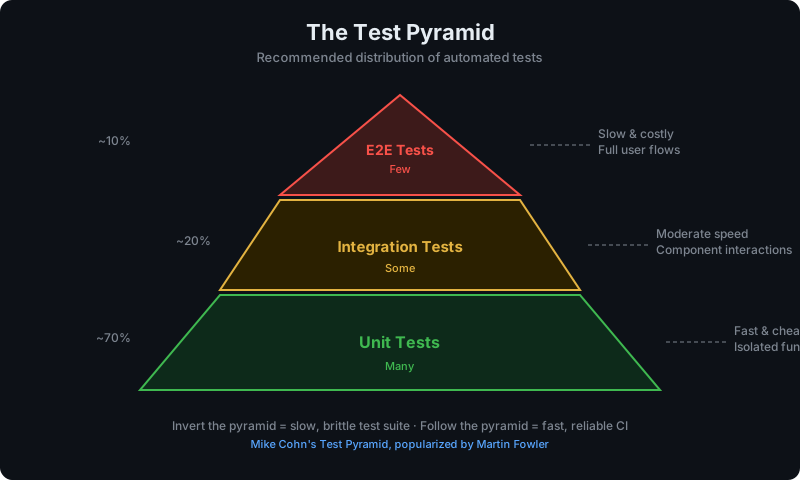
       /E2E\
      /-----\
     /  Int  \
    /---------\
   /   Unit    \
/-------------\| Layer | Quantity | Speed | Cost | What it tests |
|---|---|---|---|---|
| Unit | 70-80% | Milliseconds | Low | Logic, functions |
| Integration | 15-20% | Seconds | Medium | Component interactions |
| E2E | 5-10% | Minutes | High | User workflows |
Why keep E2E tests small in number?
- They're slow: a typical E2E test takes 5-30 seconds per test
- They're flaky: network timing, browser rendering, and external dependencies introduce variability
- They're expensive: every test needs a running application, browser, and (often) test data setup
- They're hard to debug: failures are often far removed from the root cause
A healthy E2E suite covers 10-20 critical user paths, not 500 edge cases. Edge cases belong in unit and integration tests.
Playwright vs Cypress
The two dominant E2E testing tools in 2026 are Playwright (by Microsoft) and Cypress (by Cypress.io). Both are excellent, but they have meaningful differences.
Feature Comparison
| Feature | Playwright | Cypress |
|---|---|---|
| Browser support | Chrome, Firefox, Safari, Edge | Chrome, Firefox, Edge (no Safari) |
| Language support | JS/TS, Python, Java, C# | JS/TS only |
| Speed | Faster (parallel by default) | Slower (sequential by default) |
| Test runner | Built-in (Playwright Test) | Built-in (Mocha-based) |
| Auto-waiting | Yes | Yes |
| Network mocking | Native (page.route()) |
Native (cy.intercept()) |
| Component testing | Yes (experimental) | Yes (stable) |
| CI support | Excellent | Excellent |
| Debugging | Trace viewer, video, screenshots | Time-travel debugger, screenshots |
| Pricing | Free, open source | Free (open source) + paid cloud |
| Community | Growing fast | Large, established |
When to Choose Playwright
Choose Playwright if:
- You need Safari/WebKit testing (critical for iOS behavior)
- Your team uses Python, Java, or C# (non-JS stacks)
- You want faster parallel execution by default
- You're starting fresh with no existing Cypress investment
- You need headless browser testing in multiple languages
// playwright.config.ts
import { defineConfig, devices } from '@playwright/test';

export default defineConfig({
  testDir: './tests/e2e',
  fullyParallel: true,
  retries: process.env.CI ? 2 : 0,
  workers: process.env.CI ? 4 : undefined,
  use: {
    baseURL: 'http://localhost:3000',
    trace: 'on-first-retry',
    screenshot: 'only-on-failure',
  },
  projects: [
    { name: 'chromium', use: { ...devices['Desktop Chrome'] } },
    { name: 'firefox', use: { ...devices['Desktop Firefox'] } },
    { name: 'webkit', use: { ...devices['Desktop Safari'] } },
  ],
});When to Choose Cypress
Choose Cypress if:
- Your team is JavaScript/TypeScript only
- You value the time-travel debugging experience
- You have significant existing Cypress investment
- You want mature component testing for React/Vue/Angular
- Your team prioritizes developer experience over raw speed
// cypress.config.js
import { defineConfig } from 'cypress';

export default defineConfig({
  e2e: {
    baseUrl: 'http://localhost:3000',
    viewportWidth: 1280,
    viewportHeight: 720,
    video: false,
    screenshotOnRunFailure: true,
    retries: { runMode: 2, openMode: 0 },
  },
});Bottom line: For new projects in 2026, Playwright is the better default choice — it's faster, supports more browsers and languages, and has caught up in developer experience. Teams with existing Cypress suites should evaluate the migration cost before switching.
Writing Your First E2E Test
Project Setup with Playwright
npm init playwright@latestThis scaffolds:
tests/
  example.spec.ts      # Sample tests
playwright.config.ts   # Configuration
package.json # Updated with PlaywrightPlaywright Test Structure
// tests/e2e/auth.spec.ts
import { test, expect } from '@playwright/test';

test.describe('Authentication', () => {
  test.beforeEach(async ({ page }) => {
    await page.goto('/');
  });

  test('user can sign up with valid email', async ({ page }) => {
    await page.click('text=Sign up');
    await page.fill('[name="email"]', 'test@example.com');
    await page.fill('[name="password"]', 'SecurePass123!');
    await page.click('[type="submit"]');

    await expect(page).toHaveURL('/dashboard');
    await expect(page.locator('h1')).toContainText('Welcome');
  });

  test('shows error for invalid credentials', async ({ page }) => {
    await page.goto('/login');
    await page.fill('[name="email"]', 'wrong@example.com');
    await page.fill('[name="password"]', 'wrongpassword');
    await page.click('[type="submit"]');

    await expect(page.locator('[data-testid="error-message"]')).toBeVisible();
    await expect(page.locator('[data-testid="error-message"]')).toContainText('Invalid credentials');
  });
});Using Page Object Model (POM)
Page Object Model separates test logic from page structure, making tests more maintainable:
// pages/login-page.ts
import { Page, Locator } from '@playwright/test';

export class LoginPage {
  readonly page: Page;
  readonly emailInput: Locator;
  readonly passwordInput: Locator;
  readonly submitButton: Locator;
  readonly errorMessage: Locator;

  constructor(page: Page) {
    this.page = page;
    this.emailInput = page.locator('[name="email"]');
    this.passwordInput = page.locator('[name="password"]');
    this.submitButton = page.locator('[type="submit"]');
    this.errorMessage = page.locator('[data-testid="error-message"]');
  }

  async goto() {
    await this.page.goto('/login');
  }

  async login(email: string, password: string) {
    await this.emailInput.fill(email);
    await this.passwordInput.fill(password);
    await this.submitButton.click();
  }
}

// tests/e2e/auth.spec.ts — using POM
import { test, expect } from '@playwright/test';
import { LoginPage } from '../pages/login-page';

test('user can log in', async ({ page }) => {
  const loginPage = new LoginPage(page);
  await loginPage.goto();
  await loginPage.login('alice@example.com', 'password123');

  await expect(page).toHaveURL('/dashboard');
});Best Practices for E2E Testing
1. Use Stable Selectors
Never select elements by CSS class, text that might change, or position. Use data-testid attributes:
<!-- Bad: brittle selectors -->
<button class="btn btn-primary submit-form">Submit</button>

<!-- Good: stable test ID -->
<button data-testid="checkout-submit">Submit</button>// Bad
await page.click('.btn-primary.submit-form');
await page.click('button:nth-child(3)');
// Good
await page.click('[data-testid="checkout-submit"]');2. Avoid Hard-coded Waits
Never use await page.waitForTimeout(2000). Use explicit waits tied to observable state:
// Bad — assumes 2 seconds is enough
await page.waitForTimeout(2000);
await expect(page.locator('.results')).toBeVisible();

// Good — waits for the actual condition
await expect(page.locator('.results')).toBeVisible({ timeout: 10_000 });
await page.waitForSelector('[data-testid="results-loaded"]');
await page.waitForResponse(resp => resp.url().includes('/api/search'));3. Set Up Test Data Programmatically
Don't rely on manual database state. Create test data via API or database calls before tests:
// tests/fixtures/auth.ts
import { test as base, Page } from '@playwright/test';

type AuthFixtures = {
  authenticatedPage: Page;
};

export const test = base.extend<AuthFixtures>({
  authenticatedPage: async ({ page, request }, use) => {
    // Create test user via API
    await request.post('/api/test/users', {
      data: { email: 'test@example.com', password: 'password123' }
    });

    // Log in
    await page.goto('/login');
    await page.fill('[name="email"]', 'test@example.com');
    await page.fill('[name="password"]', 'password123');
    await page.click('[type="submit"]');
    await page.waitForURL('/dashboard');

    await use(page);

    // Cleanup
    await request.delete('/api/test/users/test@example.com');
  },
});4. Isolate Tests From Each Other
Each test should be independent — no shared state between tests. This means:
- Each test creates its own test user or uses a unique identifier
- Tests don't depend on the order they run in
- Cleanup happens in
afterEachor via API calls
5. Test at the Right Level
Not every scenario needs an E2E test. Use this decision framework:
- E2E: Does this complete user workflow work? (Login, checkout, signup)
- Integration: Does this API endpoint work correctly with the database?
- Unit: Does this function handle edge cases correctly?
If you can test it with a unit test, don't write an E2E test for it.
E2E Testing in CI/CD
GitHub Actions with Playwright
# .github/workflows/e2e.yml
name: E2E Tests

on:
  push:
    branches: [main]
  pull_request:

jobs:
  e2e:
    runs-on: ubuntu-latest
    timeout-minutes: 30

    steps:
      - uses: actions/checkout@v4

      - name: Setup Node.js
        uses: actions/setup-node@v4
        with:
          node-version: '20'
          cache: 'npm'

      - name: Install dependencies
        run: npm ci

      - name: Install Playwright browsers
        run: npx playwright install --with-deps chromium

      - name: Start application
        run: npm run start:test &
        env:
          DATABASE_URL: ${{ secrets.TEST_DATABASE_URL }}

      - name: Wait for application
        run: npx wait-on http://localhost:3000

      - name: Run E2E tests
        run: npx playwright test
        env:
          BASE_URL: http://localhost:3000

      - name: Upload test results
        if: always()
        uses: actions/upload-artifact@v4
        with:
          name: playwright-report
          path: playwright-report/
retention-days: 7Strategies for Reliable CI E2E Tests
Retry on failure: Playwright's retries config re-runs flaky tests automatically. Set retries: 2 in CI.
Run in parallel: Use workers: 4 in CI to parallelize across test files.
Smoke tests only on PRs: Run a small subset of E2E tests on every PR, full suite only on main:
// playwright.config.ts
export default defineConfig({
  testDir: './tests/e2e',
  grep: process.env.CI_SMOKE ? /@smoke/ : undefined, // Tag smoke tests with @smoke
  retries: process.env.CI ? 2 : 0,
  workers: process.env.CI ? 4 : 1,
});Tag critical tests as @smoke:
test('@smoke user can log in', async ({ page }) => { ... });
test('@smoke user can complete checkout', async ({ page }) => { ... });Common E2E Testing Mistakes
Mistake 1: Writing too many E2E tests Solution: Cover user journeys, not features. 15-20 critical path tests is enough for most applications.
Mistake 2: Hard-coded waits (waitForTimeout) Solution: Always wait for observable conditions — elements, URLs, network responses.
Mistake 3: Shared test data across tests Solution: Each test creates and owns its data. Clean up in teardown.
Mistake 4: Testing implementation details Solution: Test what users see and do, not component internals.
Mistake 5: No test IDs in the UI Solution: Add data-testid attributes to interactive elements from day one.
Mistake 6: Running all E2E tests on every commit Solution: Smoke subset on PRs, full suite on main/nightly.
Mistake 7: Ignoring flaky tests Solution: Any flaky test must be fixed or deleted immediately. A 95% reliable test is worse than no test — it trains the team to ignore failures.
FAQ
What is end-to-end testing?
End-to-end testing (E2E testing) is a testing methodology that validates complete user workflows through your application from start to finish, using a real browser to simulate user behavior. It tests the UI, API, database, and integrations as a whole system, verifying that a user can successfully complete key tasks.
What is the difference between E2E testing and integration testing?
Integration tests verify that code components work together correctly — typically at the API or service level without a browser. E2E tests simulate real user behavior through the browser UI, testing the complete stack from the user's perspective. E2E tests are slower and more expensive than integration tests but validate the user experience directly.
Is Playwright better than Cypress?
For most new projects in 2026, Playwright is the better choice — it's faster, supports more browsers including Safari/WebKit, works with multiple languages (JS, Python, Java, C#), and runs tests in parallel by default. Cypress has a better-established ecosystem and superior time-travel debugging, making it a reasonable choice for teams already invested in it or prioritizing developer experience over speed.
How many E2E tests should I have?
Keep your E2E test suite small and focused. A healthy ratio is 5-10% E2E tests, 15-20% integration tests, and 70-80% unit tests. For most applications, 10-20 E2E tests covering critical user paths (login, signup, core workflow, checkout) is sufficient. If your suite exceeds 50-100 tests, look for opportunities to push coverage down to integration or unit tests.
How do I fix flaky E2E tests?
The most common causes of E2E flakiness are: hard-coded waits (replace with explicit condition waits), shared state between tests (isolate test data), timing issues in animations or async loading (use waitForLoadState, waitForSelector, or waitForResponse), and network variability (mock non-critical external APIs). Any test that fails intermittently without a code change should be treated as a bug.
How do I run E2E tests in CI/CD?
Use a CI service container or deploy a test environment with your application running. Playwright has excellent GitHub Actions support via npx playwright install --with-deps. Install only the browsers you need (usually chromium is enough for CI). Configure retries for CI runs, parallelize across workers, and run only smoke tests on PRs with full suite on main to keep pipeline times reasonable.
Can I use HelpMeTest for E2E testing?
HelpMeTest runs automated tests built on Robot Framework + Playwright, making it a strong option for teams that want managed E2E testing with AI-powered test generation, self-healing tests, and 24/7 monitoring. It also handles visual regression testing across mobile, tablet, and desktop viewports — often eliminating the need for separate visual testing tools.
Conclusion
End-to-end testing is the highest-fidelity way to verify your application works for real users. The key is restraint: cover critical paths deeply, keep the suite lean, and invest heavily in test reliability.
Start with 5-10 tests covering your most critical user flows. Use Playwright for new projects. Add data-testid attributes to your UI from day one. Run your suite in CI on every PR with retries enabled.
A small, reliable E2E suite that always passes (and occasionally catches real bugs) is vastly more valuable than a large suite that's always failing and being ignored.
Next steps:
- Integration Testing Guide — build the layer below E2E
- Unit Testing Guide — build the foundation layer
- CI/CD Pipeline Testing Guide — structure your full pipeline
Reference: This guide covers one term from the Software Testing Glossary — the complete A–Z reference for every testing concept explained in one place.