Code Coverage and Test Coverage: What It Is and What It Misses


Your coverage report says 85%. Your lead developer feels good. Then someone removes the assert from a critical test — coverage stays at 85%, but that test now catches nothing. Coverage measures how much code your tests run. It doesn't measure whether your tests would actually catch a bug.
Key Takeaways
Code coverage measures execution, not verification. A test that calls a function without asserting the result contributes to coverage while catching nothing.
80% line coverage is a reasonable baseline, not a goal. Chasing 100% coverage produces tests for trivial getters and private methods that have no chance of containing a bug.
Branch coverage catches what line coverage misses. A function can have 100% line coverage while leaving half its conditional logic untested.
Mutation testing is the only way to measure test suite quality. It answers the question coverage cannot: would your tests actually catch a bug if someone introduced one?
Code coverage (or test coverage) measures what percentage of your production code is executed when your test suite runs. It's one of the most widely used quality metrics in software development — and one of the most misunderstood.
Coverage is a measure of how much code your tests run, not how well your tests verify behavior. A 100% coverage score can coexist with a test suite that catches almost nothing. Understanding what coverage measures — and what it doesn't — is essential to using it effectively.
This guide covers the types of code coverage, how to measure them, the tools available, what coverage thresholds to set, and the dangerous coverage trap that leads teams astray.
What Is Code Coverage?
Code coverage is a measurement of which lines, branches, functions, or statements in your code are executed when your tests run. It's typically expressed as a percentage:
Coverage = (code executed by tests / total code) × 100%Coverage tools instrument your code — inserting tracking points — and report which parts ran. At the end of a test run, you see which lines were covered (green) and which weren't (red).
Example: A function with 10 lines. Your tests execute 8 of them. Line coverage = 80%.
Coverage is useful as a diagnostic tool: it reveals code paths that have no test coverage at all. It's not useful as a quality indicator — high coverage doesn't imply good tests.
Types of Code Coverage
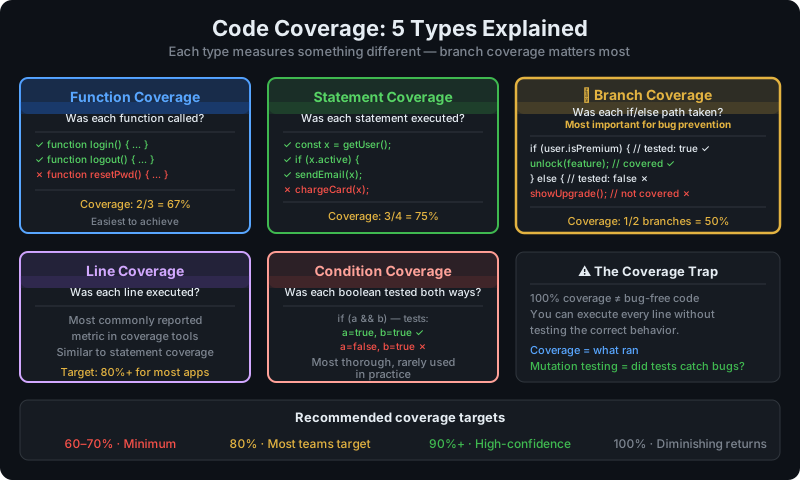
Line Coverage (Statement Coverage)
The most basic metric: what percentage of lines (statements) in the code were executed?
function getDiscount(user, orderTotal) {
  let discount = 0;                          // Line 1 — covered
  if (user.isPremium) {                      // Line 2 — covered
    discount = orderTotal * 0.15;            // Line 3 — NOT covered (no premium user tests)
  }
  if (orderTotal > 100) {                    // Line 4 — covered
    discount += 10;                          // Line 5 — covered
  }
  return discount;                           // Line 6 — covered
}
Line coverage: 5/6 = 83%. The uncovered line reveals a gap: premium users are not tested.
Limitation: Line coverage can be 100% even when the code has logic bugs in conditions.
Branch Coverage
Measures whether both branches of each conditional (if/else, ternary, switch) have been executed.
For the code above:
if (user.isPremium)has two branches:trueandfalse- If only
falseis tested, line coverage looks fine but branch coverage reveals the gap - Branch coverage: tests must exercise BOTH branches of every conditional
// These tests give 100% line coverage but 50% branch coverage
test('standard user with large order', () => {
  getDiscount({ isPremium: false }, 150); // Tests: line 1,2,4,5,6
});

// Adding this test achieves 100% branch coverage
test('premium user with small order', () => {
  getDiscount({ isPremium: true }, 50); // Tests: line 3
});
Branch coverage is more meaningful than line coverage. A line can be executed without testing all decision outcomes. Always prefer branch coverage as your primary metric.
Function Coverage
Measures what percentage of functions/methods were called during tests. Useful for identifying completely untested functions but less granular than line or branch coverage.
Path Coverage
Tests every possible execution path through a function. The number of paths grows exponentially with the number of conditionals, making 100% path coverage impractical for most real code. It's theoretically the most complete metric but practically unachievable.
Coverage Metric Comparison
| Metric | Effort | Meaningfulness | Practical? |
|---|---|---|---|
| Line coverage | Low | Low | Yes |
| Function coverage | Low | Medium | Yes |
| Branch coverage | Medium | High | Yes |
| Path coverage | Very high | Very high | Rarely |
How to Measure Coverage
JavaScript/TypeScript with Jest
// package.json
{
  "jest": {
    "collectCoverage": true,
    "coverageDirectory": "coverage",
    "coverageReporters": ["text", "lcov", "html"],
    "coverageThreshold": {
      "global": {
        "lines": 80,
        "branches": 70,
        "functions": 80
      }
    },
    "collectCoverageFrom": [
      "src/**/*.{js,ts}",
      "!src/**/*.test.{js,ts}",
      "!src/types/**"
    ]
  }
}
Run with: jest --coverage
Output:
----------|---------|----------|---------|---------|
File      | % Stmts | % Branch | % Funcs | % Lines |
----------|---------|----------|---------|---------|
src/      |   87.50 |    75.00 |   88.00 |   87.50 |
  cart.js |   91.23 |    80.00 |   90.00 |   91.23 |
  auth.js |   72.13 |    60.00 |   75.00 |   72.13 |
----------|---------|----------|---------|---------|
Python with pytest-cov
pip install pytest-cov
pytest --cov=src --cov-report=html --cov-report=term-missing
# pyproject.toml
[tool.pytest.ini_options]
addopts = "--cov=src --cov-fail-under=80"
[tool.coverage.report]
fail_under = 80
show_missing = trueGo with built-in coverage
go test ./... -coverprofile=coverage.out
go tool cover -html=coverage.out  <span class="hljs-comment"># Open HTML report
go tool cover -func=coverage.out  <span class="hljs-comment"># Per-function breakdown
Java with JaCoCo
<!-- pom.xml -->
<plugin>
  <groupId>org.jacoco</groupId>
  <artifactId>jacoco-maven-plugin</artifactId>
  <configuration>
    <rules>
      <rule>
        <limits>
          <limit>
            <counter>BRANCH</counter>
            <minimum>0.70</minimum>
          </limit>
          <limit>
            <counter>LINE</counter>
            <minimum>0.80</minimum>
          </limit>
        </limits>
      </rule>
    </rules>
  </configuration>
</plugin>
Coverage Tools by Language
| Language | Tool | Notes |
|---|---|---|
| JavaScript/TypeScript | Jest (built-in) | Uses V8 or Istanbul underneath |
| JavaScript/TypeScript | Istanbul/nyc | Standalone, works with any test runner |
| Python | pytest-cov | Wraps coverage.py |
| Python | coverage.py | The standard Python coverage tool |
| Go | Built-in (go test -cover) |
No external tool needed |
| Java | JaCoCo | Standard for Maven/Gradle projects |
| Ruby | SimpleCov | De facto standard |
| C# | Coverlet | Works with dotnet test |
| PHP | Xdebug / PCOV | Integrated with PHPUnit |
Setting Coverage Thresholds
Coverage thresholds enforce minimum coverage as a CI gate — builds fail if coverage drops below the threshold. This prevents accidental coverage regression.
Recommended Thresholds
| Codebase Type | Line Coverage | Branch Coverage |
|---|---|---|
| New greenfield project | 80-90% | 70-80% |
| Established codebase | 70-80% | 60-70% |
| Legacy codebase (improving) | 60%+ | 50%+ |
| Critical business logic modules | 90%+ | 85%+ |
Don't set thresholds at 100%. Some code is genuinely hard to test (error paths for conditions that "can't happen," OS-level exceptions, generated code). Chasing 100% produces tests that exist only to run the code, not to verify behavior.
Set per-directory thresholds for more meaningful enforcement:
// jest.config.js
module.exports = {
  coverageThreshold: {
    global: {
      lines: 70, // Whole codebase
    },
    './src/billing/': {
      lines: 95, // Critical billing code: higher threshold
      branches: 90,
    },
    './src/utils/': {
      lines: 60, // Utilities: lower threshold
    },
  },
};
What to Exclude From Coverage
Exclude code that shouldn't count against your metrics:
- Generated code (protobuf, GraphQL schemas, migrations)
- Test utilities and fixtures
- Configuration files
- Type definitions
// .nycrc or jest config
{
  "exclude": [
    "**/*.test.js",
    "**/migrations/**",
    "**/generated/**",
    "src/types/**"
  ]
}
The Coverage Trap
The coverage trap is the most common misuse of coverage metrics: optimizing for the number rather than the quality of tests.
When coverage becomes a team KPI or a performance metric, developers learn to game it:
// "Tests" that maximize coverage without testing anything
test('runs all the code', () => {
  // This executes every line but asserts nothing meaningful
  const user = new User({ email: 'test@test.com' });
  user.calculateDiscount(1000);
  user.sendWelcomeEmail();
  user.updateLastLogin();
  // No expect() calls — coverage is 100%, quality is 0%
});
This test runs all the code, hits 100% coverage, and would pass even if every function returned the wrong value or threw an error that was swallowed.
Signs You're in the Coverage Trap
- Coverage is 90%+ but production bugs are common
- Developers write tests after the fact to hit the coverage number
- Tests have no or minimal assertions
- Nobody reads the test failure details — failures are just ignored
- Coverage threshold is the only quality gate
The Right Way to Use Coverage
Use coverage as a gap detector, not a quality score:
- Run coverage and look at the red lines — what behavior isn't tested?
- Prioritize uncovered critical paths over uncovered utility code
- Write tests to cover the identified gaps with meaningful assertions
- Don't celebrate hitting 80% — ask what the 20% uncovered code does
Coverage tells you what you haven't tested. It can't tell you whether what you have tested is actually verified.
Beyond Coverage: Mutation Testing
Mutation testing answers the question that code coverage cannot: do your tests actually verify the behavior they run?
A mutation testing tool introduces artificial bugs (mutations) into your code — changing > to >=, removing a return value, flipping a boolean — and runs your test suite against each mutation. If a test fails, it "kills" the mutation. If all tests pass despite the bug, the mutation "survives" — revealing a gap in your test suite's effectiveness.
Mutation score = killed mutations / total mutations × 100%
// Original code
function isEligibleForDiscount(age) {
  return age >= 65;
}

// Mutation: >= changed to >
function isEligibleForDiscount(age) {
  return age > 65;  // BUG: 65-year-olds no longer qualify
}

// Test that KILLS this mutation (catches the bug)
test('65-year-old is eligible', () => {
  expect(isEligibleForDiscount(65)).toBe(true); // Fails with mutation
});

// Test that SURVIVES this mutation (misses the bug)
test('elderly user is eligible', () => {
  expect(isEligibleForDiscount(80)).toBe(true); // Still passes with mutation
});
Mutation testing tools:
- JavaScript: Stryker — excellent ecosystem support
- Java: PITest — industry standard
- Python: mutmut — lightweight, easy to run
- C#: Stryker.NET — port of Stryker
Mutation testing is slow (it runs your full suite per mutation, multiplied by hundreds of mutations), but it reveals test effectiveness that coverage cannot.
FAQ
What is code coverage?
Code coverage (or test coverage) is a measurement of how much of your source code is executed when your tests run. It's expressed as a percentage — for example, 80% line coverage means 80% of code lines are executed during the test suite. Coverage helps identify untested code paths but doesn't measure whether tests are correct or meaningful.
What is branch coverage?
Branch coverage measures whether both branches of every conditional statement (if/else, ternary operators, switch cases) have been tested. It's more meaningful than line coverage because a line can be executed without testing all possible outcomes of a condition. For example, testing only the if path of an if/else gives 100% line coverage for that line but only 50% branch coverage.
What is a good code coverage percentage?
80% line coverage and 70% branch coverage are reasonable targets for most codebases. These numbers vary by context: critical business logic may warrant 90%+, while UI code or generated code may be excluded entirely. 100% is rarely worth pursuing — some code paths are genuinely hard to test, and chasing 100% produces low-quality tests that run code without asserting anything useful.
Does high code coverage mean my code has no bugs?
No. High coverage means your test suite executes more code, not that it verifies it correctly. You can have 100% coverage and tests that make no meaningful assertions. Coverage tells you what hasn't been tested; it can't tell you whether what has been tested is actually correct.
What is the coverage trap?
The coverage trap is when teams optimize for their coverage percentage rather than test quality. When coverage becomes a KPI, developers write tests that execute code paths without asserting meaningful outcomes — "tests" that inflate coverage numbers while adding no real safety net. This is worse than lower coverage with high-quality tests.
What is mutation testing?
Mutation testing automatically introduces bugs (mutations) into your code — changing operators, removing return values, flipping booleans — and runs your test suite against each mutation. If your tests catch the bug (fail), the mutation is "killed." If tests pass despite the bug, the mutation "survives," revealing a gap in test effectiveness. Mutation score = killed mutations / total mutations, which measures test quality better than coverage.
Conclusion
Code coverage is a useful tool when used correctly: as a gap detector that identifies untested code paths, not as a quality metric to optimize.
Check your coverage reports to find completely untested modules and critical paths with no coverage. Write tests to cover those gaps with meaningful assertions. Set thresholds to prevent regression, not to celebrate a number.
If you want to go beyond coverage, add mutation testing for your most critical code. A 70% coverage score with high mutation kill rate means more than 95% coverage with tests that assert nothing.
HelpMeTest complements your unit test coverage with automated browser testing and health monitoring — catching bugs in production that unit tests never see.
Next steps:
- TDD Guide — build coverage through test-first development
- Integration Testing Guide — cover component interactions
- Mutation Testing Guide — go beyond coverage to test effectiveness
Reference: This guide covers one term from the Software Testing Glossary — the complete A–Z reference for every testing concept explained in one place.