Performance Testing Guide: Load Testing, Stress Testing, and Tools


Your application works perfectly with 10 users. You launch, get on Product Hunt, and it falls over at 200. Performance testing is how you find that ceiling before your users do — and how you avoid the worst possible first impression.
Key Takeaways
Performance testing answers questions that functional tests cannot. How many concurrent users can we handle? What happens when load doubles? Does performance degrade over time?
A page that takes 8 seconds to load loses 53% of mobile users. Performance is a feature — and a slow application is a broken one from the user's perspective.
Load testing and stress testing serve different purposes. Load testing validates expected capacity; stress testing finds where the system breaks under extreme conditions.
Performance test in production-like environments, not localhost. Network latency, database connection pools, and CDN behavior don't exist in local testing — and they're where performance problems actually appear.
Performance testing verifies that a system meets response time, throughput, and reliability requirements under expected and extreme load conditions. It answers questions that functional tests cannot: How many concurrent users can our system handle? What happens when load doubles suddenly? Does performance degrade over time?
Performance issues are expensive to find in production. A page that takes 8 seconds to load loses 53% of mobile users. An API that degrades under load causes cascading failures. Performance testing catches these problems before they affect users.
This guide covers the types of performance testing, the key metrics to measure, the leading tools (k6 and JMeter), how to interpret results, and how to integrate performance tests into CI/CD.
Types of Performance Testing
Load Testing
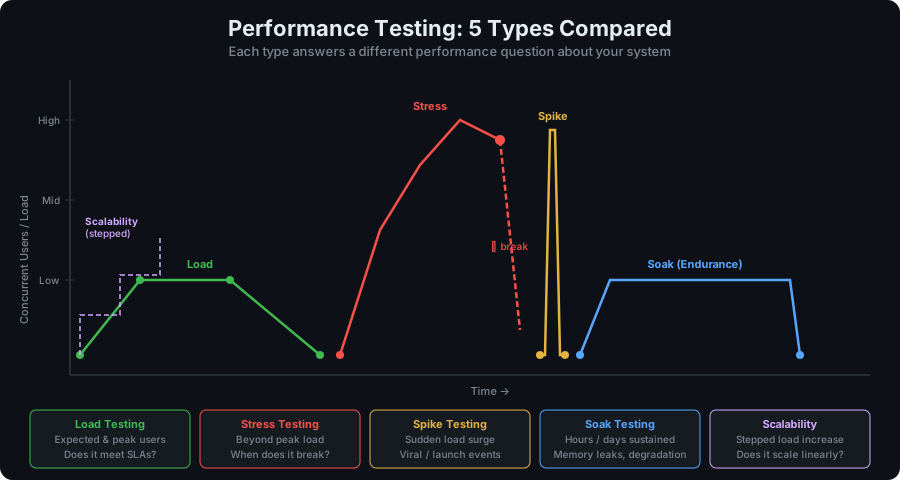
Simulates the expected number of concurrent users or requests to verify the system performs correctly under normal operating conditions.
Goal: Confirm the system meets performance requirements at expected load.
Example: Your application typically handles 500 concurrent users. A load test runs 500 virtual users for 30 minutes and verifies that 99% of requests complete in under 500ms.
Stress Testing
Pushes the system beyond its expected load to find the breaking point and understand how it fails.
Goal: Find the maximum capacity and verify the system fails gracefully (not catastrophically).
Example: Gradually ramp from 500 to 5,000 users to find when the system starts dropping requests or degrading significantly.
Endurance Testing (Soak Testing)
Runs at normal load for an extended period (hours to days) to detect memory leaks, connection pool exhaustion, and performance degradation over time.
Goal: Catch slow resource leaks that only manifest after extended operation.
Example: Run 200 concurrent users for 8 hours and monitor memory usage, database connection counts, and response time trends.
Spike Testing
Tests the system's response to sudden, dramatic increases in load.
Goal: Verify the system can handle unexpected traffic surges (viral content, marketing campaigns) without total failure.
Example: Send 10x normal traffic for 2 minutes, then return to normal, and verify the system recovers.
Volume Testing
Tests the system's behavior with large amounts of data — not concurrent users, but data volume.
Goal: Verify the system handles large datasets without degraded performance.
Example: Test database queries with 100M records instead of 1,000 records.
Scalability Testing
Measures how performance changes as resources are added (vertical scaling: bigger servers; horizontal scaling: more servers).
Goal: Understand cost/performance tradeoffs and validate auto-scaling behavior.
Key Performance Metrics
Response Time / Latency
The time from sending a request to receiving the complete response.
Don't use averages — averages hide the tail. Use percentiles:
- P50 (median): 50% of requests complete in this time or faster
- P95: 95% of requests complete in this time or faster — represents the typical "slow" user experience
- P99: 99% of requests — represents worst-case user experience (excluding outliers)
Typical targets:
- API responses: P95 < 200ms, P99 < 500ms
- Page loads: P95 < 2 seconds
- Background jobs: P95 < 30 seconds
Throughput
The number of requests the system can handle per unit of time (requests per second, transactions per second).
Higher throughput = more capacity. Monitor throughput during load tests to understand capacity limits.
Error Rate
The percentage of requests that result in errors (HTTP 5xx, timeouts, connection refused).
Target: < 0.1% error rate under normal load. Any errors under expected load indicate problems.
Resource Utilization
CPU, memory, database connections, disk I/O. These leading indicators predict problems before they cause user-visible failures.
Warning signs:
- CPU > 70% sustained (leaves no headroom for spikes)
- Memory grows continuously (memory leak)
- Database connections near pool maximum
Concurrent Users vs Requests Per Second
These are related but different:
- Concurrent users: how many users are simultaneously in the system
- Requests per second (RPS): how many requests the system processes per second
A user making 1 request every 10 seconds contributes 0.1 RPS but counts as 1 concurrent user. For capacity planning, RPS is more directly useful.
Performance Testing Tools
k6 — Modern, Code-First Performance Testing
k6 is an open-source load testing tool built for developers. Tests are written in JavaScript, run as a single binary (no JVM/dependencies), and integrate cleanly with CI/CD.
Best for: API and backend performance testing, CI integration, teams that prefer code over GUI
Key features:
- JavaScript test scripts
- Built-in thresholds to fail tests when SLOs aren't met
- Docker image for CI
- Cloud execution option (Grafana k6 Cloud)
- Excellent metrics export (Prometheus, InfluxDB, Grafana)
JMeter — Feature-Rich, Enterprise-Grade
Apache JMeter is the long-standing standard for performance testing. GUI-based test creation, extensive protocol support, and a massive plugin ecosystem.
Best for: Complex scenarios, SOAP/JDBC testing, teams with existing JMeter investment, GUI-based test creation
Key features:
- GUI and CLI modes
- Supports HTTP, HTTPS, SOAP, JDBC, FTP, SMTP, JMS
- Distributed testing (multiple load generators)
- Extensive reporting
- Large plugin ecosystem
Gatling
Scala-based, generates beautiful HTML reports. Good for high-throughput scenarios.
Artillery
Node.js-based, YAML-defined test scenarios. Good for teams that want YAML over JavaScript.
Locust
Python-based, distributed load generation. Good for Python teams.
Writing Performance Tests with k6
Basic k6 Load Test
// load-test.js
import http from 'k6/http';
import { check, sleep } from 'k6';
import { Rate } from 'k6/metrics';

// Custom metric: track error rate
const errorRate = new Rate('errors');

// Test configuration
export const options = {
  stages: [
    { duration: '2m', target: 100 },   // Ramp up to 100 users over 2 minutes
    { duration: '5m', target: 100 },   // Stay at 100 users for 5 minutes
    { duration: '2m', target: 0 },     // Ramp down
  ],
  thresholds: {
    http_req_duration: ['p(95)<500'],  // 95% of requests under 500ms
    http_req_failed: ['rate<0.01'],    // Error rate under 1%
    errors: ['rate<0.01'],
  },
};

export default function () {
  const response = http.get('https://api.example.com/products');

  // Check response
  const success = check(response, {
    'status is 200': (r) => r.status === 200,
    'response time < 500ms': (r) => r.timings.duration < 500,
    'has products': (r) => JSON.parse(r.body).length > 0,
  });

  errorRate.add(!success);
  sleep(1); // Think time: 1 second between requests
}
Run it:
k6 run load-test.jsAuthenticated API Test
// auth-load-test.js
import http from 'k6/http';
import { check, sleep } from 'k6';

export const options = {
  vus: 50,           // 50 virtual users
  duration: '5m',    // 5 minute run
  thresholds: {
    http_req_duration: ['p(99)<1000'],  // P99 under 1 second
    http_req_failed: ['rate<0.005'],    // Under 0.5% error rate
  },
};

// Setup: runs once before the test
export function setup() {
  const loginRes = http.post('https://api.example.com/auth/login', JSON.stringify({
    email: 'loadtest@example.com',
    password: 'loadtest-password',
  }), { headers: { 'Content-Type': 'application/json' } });

  return { token: JSON.parse(loginRes.body).token };
}

// Main test function — runs per virtual user
export default function (data) {
  const headers = {
    Authorization: `Bearer ${data.token}`,
    'Content-Type': 'application/json',
  };

  // Simulate user browsing products
  const productsRes = http.get('https://api.example.com/products', { headers });
  check(productsRes, { 'products loaded': (r) => r.status === 200 });

  sleep(1);

  // Simulate adding to cart
  const cartRes = http.post('https://api.example.com/cart', JSON.stringify({
    productId: 'widget-123',
    quantity: 1,
  }), { headers });
  check(cartRes, { 'item added to cart': (r) => r.status === 201 });

  sleep(2);
}
Stress Test
// stress-test.js
export const options = {
  stages: [
    { duration: '2m', target: 100 },    // Normal load
    { duration: '5m', target: 100 },
    { duration: '2m', target: 500 },    // 5x spike
    { duration: '5m', target: 500 },    // Hold at spike
    { duration: '2m', target: 1000 },   // Push to 10x
    { duration: '5m', target: 1000 },
    { duration: '5m', target: 0 },      // Recovery
  ],
  thresholds: {
    // Relaxed thresholds for stress test — we expect some degradation
    http_req_duration: ['p(99)<5000'],
    http_req_failed: ['rate<0.10'],  // Allow up to 10% errors under extreme stress
  },
};
Performance Testing with JMeter
JMeter tests are created via GUI and executed via CLI in CI:
# CLI execution (headless, for CI)
jmeter -n -t test-plan.jmx -l results.jtl -e -o report/

<span class="hljs-comment"># Key flags
<span class="hljs-comment"># -n: non-GUI mode
<span class="hljs-comment"># -t: test plan file
<span class="hljs-comment"># -l: results log file
<span class="hljs-comment"># -e: generate HTML report
<span class="hljs-comment"># -o: report output directory
Minimal test plan structure (in JMeter GUI):
- Thread Group — defines virtual users, ramp-up, and duration
- HTTP Request — the actual request being tested
- HTTP Header Manager — add headers (auth tokens, content-type)
- Assertions — verify response status, response time
- Listeners — collect and display results (Summary Report, Response Time Graph)
JMeter's distributed mode allows running tests from multiple machines simultaneously for very high load scenarios:
# Start remote servers
jmeter-server &

<span class="hljs-comment"># Run test with remote agents
jmeter -n -t test-plan.jmx -R server1,server2,server3 -l results.jtl
Interpreting Results
What to Look For
Healthy load test results:
- P95 latency stays flat as load increases (linear scaling)
- Error rate stays near 0%
- CPU and memory grow proportionally to load
- Throughput scales with user count
Problematic patterns:
- P95 latency increases exponentially at higher load — capacity limit approaching
- Error rate spikes at certain concurrency level — hard bottleneck found
- Memory grows continuously — memory leak
- Response time improves then degrades — some resource is being throttled (connection pool, external API limit)
Reading k6 Output
✓ status is 200
✓ response time < 500ms

checks.........................: 99.87% ✓ 59922 ✗ 78
data_received..................: 245 MB 817 kB/s
data_sent......................: 8.1 MB 27 kB/s
http_req_blocked...............: avg=1.16ms   p(99)=6.87ms
http_req_duration..............: avg=127.3ms  p(95)=287ms    p(99)=486ms
http_req_failed................: 0.13%  ✓ 78    ✗ 59922
http_reqs......................: 60000  199.7/s
iterations.....................: 30000  100/s
vus............................: 100    min=100 max=100
Key readings:
http_req_duration p(95)=287ms— 95% of requests under 287ms ✓http_req_duration p(99)=486ms— 99% under 486ms ✓ (under 500ms threshold)http_req_failed: 0.13%— slightly above 0.01% threshold — investigate errors
CI/CD Integration
Performance tests should run automatically, not just before big releases.
GitHub Actions with k6
# .github/workflows/performance.yml
name: Performance Tests

on:
  push:
    branches: [main]
  schedule:
    - cron: '0 3 * * *'  # Nightly performance run

jobs:
  load-test:
    runs-on: ubuntu-latest
    steps:
      - uses: actions/checkout@v4

      - name: Start application
        run: docker compose up -d

      - name: Wait for application
        run: npx wait-on http://localhost:3000

      - name: Run k6 load test
        uses: grafana/k6-action@v0.3.1
        with:
          filename: tests/performance/load-test.js
        env:
          BASE_URL: http://localhost:3000

      - name: Upload results
        if: always()
        uses: actions/upload-artifact@v4
        with:
          name: k6-results
          path: results.json
Performance Budgets
Define performance budgets in your codebase and fail CI when they're exceeded:
// performance-budget.js (k6 thresholds)
export const options = {
  thresholds: {
    // API response time budget
    'http_req_duration{url:*/api/products}': ['p(95)<200'],
    'http_req_duration{url:*/api/checkout}': ['p(95)<500'],

    // Overall error rate budget
    'http_req_failed': ['rate<0.01'],

    // Custom business metric
    'successful_checkouts': ['rate>0.995'],  // 99.5% checkout success
  },
};
When k6 exits with code 99, thresholds were exceeded — your CI step fails and the deployment is blocked.
Performance Testing Best Practices
1. Test in an environment close to production Performance in development bears no resemblance to production. Use a staging environment with production-like data volumes and infrastructure.
2. Use realistic test data Tests against an empty database will run faster than production. Seed your test environment with realistic data volumes.
3. Warm up the system Cold JVM/Node.js starts, empty caches, and connection pool initialization skew early results. Include a warmup phase in your test.
4. Monitor infrastructure, not just responses Response time is a symptom. Monitor CPU, memory, database connections, and external API calls to understand causes.
5. Test the whole system, not just the API A slow database query causes a slow API response. A slow external API call causes slow page loads. Test the full path.
6. Set thresholds before you test Decide what "acceptable" means before seeing results. Post-hoc rationalization leads to accepting degraded performance.
FAQ
What is performance testing?
Performance testing verifies that a software system meets response time, throughput, and reliability requirements under expected and extreme load conditions. It simulates realistic user traffic to measure how the system behaves as load increases — identifying bottlenecks, finding capacity limits, and catching performance regressions before they affect users.
What is load testing vs stress testing?
Load testing simulates the expected number of users or requests to verify the system meets performance requirements under normal conditions. Stress testing pushes beyond expected load to find the breaking point and understand how the system fails under extreme conditions. Load testing validates normal operation; stress testing validates failure behavior.
What is a good P95 response time?
For most web APIs, P95 under 200ms is excellent and P95 under 500ms is acceptable. For page loads, P95 under 2 seconds is generally considered acceptable for user experience. For database queries or background jobs, targets vary widely. Define your performance budget based on user expectations and business requirements before testing.
What is k6 and how does it compare to JMeter?
k6 is a modern, code-first load testing tool that writes tests in JavaScript and runs as a single binary. It integrates easily with CI/CD and is developer-friendly. JMeter is a mature, GUI-based tool with broader protocol support (SOAP, JDBC, FTP) and an extensive plugin ecosystem. For modern API and backend testing, k6 is typically the better choice; for complex protocols or teams with existing JMeter investment, JMeter remains relevant.
Should performance tests run in CI/CD?
Yes — performance tests should run automatically, ideally on every merge to main and on a nightly schedule. Use k6 thresholds or JMeter assertions to fail CI when performance budgets are exceeded, preventing performance regressions from shipping. Run full soak tests and stress tests less frequently (weekly or before major releases) due to their time requirements.
Conclusion
Performance testing isn't optional — it's the difference between knowing your system can handle production load and finding out when it can't.
Start with a baseline load test against your API's critical paths. Set meaningful thresholds for P95 latency and error rate. Run it in CI. Grow from there: add stress tests for capacity planning, endurance tests for leak detection, and spike tests for resilience.
For continuous monitoring of production performance — tracking response times over time and alerting when they degrade — HelpMeTest provides health monitoring with configurable alert thresholds across your services.
Next steps:
- Integration Testing Guide — test correctness before testing performance
- CI/CD Pipeline Testing Guide — integrate all test types into your pipeline
Reference: This guide covers one term from the Software Testing Glossary — the complete A–Z reference for every testing concept explained in one place.