
CI/CD Pipeline Testing Guide: Continuous Testing, Quality Gates, and Tools

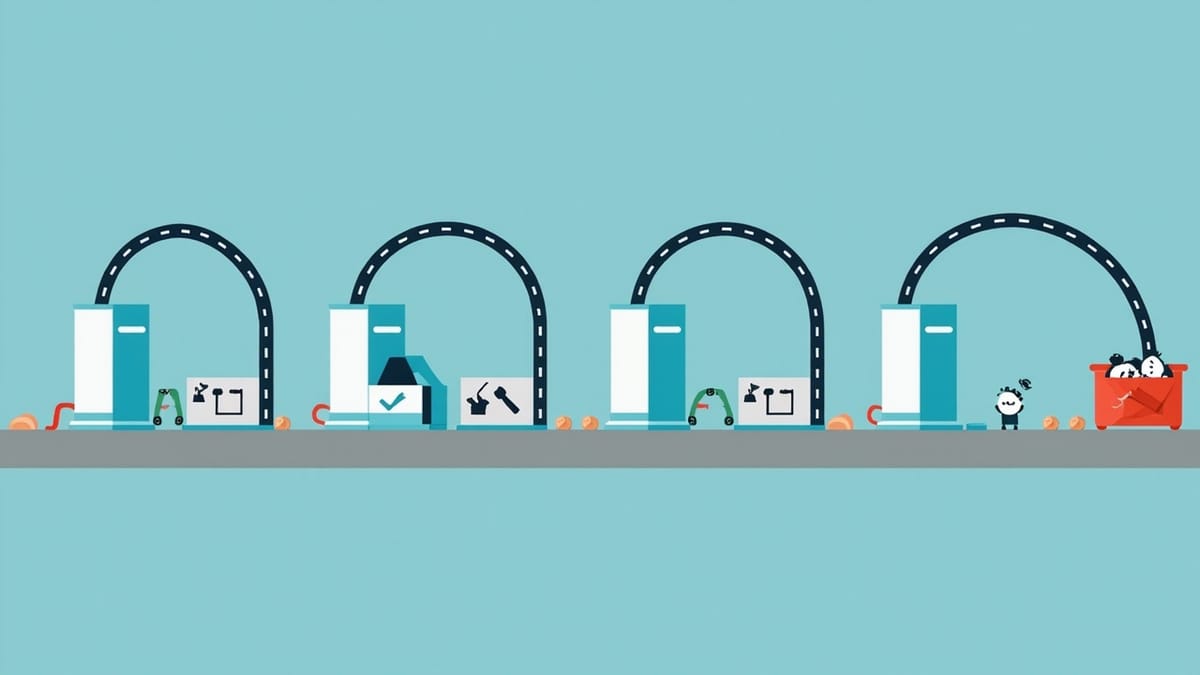
A bug caught at commit time takes 10 minutes to fix. The same bug caught in production takes 10 hours. CI/CD testing is the practice of moving that discovery window as early as possible — so every change is verified before anyone else has to deal with it.
Key Takeaways
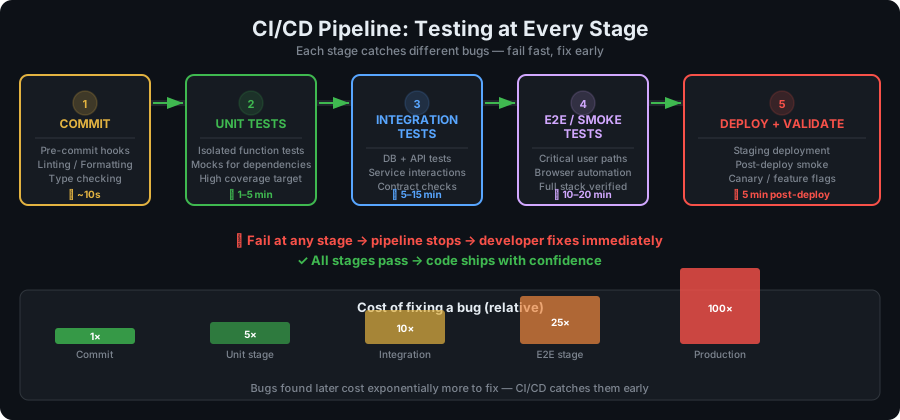
Find bugs at commit time, not production time. The same fix costs 10x-100x more when discovered by users than when caught by a pipeline.
Test selection matters as much as test quality. Running your entire 4-hour suite on every commit defeats the purpose — fast feedback requires a staged strategy of smoke tests, then regression, then full suite.
Quality gates are non-negotiable checkpoints. If coverage drops below threshold or critical tests fail, the pipeline stops — no exceptions, no override without a deliberate decision.
Parallel execution is the single biggest CI/CD speed multiplier. A 30-minute serial suite becomes 3 minutes when split across 10 workers — and fast pipelines actually get used.
CI/CD pipeline testing is the practice of automatically running tests at every stage of your software delivery pipeline — from the moment code is committed to the moment it reaches production. Done well, it turns your test suite from a periodic chore into a continuous quality shield.
The goal of continuous testing in CI/CD is simple: find problems as early as possible, when they are cheapest to fix. A bug caught at commit time takes minutes to fix. The same bug caught in production can take days and cost your team — and users — dearly.
This guide covers every layer of CI/CD testing: pipeline stage design, test selection strategies, quality gates, parallel execution, real-world GitHub Actions examples, and the tools that make it all work.
What Is Continuous Testing?
Continuous testing is the practice of executing automated tests as part of the software delivery pipeline to provide immediate feedback on the quality and risk of a software release.
Unlike traditional testing that happens after development is complete, continuous testing runs in parallel with development — providing feedback loops measured in minutes, not days.
The Shift from Periodic to Continuous
Before CI/CD:
Dev → Dev → Dev → [weeks of work] → QA → [days of testing] → Release
                                                 ↑
                                          Bugs found here
(expensive to fix)With Continuous Testing:
Commit → Unit Tests (2 min) → Build → Integration Tests (10 min) → Deploy to Staging → E2E Tests (30 min) → Production
    ↑              ↑                              ↑                                              ↑
 Lint fails    Test fails                  Integration fails                           Smoke tests fail
(30 sec) (2 min) (10 min) (2 min)Each stage catches a different type of problem. The earlier the stage, the faster and cheaper the feedback.
The Testing Feedback Loop
The value of a test is directly proportional to how quickly it gives feedback. A test that runs in 30 seconds and runs on every commit provides orders of magnitude more value than a test that runs in 30 minutes and runs once a week.
Feedback loop targets:
- Pre-commit (hooks): < 30 seconds
- Post-commit (CI on branch): < 5 minutes
- Post-merge (CI on main): < 15 minutes
- Post-deploy (staging): < 30 minutes
Testing at Every Pipeline Stage
Stage 1: Pre-Commit (Developer's Machine)
Tests: Linting, formatting, type checking, unit tests for changed files
Tools: Husky, lint-staged, pre-commit
Goal: Prevent obviously broken code from entering the repository
# .husky/pre-commit
#!/bin/sh
npx lint-staged

# lint-staged.config.js
module.exports = {
  '*.{js,ts,tsx}': [
    'eslint --fix',
    'prettier --write',
  ],
  '*.{js,ts}': () => 'tsc --noEmit',
};Keep pre-commit hooks under 30 seconds. If they take longer, developers will bypass them with --no-verify.
Stage 2: Continuous Integration on Pull Request
Tests: Full unit test suite, integration tests, SAST, dependency audit
Trigger: Every commit to any branch, every pull request
Goal: Verify that the change does not break existing functionality. Block merging until green.
This is the most important CI stage. Every developer expects immediate feedback when they push a branch.
What to run:
- Unit tests (all of them, in parallel)
- Integration tests
- Type checking
- Linting
- Security scanning (SAST,
npm audit) - Code coverage check
Stage 3: Post-Merge to Main
Tests: Extended integration tests, contract tests, component tests
Trigger: Merge to main/master
Goal: Verify the merged state is stable. This is what gets deployed to staging.
The main branch is your release candidate. Any test failure here is a production risk.
Stage 4: Staging Deployment
Tests: E2E tests, smoke tests, DAST security scan, performance tests
Trigger: Deployment to staging environment
Goal: Validate the application works end-to-end in a production-like environment
This is the last safety net before production. E2E tests should cover the critical user journeys:
- User registration and login
- Core business workflow (checkout, order submission, etc.)
- Key integrations (payment, email, third-party APIs)
Stage 5: Production Deployment
Tests: Smoke tests, synthetic monitoring, health checks
Trigger: Production deployment
Goal: Verify the deployment succeeded and the application is functioning
Post-deployment smoke tests should run within 2 minutes of deployment. If they fail, automated rollback should trigger.
Stage 6: Continuous Production Monitoring
Tests: Health checks, synthetic transaction monitoring, performance monitoring
Trigger: Scheduled (every 1-5 minutes)
Goal: Detect production regressions that slipped through all earlier stages
Production monitoring catches issues that only appear under real load, with real data, or in specific geographic regions.
Tools like HelpMeTest run automated test suites as synthetic monitoring — executing real user workflows against your production environment on a schedule and alerting immediately when they fail.
Test Selection Strategy
Running all tests on every commit is unsustainable at scale. Intelligent test selection ensures the right tests run at the right time.
By Speed
Organize tests by execution time and run faster tests first:
< 1 minute:   Unit tests, linting, type checking
1-5 minutes:  Component tests, API contract tests
5-15 minutes: Integration tests, API functional tests
15-30 minutes: E2E tests (happy paths)
30+ minutes: Full E2E suite, load tests, security scansBy Trigger
Different events should trigger different test subsets:
| Trigger | Tests to Run |
|---|---|
| Every commit (branch) | Lint, unit tests, type check |
| Pull request open/update | + Integration tests, SAST |
| Merge to main | + Contract tests, component tests |
| Deploy to staging | + E2E tests, DAST |
| Deploy to production | + Smoke tests |
| Nightly | + Full E2E suite, load tests, security scans |
By Code Change (Smart Selection)
Advanced CI/CD systems run only tests related to the changed code:
# Run tests for changed packages only (monorepo)
- name: Detect changed packages
  id: changes
  uses: dorny/paths-filter@v3
  with:
    filters: |
      api:
        - 'packages/api/**'
      frontend:
        - 'packages/frontend/**'
      shared:
        - 'packages/shared/**'

- name: Run API tests
  if: steps.changes.outputs.api == 'true'
  run: cd packages/api && npm test

- name: Run frontend tests
  if: steps.changes.outputs.frontend == 'true'
run: cd packages/frontend && npm testBy Risk
High-risk areas (payment processing, authentication, data migration) should always run full test coverage regardless of what changed.
Quality Gates
A quality gate is a pass/fail threshold that must be satisfied before the pipeline can proceed. Quality gates enforce quality standards automatically — no human review required for objective metrics.
Common Quality Gate Metrics
Code Coverage:
# Fail if coverage drops below 80%
- name: Check coverage
  run: |
    COVERAGE=$(cat coverage/coverage-summary.json | jq '.total.lines.pct')
    if (( $(echo "$COVERAGE < 80" | bc -l) )); then
      echo "Coverage $COVERAGE% is below threshold 80%"
      exit 1
fiTest Results:
- All tests must pass (zero failures)
- Zero skipped tests in critical test suites (skips should be explicit, not accidental)
Security:
- Zero high or critical severity vulnerabilities in dependencies
- No new SAST findings of severity HIGH or above
- All OWASP Top 10 checks pass
Performance:
- Page load time under threshold (e.g., LCP < 2.5s)
- API response time under threshold (e.g., p99 < 500ms)
Code Quality:
- Zero new linting errors
- No type errors
- No code duplication above threshold
Implementing Quality Gates in GitHub Actions
name: Quality Gate

on:
  pull_request:

jobs:
  quality-gate:
    runs-on: ubuntu-latest
    steps:
      - uses: actions/checkout@v4

      - name: Install dependencies
        run: npm ci

      - name: Lint
        run: npm run lint

      - name: Type check
        run: npm run type-check

      - name: Unit tests with coverage
        run: npm test -- --coverage

      - name: Coverage gate
        run: |
          node -e "
            const summary = require('./coverage/coverage-summary.json');
            const pct = summary.total.lines.pct;
            if (pct < 80) {
              console.error('Coverage ' + pct + '% below 80% threshold');
              process.exit(1);
            }
            console.log('Coverage: ' + pct + '% ✓');
          "

      - name: Security audit
run: npm audit --audit-level=highSoft Gates vs Hard Gates
Hard gate: Pipeline fails immediately. No deployment proceeds.
- Test failures
- High/critical security vulnerabilities
- Build compilation errors
Soft gate: Warning logged, team notified, but deployment may proceed.
- Coverage below target (if it did not drop significantly)
- New code quality findings below high severity
Too many hard gates slow teams down. Reserve hard gates for issues that directly impact production safety.
Parallel Test Execution
Long-running test suites are the primary obstacle to fast CI/CD. Parallel execution is how you scale without slowing down.
Parallel Jobs in GitHub Actions
jobs:
  unit-tests:
    strategy:
      matrix:
        node: [18, 20, 22]  # Test on multiple Node versions
    runs-on: ubuntu-latest
    steps:
      - uses: actions/checkout@v4
      - uses: actions/setup-node@v4
        with:
          node-version: ${{ matrix.node }}
      - run: npm ci && npm test

  integration-tests:
    runs-on: ubuntu-latest
    # Runs in parallel with unit-tests
    steps:
      - uses: actions/checkout@v4
- run: npm ci && npm run test:integrationTest Sharding for Large Suites
Split a large test suite across multiple parallel runners:
jobs:
  e2e-tests:
    strategy:
      matrix:
        shard: [1, 2, 3, 4]  # 4 parallel shards
    runs-on: ubuntu-latest
    steps:
      - uses: actions/checkout@v4
- run: npx playwright test --shard=${{ matrix.shard }}/4Dependency Between Jobs
jobs:
  build:
    runs-on: ubuntu-latest
    steps:
      - run: npm run build

  unit-tests:
    needs: build  # Wait for build to complete
    runs-on: ubuntu-latest
    steps:
      - run: npm test

  integration-tests:
    needs: build  # Also waits for build, runs in parallel with unit-tests
    runs-on: ubuntu-latest
    steps:
      - run: npm run test:integration

  e2e-tests:
    needs: [unit-tests, integration-tests]  # Wait for both to pass
    runs-on: ubuntu-latest
    steps:
- run: npm run test:e2eGitHub Actions Testing Examples
Full CI Pipeline Example
name: CI

on:
  push:
    branches: [main, develop]
  pull_request:

env:
  NODE_VERSION: '20'

jobs:
  lint-and-typecheck:
    name: Lint & Type Check
    runs-on: ubuntu-latest
    steps:
      - uses: actions/checkout@v4
      - uses: actions/setup-node@v4
        with:
          node-version: ${{ env.NODE_VERSION }}
          cache: 'npm'
      - run: npm ci
      - run: npm run lint
      - run: npm run type-check

  unit-tests:
    name: Unit Tests
    runs-on: ubuntu-latest
    steps:
      - uses: actions/checkout@v4
      - uses: actions/setup-node@v4
        with:
          node-version: ${{ env.NODE_VERSION }}
          cache: 'npm'
      - run: npm ci
      - run: npm test -- --coverage
      - uses: actions/upload-artifact@v4
        with:
          name: coverage-report
          path: coverage/

  integration-tests:
    name: Integration Tests
    runs-on: ubuntu-latest
    services:
      postgres:
        image: postgres:16
        env:
          POSTGRES_PASSWORD: testpass
          POSTGRES_DB: testdb
        options: >-
          --health-cmd pg_isready
          --health-interval 10s
          --health-timeout 5s
          --health-retries 5
        ports:
          - 5432:5432
    steps:
      - uses: actions/checkout@v4
      - uses: actions/setup-node@v4
        with:
          node-version: ${{ env.NODE_VERSION }}
          cache: 'npm'
      - run: npm ci
      - run: npm run db:migrate
        env:
          DATABASE_URL: postgres://postgres:testpass@localhost:5432/testdb
      - run: npm run test:integration
        env:
          DATABASE_URL: postgres://postgres:testpass@localhost:5432/testdb

  security:
    name: Security Scan
    runs-on: ubuntu-latest
    steps:
      - uses: actions/checkout@v4
      - uses: actions/setup-node@v4
        with:
          node-version: ${{ env.NODE_VERSION }}
          cache: 'npm'
      - run: npm ci
      - run: npm audit --audit-level=high
      - uses: semgrep/semgrep-action@v1
        with:
          config: p/owasp-top-ten

  e2e-tests:
    name: E2E Tests
    needs: [unit-tests, integration-tests]
    runs-on: ubuntu-latest
    if: github.ref == 'refs/heads/main' || github.event_name == 'pull_request'
    steps:
      - uses: actions/checkout@v4
      - uses: actions/setup-node@v4
        with:
          node-version: ${{ env.NODE_VERSION }}
          cache: 'npm'
      - run: npm ci
      - run: npx playwright install --with-deps chromium
      - run: npm run build
      - run: npm run test:e2e
      - uses: actions/upload-artifact@v4
        if: failure()
        with:
          name: playwright-report
path: playwright-report/Running Tests with Docker Services
services:
  redis:
    image: redis:7-alpine
    ports:
      - 6379:6379
    options: --health-cmd "redis-cli ping" --health-interval 5s

  postgres:
    image: postgres:16-alpine
    env:
      POSTGRES_USER: test
      POSTGRES_PASSWORD: test
      POSTGRES_DB: testdb
    ports:
      - 5432:5432
    options: >-
      --health-cmd pg_isready
      --health-interval 10s
--health-retries 5Caching Dependencies
- uses: actions/cache@v4
  with:
    path: ~/.npm
    key: ${{ runner.os }}-node-${{ hashFiles('**/package-lock.json') }}
    restore-keys: |
      ${{ runner.os }}-node-

# For Playwright browsers
- uses: actions/cache@v4
  with:
    path: ~/.cache/ms-playwright
key: ${{ runner.os }}-playwright-${{ hashFiles('**/package-lock.json') }}Test Environments in CI/CD
Environment Hierarchy
Local (developer) → CI (ephemeral) → Staging (persistent) → ProductionEach environment serves a different purpose:
CI (Ephemeral): Spun up per pipeline run. Docker services for databases. Isolated, reproducible. Destroyed after tests run.
Staging (Persistent): Mirror of production infrastructure. Shared across team. All integrations active (payment sandbox, email sandbox). Used for E2E, DAST, and UAT.
Production: Real users. Real data. Smoke tests and synthetic monitoring only — no destructive tests.
Environment Isolation Strategies
Docker Compose for Local and CI:
# docker-compose.test.yml
version: '3.8'
services:
  app:
    build: .
    environment:
      DATABASE_URL: postgres://postgres:test@db:5432/test
      REDIS_URL: redis://redis:6379
    depends_on:
      db:
        condition: service_healthy

  db:
    image: postgres:16-alpine
    environment:
      POSTGRES_PASSWORD: test
      POSTGRES_DB: test
    healthcheck:
      test: pg_isready -U postgres
      interval: 5s
      retries: 5

  redis:
image: redis:7-alpineGitHub Actions Services: Built-in Docker service containers (shown above).
Preview Environments: Deploy a full environment per pull request using platforms like Vercel, Railway, or Kubernetes namespaces per branch.
CI/CD Testing Tools
Test Runners
| Tool | Languages | Best For |
|---|---|---|
| Jest | JavaScript/TypeScript | Unit and integration tests |
| Vitest | JavaScript/TypeScript | Vite projects, fast iteration |
| Pytest | Python | All test levels |
| JUnit 5 | Java | Unit and integration tests |
| Go test | Go | Built-in, all levels |
E2E Testing
| Tool | Protocol | Best For |
|---|---|---|
| Playwright | Browser | Modern E2E, multi-browser |
| Cypress | Browser | Developer-friendly E2E |
| Selenium | Browser | Legacy, broad language support |
| Robot Framework | Browser/API | Natural language test cases |
CI/CD Platforms
| Platform | Best For | Cost |
|---|---|---|
| GitHub Actions | GitHub repositories | Free tier + usage-based |
| GitLab CI | GitLab repositories | Free tier + paid |
| CircleCI | Speed, Docker layers | Free tier + paid |
| Jenkins | Self-hosted, complex pipelines | Free (infrastructure costs) |
| Buildkite | Large teams, self-hosted agents | Usage-based |
Monitoring and Health Checks
| Tool | Type | Use Case |
|---|---|---|
| HelpMeTest | Synthetic monitoring | Automated test suites in production |
| Datadog Synthetics | Synthetic monitoring | Enterprise monitoring |
| PagerDuty | Alerting | On-call management |
Common CI/CD Testing Problems
1. Flaky Tests
Flaky tests pass sometimes and fail others — not due to bugs, but due to timing issues, order dependencies, or environment problems. Flaky tests erode trust in the entire pipeline.
Causes:
- Race conditions in async code
- Tests that depend on execution order (global state not reset)
- Hardcoded timeouts instead of proper waits
- External service dependencies
Solutions:
// Bad: hardcoded timeout
await new Promise(resolve => setTimeout(resolve, 2000));
expect(element).toBeVisible();

// Good: wait for the condition
await expect(page.locator('[data-testid="result"]')).toBeVisible({ timeout: 5000 });Track and quarantine: When a test flakes more than twice, quarantine it (skip with tracking) and fix it before re-enabling. Treat flaky tests as P1 bugs.
2. CI Pipelines That Take Too Long
Symptoms: Developers stop waiting for CI results; push without reviewing CI.
Solutions:
- Move slow tests to later stages
- Parallelize aggressively
- Cache dependencies and build artifacts
- Fail fast — run fastest tests first so failures surface quickly
3. Environment Parity Problems
Tests pass in CI but fail in production because CI environment differs from production.
Solutions:
- Use Docker to replicate production environment in CI
- Pin dependency versions (lockfiles committed to repo)
- Use the same configuration management in CI and production
4. Missing Test Data Management
Tests create data but do not clean it up, causing state pollution between tests.
Solutions:
beforeEach(async () => {
  await database.truncate(['users', 'orders']); // Clean slate
});

afterEach(async () => {
  await database.rollback(); // Rollback transaction
});5. No Failure Artifact Preservation
When E2E tests fail in CI, there is no screenshot or video to diagnose the failure.
Solution:
- uses: actions/upload-artifact@v4
  if: failure()
  with:
    name: test-failure-artifacts
    path: |
      playwright-report/
      screenshots/
test-results/6. Ignoring Test Results
CI is green but no one looks at test output. Coverage is reported but nobody acts on trends.
Solution: Configure branch protection rules that require CI to pass. Make quality gate failures blocking, not advisory.
FAQ
What is the difference between CI and CD testing?
CI (Continuous Integration) testing runs on every code commit to verify that changes integrate correctly. It typically covers unit tests, integration tests, and code quality checks. CD (Continuous Delivery/Deployment) testing runs later in the pipeline — after build and before or after deployment. CD testing includes E2E tests, smoke tests, and production validation. Together they form a continuous testing pipeline.
How do you handle database migrations in CI?
Run migrations as part of the CI database setup step, before tests execute. Use a fresh database per CI run (ephemeral) to ensure migrations are always tested on a clean state. This also tests that your migration scripts are idempotent and reliable — if a migration fails in CI, it will fail in production too.
How many E2E tests should I run in CI?
Enough to cover the critical user journeys — typically 10-30 high-value scenarios. E2E tests are slow and expensive to maintain. Focus on the workflows that would cause the most business damage if broken: login, core feature, payment, critical integrations. Unit and integration tests should cover the breadth; E2E tests cover depth on the most important paths.
What is test parallelization and when should I use it?
Test parallelization splits your test suite across multiple concurrent runners to reduce total execution time. Use it when your test suite takes more than 5-10 minutes to run. Most CI platforms (GitHub Actions, GitLab CI, CircleCI) support matrix strategies for easy parallelization. Modern test frameworks like Jest, Vitest, and Playwright support sharding out of the box.
What is a quality gate?
A quality gate is a pass/fail check on a metric that must be satisfied before the pipeline can proceed. Examples: code coverage must be above 80%, zero high-severity security vulnerabilities, all tests pass, no new type errors. Quality gates enforce standards automatically — no human needs to review objective metrics.
How should I handle secrets in CI/CD?
Never hardcode secrets in code or configuration files. Use your CI/CD platform's secret management (GitHub Actions Secrets, GitLab CI variables, HashiCorp Vault). Inject secrets as environment variables at runtime. Scan for accidentally committed secrets with tools like detect-secrets or truffleHog in pre-commit hooks and CI.
What is the difference between staging and production testing?
Staging testing runs full E2E test suites, security scans, and load tests against a production-like environment before deployment. Production testing is limited to non-destructive smoke tests and synthetic monitoring — you verify the application is working but do not run tests that create test data or simulate load. Production monitoring runs continuously, not just after deploys.
Reference: This guide covers one term from the Software Testing Glossary — the complete A–Z reference for every testing concept explained in one place.
