AI Fixed Everything. Meanwhile, Production Is Down.

AI development tools make you ship faster. They don't make production more reliable. Login can break, APIs can stop responding, payments can crash — and none of that shows up in your AI chat window. The layer that's missing isn't better AI prompts. It's production monitoring that watches what AI built and tells you the moment something stops working.
Key Takeaways
AI fixes what you report. It doesn't find what you haven't noticed yet. The loop of "AI fixes bug → new bug appears → report it → AI fixes it" only works if you're watching closely. Most production failures go unreported for hours.
"All tests are green" is not the same as "production is working." Tests run against a snapshot. Production breaks in real time, for reasons that weren't in your test suite.
Vibe coding ships features fast. It doesn't ship reliability. Speed of development and stability of production are two different things. AI helps enormously with the first. The second still needs real engineering.
The answer isn't to use less AI. The answer is to add the layer AI can't provide: continuous verification that the actual production site is working, right now, for real users.
The Conversation Every Vibe Coder Knows
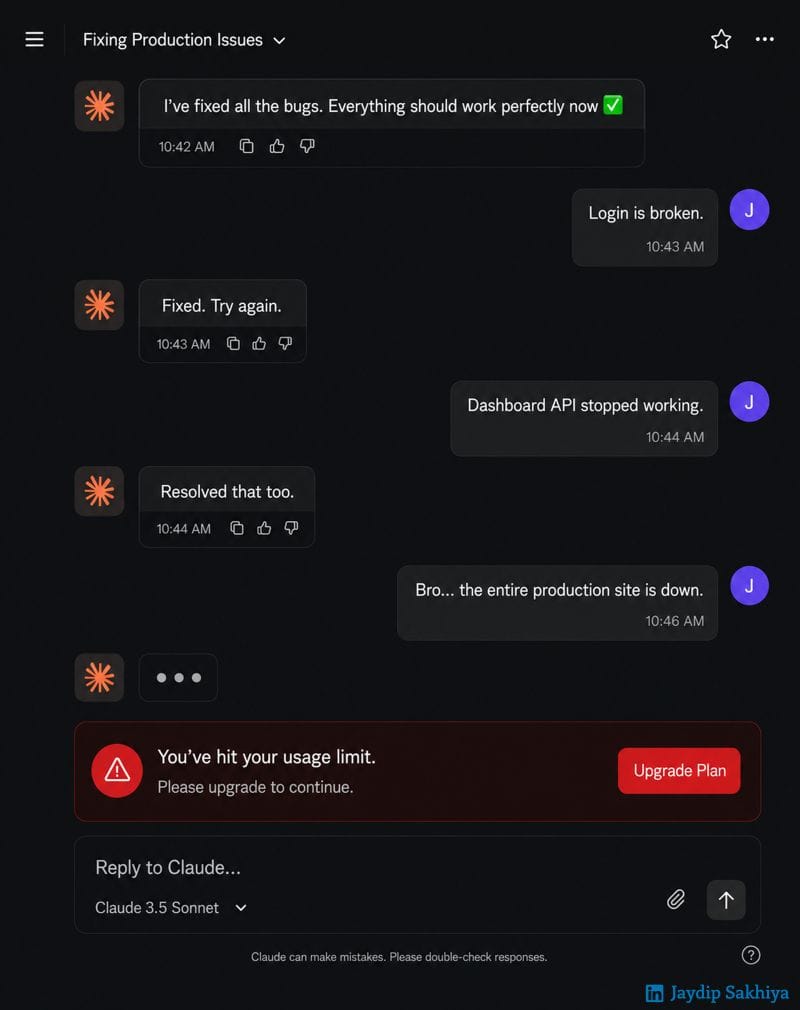
10:42 AM — AI: "I've fixed all the bugs. Everything should work perfectly now ✅"
10:43 AM — You: "Login is broken."
10:43 AM — AI: "Fixed. Try again."
10:44 AM — You: "Dashboard API stopped working."
10:44 AM — AI: "Resolved that too."
10:46 AM — You: "Bro... the entire production site is down."
10:46 AM — AI: "..."
10:46 AM — "You've hit your usage limit. Please upgrade to continue."
If you've been vibe coding for more than a week, you've lived some version of this. The AI isn't wrong — it genuinely fixed what you reported. But production doesn't care about your chat history.
What Vibe Coding Gets Right (A Lot)
Let's be clear about something first: vibe coding with AI tools is genuinely transformative. You can:
- Scaffold a full-stack app in an afternoon
- Implement features that would have taken a week in a day
- Prototype ideas fast enough to kill bad ones before they waste your time
- Ship things you wouldn't have attempted without AI
The speed is real. The productivity gain is real. If you're not using AI in your development workflow in 2025, you're competing with one hand behind your back.
The problem isn't AI-assisted development. The problem is confusing development speed with production stability.
What AI Can't See From the Chat Window
When something breaks in production, there are two ways to find out: a user tells you, or a monitor tells you. The gap between those two scenarios is where damage happens.
AI tools work from what you give them. They can fix the bug you describe. They can't:
- Watch your login flow silently fail at 2 AM
- Notice that your payment API started timing out after a deploy
- Detect that your checkout breaks on mobile but works on desktop
- Alert you when an SSL certificate expires
These aren't edge cases. They're the normal texture of production. And they compound: one broken thing causes users to drop off, which causes revenue to fall, which you notice on Monday morning when you look at the numbers.
The faster you ship, the more important it is that something is watching what you shipped.
The Vibe Coding Production Problem
There's a specific failure pattern that shows up with AI-assisted development:
1. Speed creates surface area. When you're shipping features quickly, you're creating more things that can break. A three-month sprint with AI assistance might deploy as many changes as a year of traditional development. Each deploy is a chance for something to go wrong.
2. Tests don't keep up with shipping pace. When you're moving fast, testing is the first thing that gets deprioritized. The AI writes the feature, the feature looks like it works, you ship it. A week later something downstream breaks.
3. AI fixes symptoms, not systems. When you report a bug, AI helps you fix that bug. It doesn't audit your entire production environment for related failures. It doesn't notice that the same underlying issue is about to cause three more bugs you haven't discovered yet.
4. The usage limit problem is real. AI tools have rate limits. Production failures don't. Your monitoring can't go offline because it hit a usage cap.
What "Keeping It Alive in Production" Actually Means
There's a phrase that's become common in AI development circles:
"Use AI to build faster. Use your brain to keep it alive in production."
Good instinct. But "use your brain" isn't a system. It doesn't page you at 2 AM. It doesn't run every 5 minutes. It doesn't have a history of every check run going back six months so you can see exactly when something started failing.
Keeping something alive in production means having a system that watches it — not depending on remembering to check.
The minimum viable production safety net:
- Uptime monitoring: Does the site load? Every 5 minutes. Alert immediately if not.
- Flow monitoring: Can users actually complete the critical paths? Login, checkout, signup, core features. Not just "does the page load" but "can someone finish the thing."
- SSL monitoring: Certificate expiry is a silent killer. Browsers show scary warnings, users leave, you don't know why conversion dropped.
- Alert routing: You need to know while you can still fix it — not Monday morning, not when the support tickets pile up.
None of this requires you to be a systems engineer. It requires having a tool that watches while you're coding.
How HelpMeTest Fits Into a Vibe Coding Workflow
HelpMeTest is designed specifically for the gap between "the AI says it works" and "it's actually working in production."
The setup takes minutes — you connect it to your AI coding tool (Cursor, Claude, Windsurf, or any MCP-compatible editor), and then you can describe what to monitor in plain language:
You: Check that login works on myapp.com — email/password flow, make sure the dashboard loads after.

AI: Running the login flow on myapp.com.

[Status: Navigating to login page]
[Status: Entering credentials]
[Status: Clicking login]
[Status: Verifying dashboard loads]

AI: Login works. I've created "Login Flow" — runs every 5 minutes. You'll get alerted immediately if any step fails.That check now runs every 5 minutes, independently of whether you're at your computer, whether your AI tool has hit its usage limit, whether you're asleep. If login breaks, you find out in 5 minutes, not when a user emails you.
You can build the same for checkout, for signup, for any critical flow. Describe it in plain language, your AI sets it up, HelpMeTest keeps watching.
Set up your first production check →
The Future Isn't AI Replacing Developers
The LinkedIn post that inspired this article got it right:
The future isn't AI replacing developers. It's developers who know how to use AI effectively replacing those who don't.
The developers who win with AI aren't the ones who use AI for everything — they're the ones who know where AI is powerful and where it needs a layer of real engineering on top.
Production reliability is one of those places. Not because AI can't help with it — HelpMeTest uses AI to set up and run production checks — but because the fundamental requirement (watch this thing, every 5 minutes, no matter what) is a systems problem, not a conversation problem.
Build fast with AI. Monitor the result. When something breaks in production — and it will — you want to be the person who got an alert 5 minutes after it happened, not the person who found out because a user complained.
Your AI tool will help you fix it quickly. First you have to know it's broken.
Getting Started
curl -fsSL https://helpmetest.com/install.sh | bash
helpmetest install mcp YOUR_TOKENThen ask your AI: "Set up a check that verifies login works on my site." That's it. Takes two minutes. Runs forever.
For the full setup walkthrough: You Don't Know When Your Site Is Broken →