How Do Agencies Manage Client Testing? The Methods That Actually Scale


Your client calls on a Friday afternoon. Their contact form has been broken for two weeks. You had no idea. That's not bad luck — it's the inevitable result of managing client testing reactively. The agencies that never get that call use a different method.
Key Takeaways
Agencies manage client testing through four methods: automated functional tests, uptime monitoring, pre-delivery checklists, and scheduled regression runs. High-volume agencies combine all four; new agencies typically start with uptime alone and add layers as they grow.
Manual testing breaks down at 5 clients. Beyond that threshold, the math no longer works — you'd need a dedicated QA engineer just to keep up with scheduled manual reviews across a growing portfolio.
The critical shift is moving the feedback loop. Instead of clients reporting problems to your agency, your monitoring system catches problems before clients see them. That single change is what separates agencies that lose accounts from agencies that renew them.
One platform can cover an entire portfolio. Tools like HelpMeTest manage unlimited client sites from a single dashboard — AI generates the tests, the platform monitors on a schedule, and alerts fire before clients notice.
Agencies manage client testing through a combination of automated functional tests for critical workflows (contact forms, checkout, login), uptime monitoring between deliveries, pre-delivery QA checklists before launches, and scheduled regression runs after major CMS or plugin updates. High-volume agencies (20+ clients) automate this with a single platform that handles all sites from one dashboard, so one person can realistically cover 50 client sites without a full-time QA hire.
This guide is for agency owners, project managers, and developers managing multiple client websites who want a concrete, repeatable approach to keeping those sites working correctly.
Why Most Agencies Get Stuck in Reactive Mode
The default agency testing workflow looks like this: a developer clicks through the key pages before launch, confirms the form submits, and calls it good. After launch, testing stops. The next time anyone verifies the site is working is when the client reports something is broken.
This works at 3 clients. At 10, it's already unreliable. At 25, you're permanently firefighting.
The math breaks quickly. If you spend 4 hours investigating and fixing each client-reported incident, and the average portfolio generates 2 incidents per month, that's 96 hours a year on reactive debugging. At a $150/hour blended rate, that's $14,400 in unrecoverable time — just on problems that a 5-minute monitoring alert would have surfaced before the client noticed.
The other hidden cost is client churn. Clients don't distinguish between "that was actually a plugin conflict outside your control" and "you broke my site." They see a broken form, they see the agency that manages their site didn't catch it, and they start looking at alternatives. Proactive catch rates are a retention metric, not just an operational one.
The 4 Methods Agencies Use to Manage Client Testing
Agencies that scale past 10 clients without imploding typically use a layered approach. These four methods stack on each other — each one catches a different category of failure.
Method 1: Uptime and Availability Monitoring
The floor. Every client site should have uptime monitoring running 24/7. This answers a single question: is the site reachable? It does not tell you whether the contact form submits or whether the checkout flow works — it only tells you whether the server responds.
Free-tier monitoring tools check every 5 minutes. Enterprise tiers check every 10 seconds. For most agency clients, 5-minute intervals are fine — catching a site outage within 5 minutes versus immediately is rarely the difference between a recoverable and unrecoverable situation.
What uptime monitoring catches: server outages, certificate expirations, DNS failures, and hosting provider issues.
What it misses: broken forms, failed payment processing, missing images, JavaScript errors that make pages non-functional.
That gap is why uptime monitoring alone isn't enough — it just tells you the lights are on.
Method 2: Automated Functional Tests for Critical Workflows
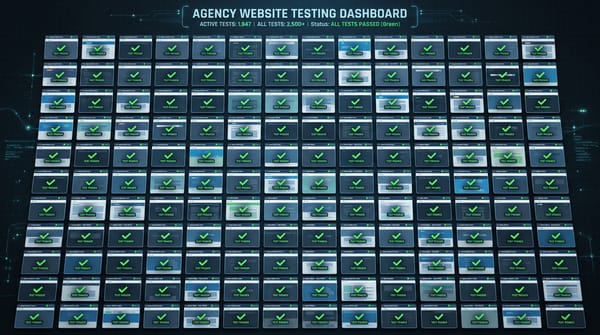
This is where most agencies underinvest and where the biggest client risk lives. Functional tests simulate real user actions: fill out a contact form, submit it, verify the confirmation message appears. Run a product search, add to cart, complete checkout. Submit a booking request, verify the calendar blocks the time.
When a plugin update removes the form's submit button ID, uptime monitoring shows green — the site is reachable. But the form is broken. Only a functional test that actually submits the form catches this.
For a typical agency client portfolio, the critical flows to automate are:
- Contact and lead forms — the most common and highest-stakes failure. A broken contact form means lost leads with zero visibility. For clients running paid search, a broken form is burning ad budget with no conversions.
- E-commerce checkout — every hour a checkout is broken is direct, measurable revenue loss.
- Login and account creation — for SaaS clients or membership sites.
- Booking and scheduling flows — for service businesses, restaurants, medical practices.
- Payment processing — Stripe, PayPal integrations that can silently fail after plugin updates.
Testing client websites automatically at this level doesn't require writing code or configuring Selenium. Modern platforms like HelpMeTest let you describe the workflow in plain language and generate the test steps automatically — the AI reads the page, maps the form fields, and writes the Robot Framework test that submits and verifies the form.
At HelpMeTest, agencies set up these functional tests once during client onboarding, then the platform runs them on a schedule (daily by default) and alerts via Slack or email when something breaks. One 30-minute setup per client site, then continuous coverage without ongoing manual effort.
Method 3: Pre-Delivery QA Checklist
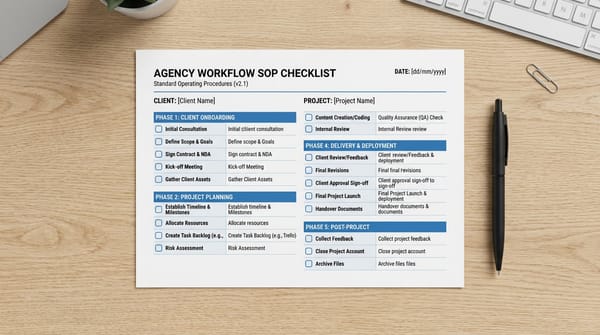
Before any launch or major update goes live, run a structured checklist rather than ad hoc clicking around. The difference between a checklist and "clicking around" is consistency — you catch the same failures every time, not just the ones that happen to be visible during your 10-minute review.
A functional agency pre-delivery checklist covers:
- All critical forms submit and send correctly
- All internal links resolve (no 404s on navigation)
- Mobile layout renders correctly at 375px and 768px
- Page load time under 3 seconds (Core Web Vitals)
- SSL certificate valid and not expiring within 30 days
- Meta titles and descriptions populated (not default WordPress values)
- Analytics tracking fires correctly
- Any third-party integrations (CRM, booking software, payment) respond correctly
Running this as a structured test suite rather than a mental checklist means new team members can execute it without supervision, and you have a record of what was verified before each launch.
Method 4: Scheduled Regression Testing After Changes
This is the most underused method and the one that catches the most post-launch failures. Most agency client sites don't break at launch — they break 3 weeks later when:
- WordPress auto-updates a plugin
- A theme update ships
- The client's developer makes a change without telling the agency
- The hosting provider upgrades PHP
- A third-party script changes its API
Regression testing means running your full test suite on a schedule, independent of any deployment. Weekly automated regression runs catch these silent failures before clients see them.
The agency QA workflow that scales combines all four methods: uptime monitoring as the baseline, functional tests on critical flows, pre-delivery checklists before launches, and weekly regression runs to catch post-launch drift.
How to Organize Testing Across Multiple Clients
The organizational question is how to manage tests across 10 or 50 different client environments without everything becoming a tangled mess.
Separate workspaces per client. Every client gets their own isolated workspace. Tests, alerts, and history are scoped to that client. You can log into one platform and switch between clients without any overlap or data leakage.
Standardized test templates. Create a base test suite that you clone for each new client: contact form test, homepage load test, SSL check. Then add client-specific tests (their specific checkout flow, their booking system). Starting from a template means onboarding a new client is 30 minutes, not 3 hours.
Centralized alerting. Route alerts for all clients to a single Slack channel or email address. The alert should identify which client, which test, and what failed — not just "something broke." When an alert fires at 11pm, you need enough context to triage it without logging in and investigating.
Reporting for client retention. The agencies that charge more for testing services don't just catch bugs — they show clients what they're catching. A monthly report showing "We ran 127 checks this month, caught 3 failures before you noticed, here's what was fixed" turns testing from a cost center into a visible service clients understand they're paying for.
For more on the full process, see the agency QA automation guide.
The Tools Agencies Actually Use
For uptime monitoring: Any dedicated uptime tool (Better Uptime, UptimeRobot) or the health check feature in a full-platform tool covers this. The important thing is 5-minute intervals and Slack/email alerting.
For functional testing: This is where most agencies are underequipped. Writing Selenium or Playwright tests requires developer time and ongoing maintenance. The tools that actually get adopted in agency environments are ones where test creation is fast — ideally AI-assisted — and maintenance is minimal.
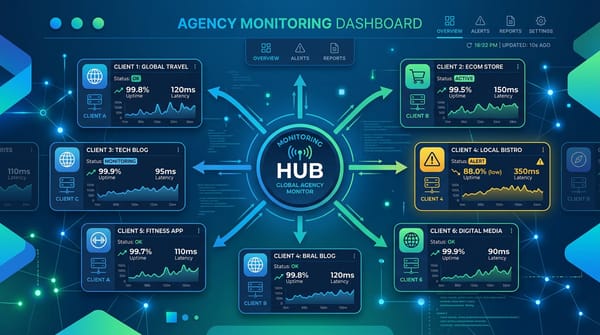
For testing multiple websites from one dashboard: The platform needs multi-site management built in. Managing separate accounts per client doesn't scale — you need one login, one alert stream, switchable client contexts.
HelpMeTest is built for exactly this use case: usage-based pricing ($0.003/run, no base fee) covering unlimited tests, unlimited sites, and all client workspaces, AI that generates tests from plain-language descriptions, and a dashboard that shows the test status of your entire portfolio at a glance. A 14-day free trial lets you validate it against your first few clients before committing.
FAQ
How do agencies manage client testing without a dedicated QA engineer?
Agencies manage client testing without a QA hire by automating the repetitive work: uptime monitoring runs 24/7 without human intervention, automated functional tests run on a schedule, and AI-powered test generation eliminates the need to write test code manually. The human role shifts from running tests to reviewing alerts and triaging failures — which takes 30-60 minutes per week instead of hours of manual clicking per client.
What should every client site have tested automatically?
At minimum: the primary lead capture form (contact form, quote request, booking form), the homepage load and availability, and SSL certificate validity. For e-commerce clients, add the checkout flow. For SaaS clients, add login and core user workflows. These are the highest-stakes failures — the ones that lose clients leads and revenue while they're unaware.
How often should agency client testing run?
Uptime checks should run every 5 minutes. Functional tests (form submissions, checkout flows) should run daily. Full regression suites (all tests for a client site) should run weekly or after any significant change (plugin updates, theme changes, hosting migrations). Pre-delivery checklists run manually before any launch.
How do agencies report testing results to clients?
Monthly reports showing test runs, failures caught, and resolutions work well for most clients. The framing matters: "We ran 89 automated checks on your site this month and caught 2 failures before they affected your leads" is more compelling than a technical test log. Screenshots of what was caught and fixed turn testing from a background service into visible value clients understand they're retaining you for.
What's the cost of managing client testing for a 20-site portfolio?
A 20-client portfolio managed with automated testing costs a small, predictable platform fee — usage-based pricing means you pay for the test runs you actually use, not a flat per-tool number. Compare that to the alternative: a single incident requiring 4 hours of developer time costs $600 in billable time that can't be recovered, and a client churn event on a $2,000/month retainer costs $24,000 annually. The ROI on automated testing pays for itself on the first prevented incident.
How do you handle client sites that change frequently?
Frequent changes require either self-healing tests (which automatically adapt when selectors change) or a stable test structure that doesn't depend on fragile CSS selectors. The best practice is to target stable, semantic elements — form labels, button text, ARIA roles — rather than auto-generated class names that change with every theme update.
Summary
Agencies that manage client testing well use the same four-method stack: uptime monitoring as the baseline, automated functional tests for critical flows, pre-delivery checklists before launches, and scheduled regression runs to catch post-launch drift.
The difference between agencies that lose clients over broken sites and agencies that retain them isn't effort — it's when they find out about problems. Build the system that tells you first, before clients do.
Set up automated testing for your client portfolio — start with a free trial across all your clients.