
Argos CI: Automated Visual Testing with GitHub PR Integration
Argos CI is a visual testing platform that compares screenshots between your main branch and pull requests.

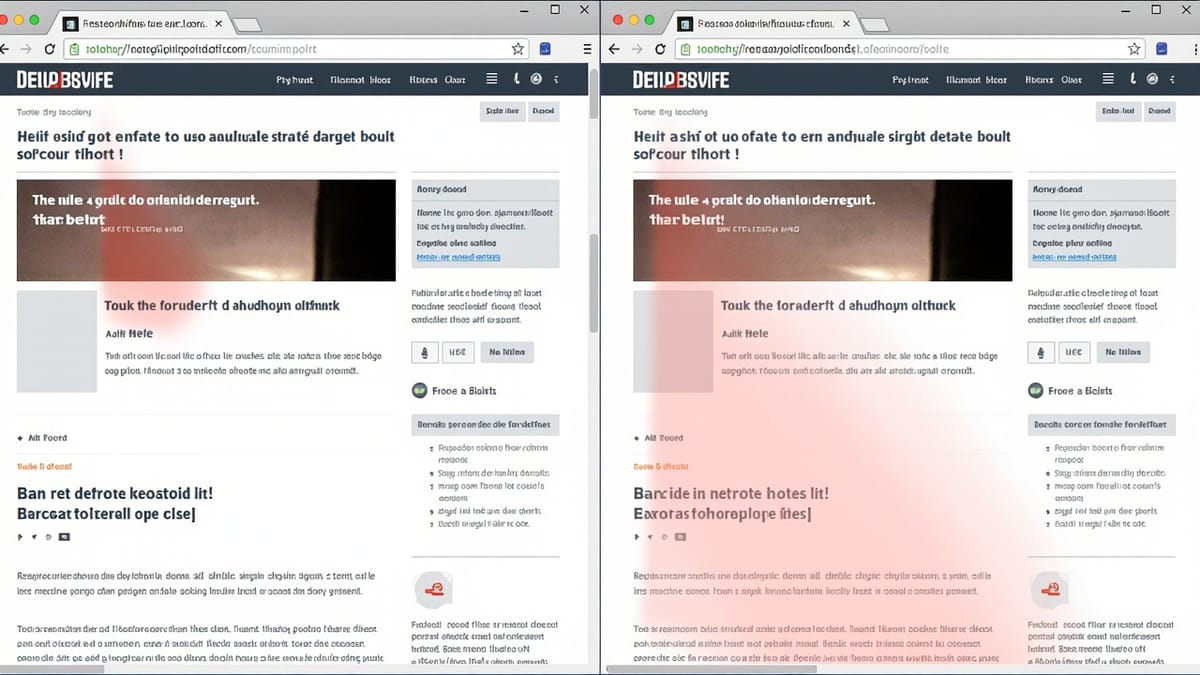
Argos CI is a visual testing platform that compares screenshots between your main branch and pull requests. When a PR changes the visual appearance of a component or page, Argos shows the before/after diff in GitHub and can block the PR until a team member approves the change. It integrates with Playwright, Cypress, Storybook, and any tool that produces screenshots.
How It Works
- Your CI runs tests and captures screenshots
- Screenshots are uploaded to Argos
- Argos compares them to the baseline (screenshots from main branch)
- Argos posts a GitHub check with pass/fail and links to diffs
- Team reviews diffs in the Argos UI — approve intentional changes, flag regressions
Setup with Playwright
npm install --save-dev @argos-ci/playwrightConfigure playwright.config.ts:
import { defineConfig } from '@playwright/test';

export default defineConfig({
  use: {
    baseURL: 'http://localhost:3000',
  },
  reporter: [
    ['list'],
    ['@argos-ci/playwright/reporter'],  // Add Argos reporter
  ],
});Write tests using argosScreenshot:
import { test } from '@playwright/test';
import { argosScreenshot } from '@argos-ci/playwright';

test('homepage visual', async ({ page }) => {
  await page.goto('/');
  await argosScreenshot(page, 'homepage');
});

test('dashboard light and dark', async ({ page }) => {
  await page.goto('/dashboard');
  await argosScreenshot(page, 'dashboard-light');

  await page.emulateMedia({ colorScheme: 'dark' });
  await argosScreenshot(page, 'dashboard-dark');
});

test('button states', async ({ page }) => {
  await page.goto('/components/button');
  await argosScreenshot(page, 'button-default');

  await page.hover('button.primary');
  await argosScreenshot(page, 'button-hover');

  await page.focus('button.primary');
  await argosScreenshot(page, 'button-focus');
});argosScreenshot wraps Playwright's screenshot() with stabilization: it waits for fonts, images, and animations to settle before capturing.
GitHub Integration
Set the ARGOS_TOKEN secret in your repository:
- Sign up at argos-ci.com
- Connect your GitHub repository
- Copy the project token
- Add to GitHub Secrets:
Settings → Secrets → ARGOS_TOKEN
GitHub Actions workflow:
name: Visual Testing

on: [push, pull_request]

jobs:
  visual:
    runs-on: ubuntu-latest
    steps:
      - uses: actions/checkout@v4

      - name: Install dependencies
        run: npm ci

      - name: Install Playwright browsers
        run: npx playwright install --with-deps chromium

      - name: Start server
        run: npm run build && npm run preview &

      - name: Wait for server
        run: npx wait-on http://localhost:4173

      - name: Run Playwright tests
        env:
          ARGOS_TOKEN: ${{ secrets.ARGOS_TOKEN }}
        run: npx playwright test

# Argos reporter uploads automatically when ARGOS_TOKEN is setSetup with Cypress
npm install --save-dev @argos-ci/cypresscypress/support/e2e.ts:
import '@argos-ci/cypress/support';cypress/e2e/visual.cy.ts:
describe('Visual tests', () => {
  it('captures homepage', () => {
    cy.visit('/');
    cy.argosScreenshot('homepage');
  });

  it('captures form states', () => {
    cy.visit('/contact');
    cy.argosScreenshot('contact-empty');

    cy.get('[name="email"]').type('invalid');
    cy.get('form').submit();
    cy.argosScreenshot('contact-validation-errors');
  });
});Storybook Integration
Argos can screenshot every Storybook story automatically:
npm install --save-dev @argos-ci/storybook# Build Storybook
npm run build-storybook
# Upload all stories to Argos
ARGOS_TOKEN=your_token npx argos upload storybook-staticThe Storybook integration doesn't require Playwright — Argos renders each story server-side and captures the screenshot.
Handling Dynamic Content
Screenshots with dynamic content (timestamps, user avatars, random data) generate false positives. Stabilize them:
await argosScreenshot(page, 'user-profile', {
  // Mask elements that contain dynamic content
  masks: [
    page.locator('.avatar'),
    page.locator('.last-seen'),
    page.locator('[data-testid="timestamp"]'),
  ],
});Masked regions are replaced with a solid color before the screenshot is taken.
Viewport and Device Screenshots
test('mobile layout', async ({ page }) => {
  await page.setViewportSize({ width: 375, height: 812 });
  await page.goto('/');
  await argosScreenshot(page, 'homepage-mobile');
});

test('tablet layout', async ({ page }) => {
  await page.setViewportSize({ width: 768, height: 1024 });
  await page.goto('/');
  await argosScreenshot(page, 'homepage-tablet');
});Name screenshots descriptively — the name is the key used for baseline comparison.
Baseline Management
The first time a screenshot name is seen (new test or new screenshot), Argos treats it as the baseline. Subsequent runs compare against it.
Updating baselines: In the Argos UI, review diffs and click Approve on intentional visual changes. Approved screenshots become the new baseline. Future runs compare against the approved version.
Branch strategy: Argos links baselines to branches. The main branch is the reference. PR screenshots are compared to the baseline from the target branch.
Threshold Configuration
For screenshots with minor rendering differences (antialiasing, font rendering across OS):
await argosScreenshot(page, 'component', {
  threshold: 0.3,  // 0-1 scale; higher = more tolerant of pixel differences
});Parallel Upload
For large screenshot suites, Argos accepts uploads from parallel CI jobs:
jobs:
  visual:
    strategy:
      matrix:
        shard: [1, 2, 3, 4]
    steps:
      - name: Run Playwright (shard ${{ matrix.shard }}/4)
        run: npx playwright test --shard=${{ matrix.shard }}/4
        env:
          ARGOS_TOKEN: ${{ secrets.ARGOS_TOKEN }}
          ARGOS_PARALLEL_NONCE: ${{ github.run_id }}
ARGOS_PARALLEL_TOTAL: 4ARGOS_PARALLEL_NONCE groups screenshots from parallel jobs into a single Argos build.
Key Points
argosScreenshot(page, 'name')captures and uploads a screenshot; comparison runs in Argos cloud- First upload creates the baseline; subsequent uploads on PRs create diffs
- GitHub check blocks or passes based on diff results — review and approve in the Argos UI
- Use
masksto hide dynamic content (timestamps, avatars) that would create false positives - Storybook integration screenshots every story without Playwright
ARGOS_PARALLEL_NONCE+ARGOS_PARALLEL_TOTALcoordinates parallel CI shards into one Argos buildthresholdadjusts pixel difference tolerance for minor rendering variance